Compare commits
| Author | SHA1 | Date | |
|---|---|---|---|
 Sean McManus Sean McManus
|
211e497a89 | ||
|
Sean McManus
|
f04ee43425 | ||
|
Sean McManus
|
3c9c1f1622 | ||
|
Michelle Matias
|
cc1998c1d6 | ||
|
Andrew Wang
|
223f63036c | ||
|
Colen Garoutte-Carson
|
2ece201c00 | ||
|
Colen Garoutte-Carson
|
fe8245fbab | ||
|
Colen Garoutte-Carson
|
419d5c1316 | ||
|
Sean McManus
|
e61c360bab | ||
|
Colen M. Garoutte-Carson
|
d479d79c36 | ||
|
Colen M. Garoutte-Carson
|
1bddf02180 | ||
|
Michelle Matias
|
acdd5ca9d2 | ||
|
Michelle Matias
|
09ba872c38 | ||
|
Michelle Matias
|
d790c6fd4d | ||
|
Michelle Matias
|
2b58af166a | ||
|
Michelle Matias
|
6e043a77bc | ||
|
Michelle Matias
|
aa8e0ce62e | ||
|
Michelle Matias
|
36e4b13232 | ||
|
Michelle Matias
|
63bfb423b4 | ||
|
Colen Garoutte-Carson
|
cb31a0d840 | ||
|
Michelle Matias
|
ac7d437d33 | ||
|
Michelle Matias
|
d41698455e | ||
|
Michelle Matias
|
91f4dbb10a | ||
|
Sean McManus
|
adc9892578 | ||
|
Colen Garoutte-Carson
|
9ece80f6d8 | ||
|
Michelle Matias
|
78b09612e9 | ||
|
Michelle Matias
|
501df6ea8c | ||
|
Michelle Matias
|
26a83985f4 | ||
|
Michelle Matias
|
8f137f9842 | ||
|
Michelle Matias
|
c2eabf1274 | ||
|
Michelle Matias
|
5059a45aab | ||
|
csigs
|
fb1ca8ffa8 | ||
|
Sean McManus
|
c5e6699421 | ||
|
Sean McManus
|
297bada947 | ||
|
Sean McManus
|
336c529fe8 | ||
|
Enna1
|
de14a285a4 | ||
|
Colen Garoutte-Carson
|
b428ff154f | ||
|
Sean McManus
|
8cd858f5f5 | ||
|
Colen Garoutte-Carson
|
3f66cb5c59 | ||
|
dx-coding
|
b18f561724 | ||
|
Michelle Matias
|
d651a3b898 | ||
|
csigs
|
d66482a115 | ||
|
csigs
|
59f25f8636 | ||
|
Colen Garoutte-Carson
|
11a2c04008 | ||
|
csigs
|
d3dd19e26f | ||
|
Michelle Matias
|
8a4bfa2183 | ||
|
Michelle Matias
|
4edd43062c | ||
|
Colen Garoutte-Carson
|
1523516673 | ||
|
Colen Garoutte-Carson
|
8e1006d78d | ||
|
Colen Garoutte-Carson
|
922ac06e2d | ||
|
Colen Garoutte-Carson
|
33f2d606e7 | ||
|
Colen Garoutte-Carson
|
2300e38645 | ||
|
Colen Garoutte-Carson
|
d362ef9814 | ||
|
csigs
|
f3b5c507d8 | ||
|
Colen Garoutte-Carson
|
f6a2a65474 | ||
|
Colen Garoutte-Carson
|
e2213568f3 | ||
|
csigs
|
e18d53e7ba | ||
|
Colen Garoutte-Carson
|
6f76898110 | ||
|
Colen Garoutte-Carson
|
95f8f11dc4 | ||
|
Colen Garoutte-Carson
|
fcf2090ffd | ||
|
csigs
|
59c90611c4 | ||
|
Bob Brown
|
c6af5ce8b5 | ||
|
Colen Garoutte-Carson
|
014f30e942 | ||
|
csigs
|
7b4288c6f4 | ||
|
Colen Garoutte-Carson
|
d3263a187e | ||
|
csigs
|
f0c961aa73 | ||
|
Colen Garoutte-Carson
|
2c436f94b0 | ||
|
Sean McManus
|
2fd3214300 | ||
|
Sean McManus
|
b33b1b3cc2 | ||
|
Michelle Matias
|
a9000a4c9d | ||
|
Colen Garoutte-Carson
|
a11b2aeb4d | ||
|
ptaylor
|
f31d641a13 | ||
|
Colen Garoutte-Carson
|
1a7e9b9fd8 | ||
|
csigs
|
2a8556df50 | ||
|
Colen Garoutte-Carson
|
acf53d02a8 | ||
|
Colen Garoutte-Carson
|
0e43057f0f | ||
|
Sean McManus
|
d2d20971a2 | ||
|
Sean McManus
|
edf99c77a2 | ||
|
Colen Garoutte-Carson
|
b88ca99a47 | ||
|
csigs
|
23f214973f | ||
|
Colen Garoutte-Carson
|
7b1f093012 | ||
|
Michelle Matias
|
f83f82db8a | ||
|
csigs
|
2da22041b5 | ||
|
csigs
|
2fe3961b23 | ||
|
Colen Garoutte-Carson
|
b82a86e5e4 | ||
|
Colen Garoutte-Carson
|
10224c1294 | ||
|
Colen Garoutte-Carson
|
7e3ff84d3b | ||
|
csigs
|
4795a5e9bb | ||
|
Colen Garoutte-Carson
|
83092d7c00 | ||
|
Sean McManus
|
d1c9d4d298 | ||
|
Sean McManus
|
69fcb1b1b4 | ||
|
Sean McManus
|
09ccd3af42 | ||
|
Sean McManus
|
375b64b4f8 | ||
|
Sean McManus
|
3d3763fbc6 | ||
|
Sean McManus
|
febccce8e3 | ||
|
Sean McManus
|
1443b4f3fc | ||
|
Colen Garoutte-Carson
|
5c1f592c17 | ||
|
csigs
|
d91a217559 | ||
|
csigs
|
565dc06c56 | ||
|
Sean McManus
|
783ef7290a | ||
|
Sean McManus
|
7f1efd4b84 | ||
|
Sean McManus
|
bf5435d5b6 | ||
|
Sean McManus
|
70560ece68 | ||
|
csigs
|
62050c2060 | ||
|
csigs
|
241bb9f6fe | ||
|
csigs
|
0274e2d527 | ||
|
Colen Garoutte-Carson
|
b24be86710 | ||
|
Colen Garoutte-Carson
|
ed6b46ee9a | ||
|
Colen Garoutte-Carson
|
4777a7de8f | ||
|
Colen Garoutte-Carson
|
e043c13019 | ||
|
Michelle Matias
|
a8537c4fa0 | ||
|
csigs
|
72163c935b | ||
|
Sean McManus
|
0b2a32ba81 | ||
|
Colen Garoutte-Carson
|
bc94dae1e4 | ||
|
csigs
|
cd8aa87f82 | ||
|
Colen Garoutte-Carson
|
d1f345437b | ||
|
Bob Brown (DEVDIV)
|
200b9e2ca6 | ||
|
csigs
|
8cd4b6f520 | ||
|
Sean McManus
|
07148cbeb9 | ||
|
Jorge Reyes Paniagua
|
66b12b8809 | ||
|
Sean McManus
|
346ee37472 | ||
|
Colen Garoutte-Carson
|
db7b8e7bab | ||
|
Sean McManus
|
b6a46ab078 | ||
|
Colen Garoutte-Carson
|
6c0eaea632 | ||
|
Sean McManus
|
c44c50b50c | ||
|
Sean McManus
|
e2fabf924f | ||
|
Colen Garoutte-Carson
|
01340bb4e9 | ||
|
Sean McManus
|
1b91354125 | ||
|
Michelle Matias
|
105f08f7a1 | ||
|
Michelle Matias
|
c267efb76d | ||
|
Sean McManus
|
47676ca893 | ||
|
Colen Garoutte-Carson
|
3b0fb6a268 | ||
|
Colen Garoutte-Carson
|
8fe1f37342 | ||
|
Colen Garoutte-Carson
|
95e47d19ef | ||
|
Michelle Matias
|
7907870362 | ||
|
Sean McManus
|
3dd0aa4806 | ||
|
Colen Garoutte-Carson
|
6a0d08e09a | ||
|
Colen Garoutte-Carson
|
46c9e53676 | ||
|
Sean McManus
|
b520073176 | ||
|
Pierson Lee
|
81576fa30f | ||
|
Colen Garoutte-Carson
|
c458f20adb | ||
|
Michelle Matias
|
130b832378 | ||
|
Colen Garoutte-Carson
|
a48e9db30c | ||
|
Sean McManus
|
88ecb46bce | ||
|
Colen Garoutte-Carson
|
8734c62ece | ||
|
Colen Garoutte-Carson
|
0f37d2f097 | ||
|
Colen Garoutte-Carson
|
1f22ea7e24 | ||
|
Colen Garoutte-Carson
|
8fe05b3a8c | ||
|
Colen Garoutte-Carson
|
46fbe89bd4 | ||
|
Colen Garoutte-Carson
|
72c8572b1e | ||
|
Michelle Matias
|
a64bbc14da | ||
|
Jorge Reyes Paniagua
|
e97b3e1570 | ||
|
Michelle Matias
|
6e879df2ba | ||
|
Colen Garoutte-Carson
|
fedb8ec7c6 | ||
|
Colen Garoutte-Carson
|
92a16965a1 | ||
|
Andrew Wang
|
958dfd9e5b | ||
|
Andrew Wang
|
b924f8de3e | ||
|
Sean McManus
|
17f2bcc343 | ||
|
Jorge Reyes Paniagua
|
0d9ecd04f1 | ||
|
Sean McManus
|
034de98202 | ||
|
Jorge Reyes Paniagua
|
3267ef003c | ||
|
Sean McManus
|
5f957090fd | ||
|
Colen Garoutte-Carson
|
400c848a7b | ||
|
Colen Garoutte-Carson
|
b04021930f | ||
|
Michelle Matias
|
b906bc8189 | ||
|
Sean McManus
|
1895ff855c | ||
|
Sean McManus
|
54e443035c | ||
|
Colen Garoutte-Carson
|
09b69a9423 | ||
|
Sean McManus
|
e53bc01aa2 | ||
|
Sean McManus
|
1513b95136 | ||
|
Sean McManus
|
fb611c79bc | ||
|
Colen Garoutte-Carson
|
6b3cdce94d | ||
|
Sean McManus
|
d68f76b51e | ||
|
Sean McManus
|
6ba1262347 | ||
|
Sean McManus
|
6cc70dfe7b | ||
|
Colen Garoutte-Carson
|
41933fa969 | ||
|
Bob Brown
|
c03fea0f1a | ||
|
Sean McManus
|
8aac573589 | ||
|
Bob Brown
|
7b1677e120 | ||
|
jogo-
|
adead7f983 | ||
|
Sean McManus
|
7ff83d5e61 | ||
|
mistersandman
|
d51ae12747 | ||
|
Colen Garoutte-Carson
|
a17cb4220a | ||
|
Sean McManus
|
3251ee599b | ||
|
Sean McManus
|
490fc7504f | ||
|
Sean McManus
|
f2959f4d7a | ||
|
Sean McManus
|
d7520eacf3 | ||
|
Bob Brown
|
e17de19810 | ||
|
Sean McManus
|
4be65505a4 | ||
|
Sean McManus
|
918faeae44 | ||
|
Sean McManus
|
423a727fcf | ||
|
Michelle Matias
|
1ad20e18a2 | ||
|
Colen Garoutte-Carson
|
bb43c500c2 | ||
|
Sean McManus
|
4ae01b6d4b | ||
|
Sean McManus
|
59af571d61 | ||
|
Sean McManus
|
355711c24c | ||
|
Sean McManus
|
c7b6f3c554 | ||
|
Sean McManus
|
c31528b716 | ||
|
Michelle Matias
|
655c320c3c | ||
|
Bob Brown
|
5e915a5a3a | ||
|
Bob Brown (DEVDIV)
|
27607493d8 | ||
|
Bob Brown
|
b80404df5a | ||
|
Bob Brown (DEVDIV)
|
f2d9aff338 | ||
|
Sean McManus
|
6bc6d4931d | ||
|
Bob Brown (DEVDIV)
|
b7bd343019 | ||
|
Bob Brown
|
1a71059316 | ||
|
Bob Brown (DEVDIV)
|
d9ca558f74 | ||
|
Sean McManus
|
c9a114b38f | ||
|
Bob Brown
|
44298673fc | ||
|
Bob Brown
|
c9869894de | ||
|
Jorge Reyes Paniagua
|
41893b049d | ||
|
Bob Brown
|
e9659f2c6e | ||
|
Bob Brown (DEVDIV)
|
7f9e5758bc | ||
|
Bob Brown (DEVDIV)
|
03fa10fbd1 | ||
|
Michelle Matias
|
d3d9655534 | ||
|
Bob Brown
|
586068e874 | ||
|
Bob Brown (DEVDIV)
|
8e69cde774 | ||
|
Griffin Downs
|
ba2da8d98c | ||
|
Andreea Isac
|
007292cbda | ||
|
Michelle Matias
|
b608921b9d | ||
|
Andreea Isac
|
8e31eb99d9 | ||
|
Colen Garoutte-Carson
|
ceac5cb95a | ||
|
pi1024e
|
14f2c9f030 | ||
|
Bob Brown
|
3d40ac231a | ||
|
Sean McManus
|
baf6f50be3 | ||
|
Colen Garoutte-Carson
|
d9de95ca15 | ||
|
Colen Garoutte-Carson
|
2b3d2ac541 | ||
|
Colen Garoutte-Carson
|
4b4c93cd94 | ||
|
Sean McManus
|
fa4d7b22c1 | ||
|
Colen Garoutte-Carson
|
3cb7f7e61f | ||
|
Colen Garoutte-Carson
|
779f2ce2b5 | ||
|
Colen Garoutte-Carson
|
0c4c83e5bd | ||
|
Colen Garoutte-Carson
|
a369ede8d9 | ||
|
Colen Garoutte-Carson
|
36ce8f885f | ||
|
Colen Garoutte-Carson
|
2cde4d6f1a | ||
|
Colen Garoutte-Carson
|
066c8f1247 | ||
|
Colen Garoutte-Carson
|
347794b0c7 | ||
|
Colen Garoutte-Carson
|
4495d0b26d | ||
|
Jorge Reyes Paniagua
|
b1d50e4336 | ||
|
Sean McManus
|
cb035dd1f2 | ||
|
Jorge Reyes Paniagua
|
3faaca14c0 | ||
|
Michelle Matias
|
53107bc57c | ||
|
Sean McManus
|
d38740c098 | ||
|
Sean McManus
|
ccc18a6f66 | ||
|
Colen Garoutte-Carson
|
e26cae6838 | ||
|
Sean McManus
|
9ea53681a5 | ||
|
Sean McManus
|
3ed087134c | ||
|
Sean McManus
|
902355e021 | ||
|
Sean McManus
|
32e98912df | ||
|
Colen Garoutte-Carson
|
6bc49d595e | ||
|
Pierson Lee
|
6b3c0f1b10 | ||
|
Sean McManus
|
35501431f8 | ||
|
Colen Garoutte-Carson
|
27a3c9958d | ||
|
Sean McManus
|
5b3d4ebf44 | ||
|
Andrew Wang
|
cfc064efcd | ||
|
Colen Garoutte-Carson
|
4f7a64a1a2 | ||
|
Sean McManus
|
c84cb36004 | ||
|
Andrew Wang
|
0502351002 | ||
|
Andrew Wang
|
5de420ee70 | ||
|
Bob Brown
|
6a73275924 | ||
|
Michelle Matias
|
d12591062e | ||
|
Colen Garoutte-Carson
|
3926110b33 | ||
|
Bob Brown
|
f5975e6534 | ||
|
Pierson Lee
|
b55e2c7ac5 | ||
|
Colen Garoutte-Carson
|
73fda38d71 | ||
|
TheGreatRambler
|
9211292b60 | ||
|
Colen Garoutte-Carson
|
f63a8da581 | ||
|
Colen Garoutte-Carson
|
fd314b1b04 | ||
|
Sean McManus
|
ea52c76595 | ||
|
Colen Garoutte-Carson
|
7659e2826b | ||
|
Michelle Matias
|
8e898151f6 | ||
|
Colen Garoutte-Carson
|
b2b0ad37af | ||
|
Bob Brown
|
cee6ebe1d9 | ||
|
Colen Garoutte-Carson
|
566e657fad | ||
|
Colen Garoutte-Carson
|
db1f631396 | ||
|
Colen Garoutte-Carson
|
426c08293d | ||
|
Colen Garoutte-Carson
|
631a4452d0 | ||
|
Michelle Matias
|
9b29698b0e | ||
|
Colen Garoutte-Carson
|
b5c94e9e1f | ||
|
Sean McManus
|
384cd35d6b | ||
|
Sean McManus
|
2d4df9149f | ||
|
Michelle Matias
|
d3c2ccbb93 | ||
|
Colen Garoutte-Carson
|
c637221b92 | ||
|
Michelle Matias
|
814f01b263 | ||
|
Andrew Wang
|
b763aa57d3 | ||
|
Michelle Matias
|
54b1e69975 | ||
|
Andrew Wang
|
dacfe08033 | ||
|
Michelle Matias
|
f5aa7dc33e | ||
|
Michelle Matias
|
90c6e9876a | ||
|
Bob Brown
|
9fa950db6a | ||
|
Bob Brown
|
8ea627e085 | ||
|
Andrew Wang
|
536d38e3bf | ||
|
Sean McManus
|
c10c626869 | ||
|
Sean McManus
|
24d37bc233 | ||
|
Sean McManus
|
158719cf46 | ||
|
Colen Garoutte-Carson
|
b6327ed6c3 | ||
|
Michelle Matias
|
c60a2c6752 | ||
|
Michelle Matias
|
1f7c27d7f9 | ||
|
Karsten Thoms
|
1d82458a3a | ||
|
Michelle Matias
|
25d122c3f7 | ||
|
Andreea Isac
|
627acc535e | ||
|
Sean McManus
|
515d858b4d | ||
|
Bob Brown
|
7ec15af47c | ||
|
Bob Brown
|
cac58e9f88 | ||
|
Sean McManus
|
0c28725628 | ||
|
Sean McManus
|
084a8e708c | ||
|
Sean McManus
|
045d50bb90 | ||
|
Sean McManus
|
68eda19665 | ||
|
Sean McManus
|
ae564c8428 | ||
|
Sean McManus
|
5241ce28e0 | ||
|
Sean McManus
|
febb880e32 | ||
|
Sean McManus
|
d1c344b944 | ||
|
Colen Garoutte-Carson
|
a19d1c325e | ||
|
Sean McManus
|
82225338c4 | ||
|
Sean McManus
|
fa72ab582d | ||
|
Sean McManus
|
0b3e43c93f | ||
|
Sean McManus
|
8b332a7795 | ||
|
Sean McManus
|
39ab866a10 | ||
|
Sean McManus
|
d4cdfe6994 | ||
|
Sean McManus
|
4e20f27127 | ||
|
Michelle Matias
|
4e2f1b8ba5 | ||
|
Sean McManus
|
0cffa4e27a | ||
|
Colen Garoutte-Carson
|
b67e701fc9 | ||
|
Sean McManus
|
77f3747630 | ||
|
Sean McManus
|
dc8813f449 | ||
|
Sean McManus
|
e0543a64c1 | ||
|
Sean McManus
|
e5b118c707 | ||
|
Colen Garoutte-Carson
|
f465766d1e | ||
|
Michelle Matias
|
7f4fc339c7 | ||
|
Sean McManus
|
788cee3ecf | ||
|
Michelle Matias
|
05939c19a9 | ||
|
Colen Garoutte-Carson
|
110e683790 | ||
|
Andrew Wang
|
6a88c9917b | ||
|
Sean McManus
|
2ac33971ed | ||
|
Sean McManus
|
a5905276ce | ||
|
Colen Garoutte-Carson
|
d6726e5d42 | ||
|
Colen Garoutte-Carson
|
aa6873b84e | ||
|
Colen Garoutte-Carson
|
e3ddec66ee | ||
|
Sean McManus
|
26d83d136e | ||
|
Colen Garoutte-Carson
|
6f4439ca88 | ||
|
Colen Garoutte-Carson
|
3fbeba779c | ||
|
Colen Garoutte-Carson
|
cfc908a1ac | ||
|
Sean McManus
|
f3a02fde4e | ||
|
Sean McManus
|
e863e88e95 | ||
|
Sean McManus
|
bc70ea8c79 | ||
|
Michelle Matias
|
bbfea25a1d | ||
|
Sean McManus
|
968d6c5919 | ||
|
Sean McManus
|
33d23b3a5e | ||
|
Sean McManus
|
4bf3691f7f | ||
|
Sean McManus
|
bf9d69a8ad | ||
|
Bob Brown
|
9a78289fec | ||
|
Michelle Matias
|
7960904575 | ||
|
Michelle Matias
|
dd590ea1f5 | ||
|
Sean McManus
|
5d1e503480 | ||
|
Sean McManus
|
3b15f515d1 | ||
|
Sean McManus
|
d7a3384a07 | ||
|
Sean McManus
|
4cdcd72990 | ||
|
Sean McManus
|
740705973e | ||
|
Colen Garoutte-Carson
|
3a78e96785 | ||
|
Sean McManus
|
39b89bdb5b | ||
|
Sean McManus
|
d4d68cb808 | ||
|
Sean McManus
|
d3e8958b29 | ||
|
Colen Garoutte-Carson
|
0e3fea978a | ||
|
Sean McManus
|
a39b1a5d6c | ||
|
Sean McManus
|
f15994a58c | ||
|
Sean McManus
|
009c77d45f | ||
|
Sean McManus
|
94e213449f | ||
|
Michelle Matias
|
7ae6818bfb | ||
|
Sean McManus
|
03a6c04629 | ||
|
Andrew Wang
|
8526bc90cb | ||
|
Bob Brown
|
105760833d | ||
|
Colen Garoutte-Carson
|
239e4015d6 | ||
|
Bob Brown (DEVDIV)
|
7e7b38acd7 | ||
|
Sean McManus
|
260dc5d840 | ||
|
Michelle Matias
|
99b290513b | ||
|
Sean McManus
|
76b3d9ca28 | ||
|
Sean McManus
|
806dc8ac43 | ||
|
Colen Garoutte-Carson
|
03cf4d7aaf | ||
|
Sean McManus
|
569a7cb53d | ||
|
Sean McManus
|
6de2250fef | ||
|
Sean McManus
|
ae861b3605 | ||
|
Bob Brown
|
2aeadbd395 | ||
|
Sean McManus
|
0b500cefb7 | ||
|
Sean McManus
|
2e8cd7f406 | ||
|
Sean McManus
|
8c8c2c22e3 | ||
|
Sean McManus
|
bdc8322da3 | ||
|
Sean McManus
|
eeb2ba207c | ||
|
Sean McManus
|
f848bf392a | ||
|
Sean McManus
|
f72a3ded96 | ||
|
Sean McManus
|
31b993941b | ||
|
Sean McManus
|
59b0b3f924 | ||
|
Sean McManus
|
5b90fc6bd3 | ||
|
Sean McManus
|
a4e9df0e6e | ||
|
Sean McManus
|
3ef0b7597f | ||
|
Sean McManus
|
74c9b0b967 | ||
|
Sean McManus
|
3b5a8466d7 | ||
|
Sean McManus
|
fbf8ed4e35 | ||
|
Colen Garoutte-Carson
|
c978eb0755 | ||
|
Sean McManus
|
0f67f54b42 | ||
|
Sean McManus
|
b770030ec2 | ||
|
Colen Garoutte-Carson
|
8129ce337e | ||
|
Colen Garoutte-Carson
|
93a88c948a | ||
|
Sean McManus
|
34d8874754 | ||
|
Sean McManus
|
0773ec8c41 | ||
|
Colen Garoutte-Carson
|
9f842ac0d9 | ||
|
Sean McManus
|
e8d0ded816 | ||
|
Tara Raj
|
f5bdac9889 | ||
|
Sean McManus
|
eb976d5ca5 | ||
|
Sean McManus
|
d5a902e144 | ||
|
Sean McManus
|
b0c2d54144 | ||
|
Sean McManus
|
bcdabc9c36 | ||
|
Sean McManus
|
e054287c48 | ||
|
Sean McManus
|
dcf480990b | ||
|
Sean McManus
|
02a3152f0f | ||
|
Sean McManus
|
77806f657f | ||
|
Bob Brown
|
7e5f22f862 | ||
|
Sean McManus
|
0f8e7b2d7b | ||
|
Sean McManus
|
088276b4af | ||
|
Tara Raj
|
a7cefc9d4d | ||
|
Bob Brown
|
30d8a1daa4 | ||
|
Bob Brown (DEVDIV)
|
148ae1d325 | ||
|
Tara Raj
|
968ce8acba | ||
|
Tara Raj
|
ff6e13e829 | ||
|
Sean McManus
|
c18592b5a3 | ||
|
Sean McManus
|
fee924b374 | ||
|
Sean McManus
|
6724e13c63 | ||
|
Sean McManus
|
798e90574c | ||
|
Sean McManus
|
1eb064e020 | ||
|
Sean McManus
|
717de54b06 | ||
|
Sean McManus
|
51cd214f1e | ||
|
Sean McManus
|
4ca9ad8b3a | ||
|
Sean McManus
|
8aadd40a58 | ||
|
Tara Raj
|
7088f546aa | ||
|
Tara Raj
|
64ca48b50e | ||
|
Sean McManus
|
0c61ee96b7 | ||
|
Bob Brown
|
e020801dac | ||
|
Sean McManus
|
270a4f7d38 | ||
|
Sean McManus
|
342de46452 | ||
|
Bob Brown
|
cd0dde9e27 | ||
|
Bob Brown
|
79f8262d26 | ||
|
Sean McManus
|
24b69c7873 | ||
|
Andrew Wang
|
260124b39b | ||
|
Sean McManus
|
2426a66be4 | ||
|
Sean McManus
|
6f5c9e362b | ||
|
Sean McManus
|
868799af10 | ||
|
Sean McManus
|
01d013723f | ||
|
Sean McManus
|
1a8e84bca3 | ||
|
lh123
|
3db3c8da9a | ||
|
Sean McManus
|
670a105c1f | ||
|
Andrew Wang
|
5445eff250 | ||
|
Sean McManus
|
95dd5386ed | ||
|
Sean McManus
|
55120359a4 | ||
|
Sean McManus
|
bb2d23c694 | ||
|
Sean McManus
|
15ac01d70c | ||
|
Sean McManus
|
0c77b9e6cf | ||
|
Sean McManus
|
c39579010b | ||
|
Bob Brown
|
e928bfb0a9 | ||
|
Sean McManus
|
1d47bc4160 | ||
|
Griffin Downs
|
3d7937feeb | ||
|
Andrew Wang
|
98260f96ea | ||
|
Bob Brown
|
8d96465cb6 | ||
|
Bob Brown
|
ece90711fb | ||
|
Bob Brown
|
361ca45b50 | ||
|
Sean McManus
|
28e8f1f2ed | ||
|
Michelle Matias
|
d27e609d92 | ||
|
Michelle Matias
|
fdcbfee87c | ||
|
Sean McManus
|
bda5bbf89c | ||
|
Sean McManus
|
50ddd670c7 | ||
|
Andrew Wang
|
cc81b4bb8f | ||
|
Michelle Matias
|
a0f6eb61ad | ||
|
Michelle Matias
|
10a06af93d | ||
|
Michelle Matias
|
b28ab0a874 | ||
|
Michelle Matias
|
f1ca548849 | ||
|
Michelle Matias
|
f860223723 | ||
|
Michelle Matias
|
e2aaababc4 | ||
|
Andrew Wang
|
49aa55261f | ||
|
Griffin Downs
|
035d0284d9 | ||
|
Sean McManus
|
f216e0262a | ||
|
Sean McManus
|
373e9be4cb | ||
|
Sean McManus
|
7a20270b10 | ||
|
Bob Brown
|
41a4e14e4c | ||
|
xisui-MSFT
|
13b78f2129 | ||
|
Tucker Kern
|
bf6b4aa54e | ||
|
Bob Brown
|
f978719dea | ||
|
Bob Brown (DEVDIV)
|
2713e70563 | ||
|
Sean McManus
|
af516b9515 | ||
|
Andrew Wang
|
243f21380d | ||
|
Sean McManus
|
da277c8593 | ||
|
Sean McManus
|
6fc9f7b682 | ||
|
Bob Brown
|
b3cce807bb | ||
|
Sean McManus
|
a533eb9a43 | ||
|
Sean McManus
|
9702eae953 | ||
|
Sean McManus
|
a4b51997ff | ||
|
Sean McManus
|
ec9270f5a9 | ||
|
Griffin Downs
|
75f35a1fd7 | ||
|
Sean McManus
|
dcc0174133 | ||
|
jogo-
|
3b8c3143e4 | ||
|
jogo-
|
33e7d70324 | ||
|
jogo-
|
703e23a62b | ||
|
Jmnote
|
39ba7fc6ba | ||
|
Sean McManus
|
6488a11dc3 | ||
|
Sean McManus
|
5ca48e24cf | ||
|
Sean McManus
|
de9cc715fc | ||
|
Sean McManus
|
c727ceca1b | ||
|
Sean McManus
|
f58af4fb2e | ||
|
Andrew Wang
|
7935b97329 | ||
|
Sean McManus
|
bd6f8f0df3 | ||
|
Sean McManus
|
4b22333f5c | ||
|
Sean McManus
|
968e0d2aae | ||
|
Sean McManus
|
8dc8b3bc37 | ||
|
Matt Bise
|
bb962b91e8 | ||
|
Sean McManus
|
8c53c027ca | ||
|
Sean McManus
|
b864126494 | ||
|
Bob Brown
|
b78e85619a | ||
|
Sean McManus
|
f474ba8539 | ||
|
Sean McManus
|
0f1071a5c9 | ||
|
Sean McManus
|
f69e6e191b | ||
|
Sean McManus
|
230895d6ba | ||
|
Sean McManus
|
fa8173076d | ||
|
Bob Brown
|
3079fb58ae | ||
|
Julien Russo
|
9f1b482de4 | ||
|
Sean McManus
|
8f6714254a | ||
|
Sean McManus
|
5246cdc527 | ||
|
Sean McManus
|
4938f5b2f4 | ||
|
Bob Brown
|
21fef3b067 | ||
|
Pierson Lee
|
71582d1883 | ||
|
Pierson Lee
|
23fc338f71 | ||
|
Sean McManus
|
4a8b143ce0 | ||
|
Sean McManus
|
b1274d3c76 | ||
|
Sean McManus
|
8f8565dbfd | ||
|
Sean McManus
|
7f4614c31c | ||
|
Sean McManus
|
eccee49017 | ||
|
Sean McManus
|
e231453778 | ||
|
Sean McManus
|
8729804dc2 | ||
|
Anandlal
|
c607604b6b | ||
|
Sean McManus
|
460b95920f | ||
|
Pierson Lee
|
1c38b55b9f | ||
|
Sean McManus
|
0cf237c839 | ||
|
Sean McManus
|
e12bad5172 | ||
|
Bob Brown
|
04bb260577 | ||
|
Bob Brown
|
ddc1f901c2 | ||
|
Sean McManus
|
9ca27af2df | ||
|
Sean McManus
|
b964d4ebc4 | ||
|
Sean McManus
|
082435ec8b | ||
|
Sean McManus
|
324c5f59f4 | ||
|
Sean McManus
|
72581c23b7 | ||
|
Sean McManus
|
807ff80f56 | ||
|
Griffin Downs
|
b0e17a1fd9 | ||
|
Griffin Downs
|
bc64d25a1d | ||
|
Sean McManus
|
ed5d8c8fac | ||
|
Sean McManus
|
3a9f4c404d | ||
|
Bob Brown
|
4330679e23 | ||
|
Andrew Wang
|
88e9724892 | ||
|
Sean McManus
|
acf7b464eb | ||
|
Sean McManus
|
78f5a38110 | ||
|
Pierson Lee
|
31eed4cee2 | ||
|
Pierson Lee
|
ea8ab1358f | ||
|
Pierson Lee
|
55558a53e3 | ||
|
Griffin Downs
|
536685c8a0 | ||
|
Sean McManus
|
b6f184744c | ||
|
Sean McManus
|
539ecc536f | ||
|
Sean McManus
|
e819f36e91 | ||
|
Bob Brown
|
140670c371 | ||
|
Pierson Lee
|
102ffc1616 | ||
|
Bob Brown
|
28981f3ce6 | ||
|
shankaryoga21
|
775aba8650 | ||
|
Bob Brown
|
b3fb2558fd | ||
|
Griffin Downs
|
80716ae228 | ||
|
Bob Brown
|
6d71c6dd4f | ||
|
Bob Brown (DEVDIV)
|
da68908e3e | ||
|
Sean McManus
|
963ee02117 | ||
|
Sean McManus
|
45a1804da4 | ||
|
Pierson Lee
|
f66eb138f4 | ||
|
Bob Brown
|
da862646c3 | ||
|
Bob Brown (DEVDIV)
|
1bcaa540b6 | ||
|
Bob Brown
|
96e3386288 | ||
|
Sean McManus
|
862a10f3f8 | ||
|
Sean McManus
|
2e62382b24 | ||
|
Sean McManus
|
5f9ef54c54 | ||
|
Bob Brown
|
4575e2840e | ||
|
Bob Brown
|
a9a09dcd11 | ||
|
Bob Brown
|
e0e7944f3a | ||
|
Griffin Downs
|
63e18afcf1 | ||
|
Bob Brown
|
fcdcd80157 | ||
|
Griffin Downs
|
126cf7cef6 | ||
|
Bob Brown
|
ad451bb438 | ||
|
Griffin Downs
|
83be111769 | ||
|
Bob Brown
|
2f931d930d | ||
|
Sean McManus
|
bc6cb3e55f | ||
|
Gabriel Arjones
|
f44e9068ca | ||
|
Gabriel Arjones
|
c206a4b88c | ||
|
Bob Brown
|
9e95e412a8 | ||
|
Bob Brown
|
86ce6c6115 | ||
|
Pierson Lee
|
ecd3eb24f4 | ||
|
Bob Brown
|
25e29a01c2 | ||
|
Bob Brown
|
e9b8ad66a1 | ||
|
Bob Brown
|
3e5a6aae80 | ||
|
Bob Brown
|
49fea0249d | ||
|
Bob Brown
|
7de9956a92 | ||
|
Bob Brown
|
9abf44b7ac | ||
|
Bob Brown
|
daaf169c8a | ||
|
Bob Brown
|
23d94452bb | ||
|
Bob Brown
|
705122a168 | ||
|
Sean McManus
|
757f1f94be | ||
|
Sean McManus
|
7fe2db1202 |
@@ -6,9 +6,14 @@ about: Issues pertaining to debugging such as call stack, breakpoints, watch win
|
||||
---
|
||||
|
||||
Type: Debugger
|
||||
**Input information below**
|
||||
<!----- Input information below ----->
|
||||
|
||||
**Please review existing issues and our documentation at https://github.com/Microsoft/vscode-cpptools/tree/master/Documentation prior to filing an issue.**
|
||||
<!--
|
||||
**Prior to filing an issue, please review:**
|
||||
- Existing issues at https://github.com/Microsoft/vscode-cpptools/issues
|
||||
- Our documentation at https://code.visualstudio.com/docs/languages/cpp
|
||||
- FAQs at https://code.visualstudio.com/docs/cpp/faq-cpp
|
||||
-->
|
||||
|
||||
**Describe the bug**
|
||||
- OS and Version:
|
||||
|
||||
@@ -5,9 +5,14 @@ about: Issues pertaining to downloading, installing, or building the extension.
|
||||
---
|
||||
|
||||
Type: General
|
||||
**Input information below**
|
||||
<!----- Input information below ----->
|
||||
|
||||
**Please review existing issues and our documentation at https://github.com/Microsoft/vscode-cpptools/tree/master/Documentation prior to filing an issue.**
|
||||
<!--
|
||||
**Prior to filing an issue, please review:**
|
||||
- Existing issues at https://github.com/Microsoft/vscode-cpptools/issues
|
||||
- Our documentation at https://code.visualstudio.com/docs/languages/cpp
|
||||
- FAQs at https://code.visualstudio.com/docs/cpp/faq-cpp
|
||||
-->
|
||||
|
||||
**Describe the bug**
|
||||
- OS and Version:
|
||||
|
||||
@@ -4,10 +4,15 @@ about: 'Issues pertaining to IntelliSense, autocomplete, code editing, etc. '
|
||||
|
||||
---
|
||||
|
||||
Type: LanguageService
|
||||
**----- Input information below -----**
|
||||
**Type: LanguageService**
|
||||
<!----- Input information below ----->
|
||||
|
||||
**Please review existing issues and our documentation at https://github.com/Microsoft/vscode-cpptools/tree/master/Documentation prior to filing an issue.**
|
||||
<!--
|
||||
**Prior to filing an issue, please review:**
|
||||
- Existing issues at https://github.com/Microsoft/vscode-cpptools/issues
|
||||
- Our documentation at https://code.visualstudio.com/docs/languages/cpp
|
||||
- FAQs at https://code.visualstudio.com/docs/cpp/faq-cpp
|
||||
-->
|
||||
|
||||
**Describe the bug**
|
||||
- OS and Version:
|
||||
@@ -17,19 +22,21 @@ Type: LanguageService
|
||||
- A clear and concise description of what the bug is.
|
||||
|
||||
**To Reproduce**
|
||||
Steps to reproduce the behavior:
|
||||
*Provide a code sample including configuration files such as c_cpp_properties.json*
|
||||
<!-- Steps to reproduce the behavior: -->
|
||||
<!-- *The most actionable issue reports include a code sample including configuration files such as c_cpp_properties.json* -->
|
||||
1. Go to '...'
|
||||
2. Click on '....'
|
||||
3. Scroll down to '....'
|
||||
4. See error
|
||||
|
||||
**Expected behavior**
|
||||
A clear and concise description of what you expected to happen.
|
||||
<!-- A clear and concise description of what you expected to happen. -->
|
||||
|
||||
**Screenshots**
|
||||
If applicable, add screenshots to help explain your problem.
|
||||
<!-- If applicable, add screenshots to help explain your problem. -->
|
||||
|
||||
**Additional context**
|
||||
*Call Stacks: For bugs like crashes, deadlocks, infinite loops, etc. that we are not able to repro and for which the call stack may be useful, please attach a debugger and/or create a dmp and provide the call stacks. Starting with 0.17.3, Windows binaries have symbols available in VS Code by setting your "symbolSearchPath" to "http://msdl.microsoft.com/download/symbols".*
|
||||
Add any other context about the problem here including log messages in your Output window ("C_Cpp.loggingLevel": "Debug" in settings.json).
|
||||
<!--
|
||||
* Call Stacks: For bugs like crashes, deadlocks, infinite loops, etc. that we are not able to repro and for which the call stack may be useful, please attach a debugger and/or create a dmp and provide the call stacks. Windows binaries have symbols available in VS Code by setting your "symbolSearchPath" to "https://msdl.microsoft.com/download/symbols".
|
||||
* Add any other context about the problem here including log messages in your Output window ("C_Cpp.loggingLevel": "Debug" in settings.json).
|
||||
-->
|
||||
|
||||
@@ -0,0 +1,13 @@
|
||||
# ignore cache files for sample projects
|
||||
.vscode/ipch
|
||||
browse*.db*
|
||||
*.obj
|
||||
*.pdb
|
||||
*.exe
|
||||
*.ilk
|
||||
|
||||
# ignore exported localization xlf directory
|
||||
vscode-extensions-localization-export
|
||||
|
||||
# ignore imported localization xlf directory
|
||||
vscode-translations-import
|
||||
@@ -1,41 +0,0 @@
|
||||
language: node_js
|
||||
|
||||
node_js:
|
||||
- "8"
|
||||
|
||||
before_install:
|
||||
# Do not modify. Required for GUI based tests: See https://docs.travis-ci.com/user/gui-and-headless-browsers/#Using-xvfb-to-Run-Tests-That-Require-a-GUI
|
||||
- if [ $TRAVIS_OS_NAME == "linux" ]; then
|
||||
export CXX="g++-4.9" CC="gcc-4.9" DISPLAY=:99.0;
|
||||
sh -e /etc/init.d/xvfb start;
|
||||
sleep 3;
|
||||
fi
|
||||
|
||||
addons:
|
||||
apt:
|
||||
sources:
|
||||
- ubuntu-toolchain-r-test
|
||||
- sourceline: 'deb https://packages.microsoft.com/repos/microsoft-ubuntu-trusty-prod trusty main'
|
||||
key_url: 'https://packages.microsoft.com/keys/microsoft.asc'
|
||||
packages:
|
||||
- gdb
|
||||
- g++-4.9
|
||||
|
||||
|
||||
script:
|
||||
# Download debugAdapters from an existing extension version. See TravisCI settings to set CPPTOOL_VERSION
|
||||
- mkdir -p ~/.vscode/extensions/ms-vscode.cpptools-$CPPTOOL_VERSION
|
||||
- wget https://github.com/Microsoft/vscode-cpptools/releases/download/$CPPTOOL_VERSION/cpptools.vsix -O ~/cpptools.vsix
|
||||
- unzip ~/cpptools.vsix "extension/debugAdapters/*" -d ~/.
|
||||
- mv ~/extension/debugAdapters ~/.vscode/extensions/ms-vscode.cpptools-$CPPTOOL_VERSION/debugAdapters
|
||||
# Build and then run tests
|
||||
- cd Extension
|
||||
- npm install
|
||||
- npm run compile
|
||||
- npm run tslint
|
||||
# pr-check needs to run before test. test modifies package.json.
|
||||
- npm run pr-check
|
||||
- npm run test
|
||||
# Dump integrationTest.log output
|
||||
- find ~ -name "integrationTests.log" -type f -exec cat {} \;
|
||||
|
||||
@@ -18,3 +18,18 @@
|
||||
* [**LanguageServer/configurations.ts**](Extension/src/LanguageServer/configurations.ts) handles functionality related to **c_cpp_properties.json**.
|
||||
* [**telemetry.ts**](Extension/src/telemetry.ts): Telemetry data gets sent to either `logLanguageServerEvent` or `logDebuggerEvent`.
|
||||
* The Tag Parser (symbol database) doesn't automatically expand macros, so the [**cpp.hint**](Extension/cpp.hint) file contains definitions of macros that should be expanded in order for symbols to be parsed correctly.
|
||||
|
||||
## String Localization
|
||||
|
||||
* [vscode-nls](https://github.com/microsoft/vscode-nls) is used to localize strings in TypeScript code. To use [vscode-nls](https://github.com/microsoft/vscode-nls), the source file must contain:
|
||||
```typescript
|
||||
import * as nls from 'vscode-nls';
|
||||
|
||||
nls.config({ messageFormat: nls.MessageFormat.bundle, bundleFormat: nls.BundleFormat.standalone })();
|
||||
const localize: nls.LocalizeFunc = nls.loadMessageBundle();
|
||||
```
|
||||
* For each user-facing string, wrap the string in a call to localize:
|
||||
```typescript
|
||||
const readmeMessage: string = localize("refer.read.me", "Please refer to {0} for troubleshooting information. Issues can be created at {1}", readmePath, "https://github.com/Microsoft/vscode-cpptools/issues");
|
||||
```
|
||||
* The first parameter to localize should be a unique key for that string, not used by any other call to localize() in the file unless representing the same string. The second parameter is the string to localize. Both of these parameters must be string literals. Tokens such as {0} and {1} are supported in the localizable string, with replacement values passed as additional parameters to localize().
|
||||
|
||||
@@ -0,0 +1,19 @@
|
||||
#ifndef BOX_H
|
||||
#define BOX_H
|
||||
|
||||
/**
|
||||
* Definition of a box object with three dimensions.
|
||||
*/
|
||||
struct box
|
||||
{
|
||||
int length;
|
||||
int width;
|
||||
int height;
|
||||
|
||||
int volume()
|
||||
{
|
||||
return length * width * height;
|
||||
}
|
||||
};
|
||||
|
||||
#endif
|
||||
@@ -0,0 +1,24 @@
|
||||
# Box Sample
|
||||
This sample is a simple C++ program that computes and outputs the volume of a box.
|
||||
|
||||
We use this example in our blog posts to illustrate new extension features.
|
||||
|
||||
## Build and Debug Active File
|
||||
Available as of March 2019, "Build and Debug Active File" automatically configures the build tasks and kicks off a build and debug session. There are
|
||||
three ways to get started with this feature.
|
||||
|
||||
### Command
|
||||
While editing a file in your workspace folder, you can open the command palette and select the `C/C++: Build and Debug Active File` command.
|
||||
This option will generate a tasks.json file for you, build your active source file, and then launch the debugger.
|
||||
|
||||

|
||||
|
||||
### Context Menu
|
||||
While editing a file in a workspace folder, you can right click in the editor field and select the "Build and Debug Active File" context menu option.
|
||||
This option will generate a tasks.json file for you, build your active source file, and then launch the debugger.
|
||||
|
||||

|
||||
|
||||
### F5
|
||||
Another way to begin building and debugging your active file is to execute the command by pressing <kbd>F5</kbd>. This method will configure
|
||||
both a tasks.json and launch.json file for you, build your active source file, and then launch the debugger.
|
||||
@@ -0,0 +1,16 @@
|
||||
#include <iostream>
|
||||
#include "Objects/box.h"
|
||||
|
||||
using namespace std;
|
||||
|
||||
/**
|
||||
* Calculate and print the volume of a box.
|
||||
*/
|
||||
int main()
|
||||
{
|
||||
box package{ 10, 10, 10 };
|
||||
cout << "Package length: " << package.length << endl;
|
||||
cout << "Package width: " << package.width << endl;
|
||||
cout << "Package height: " << package.height << endl;
|
||||
cout << "Package volume: " << package.volume() << endl;
|
||||
}
|
||||

|
After Width: | Height: | Size: 26 KiB |

|
After Width: | Height: | Size: 33 KiB |
@@ -4,7 +4,7 @@
|
||||
"version": "2.0.0",
|
||||
"tasks": [
|
||||
{
|
||||
"taskName": "build",
|
||||
"label": "build",
|
||||
"type": "shell",
|
||||
"group": {
|
||||
"kind": "build",
|
||||
@@ -47,4 +47,4 @@
|
||||
}
|
||||
}
|
||||
]
|
||||
}
|
||||
}
|
||||
|
||||
@@ -1,2 +0,0 @@
|
||||
main.exe
|
||||
main.exe.dSYM
|
||||
@@ -1,17 +0,0 @@
|
||||
{
|
||||
"version": "0.2.0",
|
||||
"configurations": [
|
||||
{
|
||||
"name": "(lldb) Launch",
|
||||
"type": "cppdbg",
|
||||
"request": "launch",
|
||||
"program": "${workspaceRoot}/main.exe", // this is executable to launch the debugger with
|
||||
"args": ["YourNameHere"],
|
||||
"stopAtEntry": true, // if true then stop at the main entry (function)
|
||||
"cwd": "${workspaceRoot}",
|
||||
"environment": [],
|
||||
"externalConsole": true,
|
||||
"MIMode": "lldb"
|
||||
}
|
||||
]
|
||||
}
|
||||
@@ -1,19 +0,0 @@
|
||||
{
|
||||
// See https://go.microsoft.com/fwlink/?LinkId=733558
|
||||
// for the documentation about the tasks.json format
|
||||
"version": "2.0.0",
|
||||
"tasks": [
|
||||
{
|
||||
"label": "clang++",
|
||||
"command": "clang++ --debug -o main.exe main.cpp",
|
||||
// "--debug" enables debugging symbols
|
||||
// "-o main.exe" specifies the output executable
|
||||
// "main.cpp" is the source file to compile
|
||||
"type": "shell",
|
||||
"group": {
|
||||
"kind": "build",
|
||||
"isDefault": true
|
||||
}
|
||||
}
|
||||
]
|
||||
}
|
||||
@@ -1,10 +0,0 @@
|
||||
# README
|
||||
This is a sample debuggable C++ project. It uses the vendor provided version of clang installed. `tasks.json` and `launch.json` have been edited to demonstrate how to create a configuration for a C++ project that builds with clang.
|
||||
|
||||
There's a sample build task in `.vscode/tasks.json`; you can also see the build configurations by using the menu option `Configure` -> `Configure Tasks` or by clicking the gear icon in the Debug Panel.
|
||||
|
||||
To run a build, use the menu option `Tasks` -> `Run Build Task...`.
|
||||
|
||||
There's a sample debug configuration in `.vscode/launch.json`; you can also see the configuration by using the menu option `Debug` -> `Open Configurations`.
|
||||
|
||||
To debug the build, use the menu option `Debug` -> `Start Debugging`. The executable will launch and stop in the main function.
|
||||
@@ -1,17 +0,0 @@
|
||||
#include <iostream>
|
||||
#include <string>
|
||||
|
||||
using namespace std;
|
||||
|
||||
void greet(const string& person) {
|
||||
cout << "Hello, " << person << "!" << endl;
|
||||
}
|
||||
|
||||
int main(int argc, char** argv) {
|
||||
if(argc >= 2) {
|
||||
greet(argv[1]);
|
||||
} else {
|
||||
cerr << "insufficient args, usage: " << argv[0] << " personNameHere" << endl;
|
||||
}
|
||||
return 0;
|
||||
}
|
||||
@@ -3,11 +3,13 @@
|
||||
These steps will allow you to debug the TypeScript code that is part of the Microsoft CppTools extension for Visual Studio Code.
|
||||
|
||||
Prerequisite steps:
|
||||
* Clone [this](https://github.com/Microsoft/vscode-cpptools) repository.
|
||||
* Install [npm](https://nodejs.org).
|
||||
* Clone the release branch of [this](https://github.com/Microsoft/vscode-cpptools) repository.
|
||||
* git clone -b release https://github.com/Microsoft/vscode-cpptools
|
||||
* Install [node](https://nodejs.org).
|
||||
* Install [yarn](https://yarnpkg.com).
|
||||
* From a command line, run the following commands from the **Extension** folder in the root of the repository:
|
||||
* `npm install` will install the dependencies needed to build the extension.
|
||||
* **(optional)** `npm install -g vsce` will install `vsce` globally to create a VSIX package that you can install.
|
||||
* `yarn install` will install the dependencies needed to build the extension.
|
||||
* **(optional)** `yarn global add vsce` will install `vsce` globally to create a VSIX package that you can install.
|
||||
* **(optional)** Set an environment variable `CPPTOOLS_DEV=1`.
|
||||
* This enables the local developer workflow when testing the debugger, copying dependencies from the **node_modules** folder. Testing the language server does not require this step.
|
||||
* Open the **Extension** folder in Visual Studio Code and press F5. This will launch a VS Code Extension Host window and activate the TypeScript debugger. You can set breakpoints on the extension source code and debug your scenario.
|
||||
|
||||
@@ -15,12 +15,13 @@ You can open the solution file **MIDebugEngine.sln** located under **src** and c
|
||||
* Microsoft.MIDebugEngine.dll
|
||||
* vscode\OpenDebugAD7.exe
|
||||
* vscode\Microsoft.DebugEngineHost.dll
|
||||
* vscode\Microsoft.VisualStudio.Shared.VSCodeDebugProtocol.dll
|
||||
|
||||
The symbol files are as follows:
|
||||
|
||||
**On Windows**
|
||||
* Microsoft.MICore.pdb
|
||||
* Microsoft.MIDebugEngine.dll
|
||||
* Microsoft.MIDebugEngine.pdb
|
||||
* vscode\OpenDebugAD7.pdb
|
||||
* vscode\Microsoft.DebugEngineHost.pdb
|
||||
|
||||
@@ -51,11 +52,13 @@ This will cause the debugger to look like it has hung once you start debugging,
|
||||
|
||||
### Debugging MIEngine running on Linux or Mac OS X
|
||||
|
||||
#### With MonoDevelop
|
||||
|
||||
On Linux and Mac OS X, we use `mono` as our framework. You can download Xamarin Studio v5.10.1.6 and remotely attach to your Mac or Linux box to debug there.
|
||||
|
||||
#### Install Prerequisites
|
||||
1. Install [GTK](http://www.mono-project.com/download/)
|
||||
2. Install [Xamarin Studio v5.10.1.6](http://download.xamarin.com/studio/Windows/XamarinStudio-5.10.1.6-0.msi)
|
||||
##### Install Prerequisites
|
||||
1. Install [GTK](http://www.mono-project.com/download/).
|
||||
2. Install [Xamarin Studio v5.10.1.6](http://download.xamarin.com/studio/Windows/XamarinStudio-5.10.1.6-0.msi).
|
||||
|
||||
Remote attach functionality behind a flag. You can run it like this:
|
||||
```PowerShell
|
||||
@@ -64,26 +67,60 @@ set MONODEVELOP_SDB_TEST=1
|
||||
MonoDevelop.exe
|
||||
```
|
||||
|
||||
#### Create an empty project for attaching (one-time setup)
|
||||
##### Create an empty project for attaching (one-time setup)
|
||||
|
||||
1. Launch MonoDevelop
|
||||
2. File -> New Solution
|
||||
3. Misc/Generic Project
|
||||
4. Name project and hit "Create"
|
||||
5. Right-click the project node (blue square) and do "Options"
|
||||
1. Launch MonoDevelop.
|
||||
2. File -> New Solution.
|
||||
3. Misc/Generic Project.
|
||||
4. Name project and hit "Create".
|
||||
5. Right-click the project node (blue square) and do "Options".
|
||||
6. Under Run -> Custom Commands, select "Execute" in the lower dropdown and choose a command (I use `c:\windows\notepad.exe` - it doesn't matter what the command is, but MonoDevelop requires it to exist before it'll light up the Run menu).
|
||||
|
||||
#### Configure the extension to enable remote debugging
|
||||
##### Configure the extension to enable remote debugging
|
||||
|
||||
Open the **~/.vscode/extensions/ms-vscode.cpptools-\<version\>/debugAdapters/OpenDebugAD7** file with a text editor and locate and uncomment the line at the bottom. When you start debugging, it will now hang until the remote debugger is attached from Xamarin Studio.
|
||||
|
||||
#### Attach the remote debugger
|
||||
##### Attach the remote debugger
|
||||
|
||||
In MonoDevelop: Run -> Run With -> Custom Command Mono Soft Debugger
|
||||
Fill in the IP and port of the Linux/Mac OS X machine and hit "Connect" to start debugging
|
||||
In MonoDevelop: Run -> Run With -> Custom Command Mono Soft Debugger.
|
||||
Fill in the IP and port of the Linux/Mac OS X machine and hit "Connect" to start debugging.
|
||||
|
||||
After you've done this once, you can hit the MonoDevelop "Play" button or <kbd>F5</kbd> to bring up the connect dialog again.
|
||||
|
||||
Note: If you are debugging to CentOS, you will need to make an exception in the firewall
|
||||
#### With VS Code + Mono Debug
|
||||
|
||||
##### Install Prerequisites
|
||||
1. Install [VS Code](https://code.visualstudio.com/Download).
|
||||
2. Install Mono Debug extension for VS Code.
|
||||
|
||||
##### Create an empty project (one-time setup)
|
||||
1. Open to a new folder and create `.vscode/launch.json`.
|
||||
2. Create the following configuration in launch.json.
|
||||
```
|
||||
{
|
||||
"version": "0.2.0",
|
||||
"configurations": [
|
||||
{
|
||||
"name": "Attach to Mono",
|
||||
"request": "attach",
|
||||
"type": "mono",
|
||||
"address": "<INSERT_MACHINE_IP_ADDRESS_HERE>",
|
||||
"port": 1234
|
||||
}
|
||||
]
|
||||
}
|
||||
```
|
||||
|
||||
##### Configure the extension to enable remote debugging
|
||||
|
||||
Open the **~/.vscode/extensions/ms-vscode.cpptools-\<version\>/debugAdapters/OpenDebugAD7** file with a text editor and locate and uncomment the line at the bottom. When you start debugging, it will now hang until the remote debugger is attached from VS Code.
|
||||
|
||||
##### Attach the remote debugger
|
||||
|
||||
Select the `Attach to Mono` configuration and hit F5.
|
||||
|
||||
#### Additional Notes
|
||||
|
||||
Note: If you are debugging to CentOS, you will need to make an exception in the firewall.
|
||||
* `sudo firewall-cmd --zone=public --add-port=1234/tcp --permanent`
|
||||
* `sudo firewall-cmd --reload`
|
||||
|
||||
@@ -1,54 +1 @@
|
||||
# Pipe Transport
|
||||
|
||||
Pipe Transport allows communication through a pipe program to a remote shell. An example on Linux would be `ssh`.
|
||||
|
||||
## How-To
|
||||
|
||||
We have added `"pipeTransport"` as an option within the **launch.json** file. The structure looks as follows:
|
||||
```json
|
||||
"pipeTransport": {
|
||||
"pipeCwd": "/usr/bin",
|
||||
"pipeProgram": "/usr/bin/ssh",
|
||||
"pipeArgs": [
|
||||
"-pw",
|
||||
"<password>",
|
||||
"[email protected]"
|
||||
],
|
||||
"debuggerPath": "/usr/bin/gdb"
|
||||
},
|
||||
```
|
||||
The `pipeArgs` can be any set of arguments necessary to setup and authenticate the pipe connection. In the example, a password is used but you can also use an ssh key.
|
||||
|
||||
You may also need to add a `sourceFileMap` to map the path of where the code exists on the remote shell to where it is locally:
|
||||
```json
|
||||
"sourceFileMap": {
|
||||
// "remote": "local"
|
||||
"/home/user/src": "/src/projectA/src"
|
||||
}
|
||||
```
|
||||
|
||||
## Attach
|
||||
|
||||
You can also use the above `pipeTransport` block to attach to a remote process. In the attach case, you will need to specify a `processId`. We have added the ability to query processes from the remote machine. To do this, change `"processId": "${command.pickProcess}"` to `"processId": "${command.pickRemoteProcess}"`. The `pipeTransport` settings will be used to query the processes on the remote machine. Then select the process from the drop down list. As with `launch`, you may need to configure `sourceFileMap`.
|
||||
|
||||
## Docker example
|
||||
|
||||
The `pipeTransport` can also be used to debug a process in a Docker container. For an attach, **launch.json** will include:
|
||||
|
||||
```json
|
||||
"pipeTransport": {
|
||||
"pipeCwd": "${workspaceRoot}",
|
||||
"pipeProgram": "docker",
|
||||
"pipeArgs": [
|
||||
"exec",
|
||||
"-i",
|
||||
"hello_gdb",
|
||||
"sh",
|
||||
"-c"
|
||||
],
|
||||
"debuggerPath": "/usr/bin/gdb"
|
||||
},
|
||||
```
|
||||
Where `hello_gdb` is the name of your container.
|
||||
|
||||
Launching a process is accomplished by starting a container and then using the same `pipeTransport` launch additional processes in the container. See this [**launch.json**](https://github.com/andyneff/hello-world-gdb/blob/master/.vscode/launch.json) for a [full example](https://github.com/andyneff/hello-world-gdb/).
|
||||
The documentation for pipe transport has moved to https://code.visualstudio.com/docs/cpp/pipe-transport.
|
||||
@@ -1,91 +1 @@
|
||||
# Windows 10's Windows Subsystem for Linux
|
||||
|
||||
With the release of Windows 10 Creators Update (Build 15063), you will now be able to use Visual Studio Code and the Microsoft C/C++ extension to debug your [Windows Subsystem for Linux (WSL)](https://msdn.microsoft.com/en-us/commandline/wsl/about) projects.
|
||||
|
||||
Code can be written on Windows itself using VSCode and debugged through `bash.exe` to the Bash on Windows layer.
|
||||
|
||||
As of the Fall Creator's Update, you can have multiple distros installed, but `bash.exe` and `wsl.exe` use the default distro. Use [WSL Config](https://msdn.microsoft.com/en-us/commandline/wsl/wsl-config) to set your default distro.
|
||||
|
||||
**NOTE: Creator's Update (Build 15063 or later) is required due to bug-fixes within the subsystem that we rely on to provide debugging. Debugging using a previous version of WSL is unsupported and likely will not work. To check your Windows version, enter `winver` in a command prompt.**
|
||||
|
||||
## Prerequisites
|
||||
|
||||
* [Windows 10 Creators Update or later with Windows Subsystem for Linux](https://msdn.microsoft.com/en-us/commandline/wsl/install_guide) installed.
|
||||
* Install g++/gcc and gdb within `WSL` to allow compiling and debugging. You can use the package manager to do this. For example, to install g++, you can run `sudo apt install g++` in the Bash window.
|
||||
* [Visual Studio Code](https://code.visualstudio.com) + Microsoft C/C++ extension for VSCode.
|
||||
|
||||
## How-To
|
||||
|
||||
To debug, commands will be routed from Windows through `bash.exe` to set up debugging. Because our extension runs as a 32-bit process, it will need to use the `C:\Windows\SysNative` folder to access the `bash.exe` executable that is normally in `C:\Windows\System32`. We will be using the `"pipeTransport"` ability within the extension to do debugging and `"sourceFileMap"` to map the source from the subsystem's paths back to Windows path.
|
||||
|
||||
**NOTE: Applications will need to be compiled in the `Windows Subsystem for Linux (WSL)` prior to debugging.**
|
||||
|
||||
### Example `launch.json` for Launching
|
||||
|
||||
In the following example, I have a local drive, `Z:\` that has my source code within windows for an app called _kitchensink_. I have set up the `"program"` and `"cwd"` paths to point to the directory within `WSL`. I have set up the `"pipeTransport"` to use `bash.exe`. I have also set up a `"sourceFileMap"` to have everything that is returned by `gdb` that starts with `/mnt/z` to point to `Z:\\` in Windows.
|
||||
|
||||
```json
|
||||
{
|
||||
"name": "C++ Launch",
|
||||
"type": "cppdbg",
|
||||
"request": "launch",
|
||||
"program": "/mnt/z/Bash/kitchensink/a.out",
|
||||
"args": ["-fThreading"],
|
||||
"stopAtEntry": false,
|
||||
"cwd": "/mnt/z/Bash/kitchensink",
|
||||
"environment": [],
|
||||
"externalConsole": true,
|
||||
"windows": {
|
||||
"MIMode": "gdb",
|
||||
"setupCommands": [
|
||||
{
|
||||
"description": "Enable pretty-printing for gdb",
|
||||
"text": "-enable-pretty-printing",
|
||||
"ignoreFailures": true
|
||||
}
|
||||
]
|
||||
},
|
||||
"pipeTransport": {
|
||||
"pipeCwd": "",
|
||||
"pipeProgram": "c:\\windows\\sysnative\\bash.exe",
|
||||
"pipeArgs": ["-c"],
|
||||
"debuggerPath": "/usr/bin/gdb"
|
||||
},
|
||||
"sourceFileMap": {
|
||||
"/mnt/z": "z:\\"
|
||||
}
|
||||
}
|
||||
```
|
||||
|
||||
### Example `launch.json` for Attaching to an Existing Process
|
||||
|
||||
This configuration similar to the launch process above. I have chosen to start the same application above from the Bash command line and now I want to attach to it for debugging. I have changed the `"processID"` to use the remote process picker by specifying the command `"${command:pickRemoteProcess}"` and set up the same `"sourceFileMap"`. When I press <kbd>F5</kbd> to attach, I get a picker drop down showing the running processes within `WSL`. I can scroll or search for the process I want to attach to and start debugging.
|
||||
|
||||
```json
|
||||
{
|
||||
"name": "C++ Attach",
|
||||
"type": "cppdbg",
|
||||
"request": "attach",
|
||||
"program": "/mnt/z/Bash/kitchensink/a.out",
|
||||
"processId": "${command:pickRemoteProcess}",
|
||||
"windows": {
|
||||
"MIMode": "gdb",
|
||||
"setupCommands": [
|
||||
{
|
||||
"description": "Enable pretty-printing for gdb",
|
||||
"text": "-enable-pretty-printing",
|
||||
"ignoreFailures": true
|
||||
}
|
||||
]
|
||||
},
|
||||
"pipeTransport": {
|
||||
"pipeCwd": "",
|
||||
"pipeProgram": "c:\\windows\\sysnative\\bash.exe",
|
||||
"pipeArgs": ["-c"],
|
||||
"debuggerPath": "/usr/bin/gdb"
|
||||
},
|
||||
"sourceFileMap": {
|
||||
"/mnt/z": "z:\\"
|
||||
}
|
||||
}
|
||||
```
|
||||
The documentation for GCC on Windows Subsystem for Linux (WSL) has moved to https://code.visualstudio.com/docs/cpp/config-wsl.
|
||||
@@ -1,15 +1 @@
|
||||
# Natvis - Custom views for native objects
|
||||
|
||||
The Natvis framework allows developers to write custom schemas to help visualize native objects.
|
||||
|
||||
For gdb/lldb debugging (`"type": "cppdbg"`), a subset of the Natvis framework has been ported to the C/C++ extension and the code resides in the [MIEngine](https://github.com/Microsoft/MIEngine) shared component. If additional features that are not implemented are requested, please file an [issue](https://github.com/Microsoft/MIEngine/issues) on the MIEngine GitHub page with details of what is missing.
|
||||
|
||||
For Visual C++ debugging (`"type": "cppvsdbg"`), the debugger contains the full implementation of the Natvis framework as Visual Studio.
|
||||
|
||||
## Documentation
|
||||
|
||||
The official documentation can be found [here](https://docs.microsoft.com/en-us/visualstudio/debugger/create-custom-views-of-native-objects).
|
||||
|
||||
## Schema
|
||||
|
||||
The Natvis schema can be found [here](natvis.xsd).
|
||||
The documentation for Natvis has moved to https://code.visualstudio.com/docs/cpp/natvis.
|
||||
@@ -1,82 +1 @@
|
||||
# FAQs
|
||||
|
||||
## Table of Contents
|
||||
* Setup: [Debugging Setup](#debugging-setup)
|
||||
* Debugger: [Why is debugging not working?](#why-is-debugging-not-working)
|
||||
* Build: [How to enable debug symbols](#how-to-enable-debug-symbols)
|
||||
* Logging: [How to enable logging](#how-to-enable-logging)
|
||||
|
||||
## Debugging Setup
|
||||
The debugger needs to be configured to know which executable and debugger to use:
|
||||
|
||||
Click menu item: `Debug` -> `Add Configuration...`
|
||||
|
||||
The file **launch.json** will now be open for editing with a new configuration. The default settings will *probably* work except that you need to specify the **program** setting.
|
||||
|
||||
See the [**Documentation/Debugger**](https://github.com/Microsoft/vscode-cpptools/tree/master/Documentation/Debugger) folder in this repository for more in-depth documentation on how to configure the debugger.
|
||||
|
||||
## Why is debugging not working?
|
||||
|
||||
### My breakpoints aren't being hit
|
||||
|
||||
When you start debugging, if it is showing that your breakpoints aren't bound (solid red circle) or they are not being hit, you may need to enable [debug symbols](#how-to-enable-debug-symbols) during compilation.
|
||||
|
||||
### Debugging starts but all the lines in my stack trace are grey
|
||||
|
||||
If your debugger is showing a grey stacktrace or won't stop at a breakpoint,or the symbols in the call stack are grey then your executable was compiled without [debug symbols](#how-to-enable-debug-symbols).
|
||||
|
||||
## How to enable debug symbols?
|
||||
|
||||
Enabling debug symbols are dependent on the type of compiler you are using. Below are some of the compilers and the compiler options necessary to enable debug symbols.
|
||||
|
||||
When in doubt, please check your compiler's documentation for the options necessary to include debug symbols in the output. This may be some variant of `-g` or `--debug`.
|
||||
|
||||
* #### Clang (C++)
|
||||
* If you invoke the compiler manually then add the `--debug` option.
|
||||
* If you're using a script then make sure the `CXXFLAGS` environment variable is set; e.g. `export CXXFLAGS="${CXXFLAGS} --debug"`
|
||||
* If you're using CMake then set make sure the `CMAKE_CXX_FLAGS` is set; e.g. `export CMAKE_CXX_FLAGS=${CXXFLAGS}`
|
||||
|
||||
* #### Clang (C)
|
||||
See Clang C++ but use `CFLAGS` instead of `CXXFLAGS`.
|
||||
|
||||
* #### gcc or g++
|
||||
If you invoke the compiler manually, add the `-g` option.
|
||||
|
||||
* #### cl.exe
|
||||
Symbols are located in the `*.pdb` file.
|
||||
|
||||
## How to enable logging
|
||||
|
||||
Enabling logging will show communication information between VS Code and our extension and between our extension and the debugger.
|
||||
|
||||
### Logging for `MI` debuggers
|
||||
|
||||
The logging block with its defaults is as follows:
|
||||
|
||||
```
|
||||
"logging": {
|
||||
"trace": false,
|
||||
"traceResponse": false,
|
||||
"engineLogging": false
|
||||
}
|
||||
```
|
||||
|
||||
#### VS Code and the CppTools extension
|
||||
|
||||
The logging here is called `trace` logging and can be enabled by setting `trace` and `traceResponse` to `true` in the logging block inside `launch.json`. This will help diagnose issues related to VS Code's communication to our extension and our responses.
|
||||
|
||||
#### CppTools extension and the debugger
|
||||
|
||||
The logging between CppTools and the debugger is called `engineLogging`. When using an `MI` debugger such as `gdb` or `lldb`, this will show the request, response and events using the `mi` interpreter. This logging will help us determine whether the debugger is receiving the right commands and generating the correct responses.
|
||||
|
||||
### Logging for `Visual C++` debugger
|
||||
|
||||
The logging block with its defaults is as follows:
|
||||
|
||||
```
|
||||
"logging": {
|
||||
"engineLogging": false
|
||||
}
|
||||
```
|
||||
|
||||
The `Visual C++` debugger logging will show only the communication to and from VS Code as all communication to the debugger is done internally to the process and is not visible through logging.
|
||||
The FAQs for the C/C++ extension has moved to https://code.visualstudio.com/docs/cpp/faq-cpp.
|
||||
@@ -1,56 +1,3 @@
|
||||
This file is deprecated.
|
||||
|
||||
# Configuring includePath for better IntelliSense results
|
||||
|
||||
This page describes how to configure include paths for folders containing C or C++ files to get the full IntelliSense experience. If you're seeing the following message when opening a folder in VS Code, it means the C++ IntelliSense engine needs additional information about the paths in which your include files are located.
|
||||
|
||||

|
||||
|
||||
## Where are the include paths defined?
|
||||
|
||||
The include paths are defined in the `"includePath"` setting in a file called **c_cpp_properties.json** located in the **.vscode** directory in the opened folder.
|
||||
|
||||
You can create or open this file by either using the `"C/Cpp: Edit Configurations"` command in the command palette or by selecting `"Edit "includePath" setting"` in the lightbulb menu (see the screenshot below). The quickest way to locate a lightbulb is to scroll to the top of the source file and click on any green squiggle that shows up under a #include statement.
|
||||
|
||||

|
||||
|
||||
When a folder is opened, the extension attempts to locate your system headers based on your operating system, but it does not know about any other libraries that your project depends on. You can hover over the green squiggles or open the Problems window to understand which headers the IntelliSense engine is unable to open - sometimes it's the dependent headers that can't be located.
|
||||
|
||||

|
||||
|
||||
## How to specify the include paths?
|
||||
|
||||
You can specify the remaining paths using one of the techniques described below.
|
||||
|
||||
#### 1. Use `compile_commands.json` file to supply includePaths and defines information
|
||||
|
||||
The extension can get the information for `"includePath"` and `"defines"` from a **compile_commands.json** file, which can be auto-generated by many build systems such as CMake and Ninja. Look for the section where your current configuration is defined (by default there's one configuration per OS, such as "Win32 or "Mac"), and set the `"compileCommands"` property in **c_cpp_properties.json** to the full path to your **compile_commands.json** file and the extension will use that instead of the `"includes"` and `"defines"` properties for IntelliSense.
|
||||
|
||||

|
||||
|
||||
#### 2. Use the lightbulb suggestions to auto-resolve includePath
|
||||
|
||||
The first thing to try is to leverage the lightbulb path suggestions to auto-resolve the include paths. When you open a folder, the extension will **recursively** search for potential include paths that match the header files your code is using based on the paths set by the `"browse.path"` setting in **c_cpp_properties.json**. Click on the green squiggles under #include statements and you'll see a lightbulb offering suggestions of paths that will allow IntelliSense to resolve the included file.
|
||||
|
||||

|
||||
|
||||
If you don't see path suggestions in the lightbulb, try adding the root folder where the headers are likely located in to the `"browse.path"` setting in **c_cpp_properties.json**. This allows the extension to **recursively** search in these folders and offer more suggestions in the lightbulb as the search process goes on.
|
||||
|
||||
#### 3. Manually add include paths
|
||||
If none of the above fully resolves the paths, you could manually specify the paths to the headers that your project depends on in the **c_cpp_properties.json** file. Look for the section where your current configuration is defined (by default there's one configuration per OS, such as "Win32 or "Mac"), and add your paths in the `"includePath"` setting and defines in the `"defines"` setting. For example, the following screenshot shows a snippet of the file specifying path for the Mac configuration.
|
||||
|
||||

|
||||
|
||||
## Verify the include paths are correctly resolved
|
||||
|
||||
There are two ways to verify that the include paths are correctly resolved:
|
||||
|
||||
1. The green squiggles in the source file are no longer showing
|
||||
2. Error messages are cleared in the Problems window
|
||||
|
||||
This indicates that the IntelliSense engine has got the include paths resolved so you can start enjoying the full IntelliSense for your C or C++ code for the current translation unit. Note that you may still see errors on other files if they belong to a different translation unit that requires additional include paths to be configured.
|
||||
|
||||
## See Also
|
||||
|
||||
[IntelliSense engines](https://github.com/Microsoft/vscode-cpptools/blob/master/Documentation/LanguageServer/IntelliSense%20engine.md)
|
||||
|
||||
[**c_cpp_properties.json** reference guide](https://github.com/Microsoft/vscode-cpptools/blob/master/Documentation/LanguageServer/c_cpp_properties.json.md)
|
||||
Please find documentation for the C/C++ extension at https://code.visualstudio.com/docs/languages/cpp.
|
||||
@@ -1,99 +1 @@
|
||||
# Customizing Default Settings
|
||||
|
||||
In version 0.17.0 we introduced new settings that allow you to override the extension's default values for properties set in **c_cpp_properties.json**.
|
||||
|
||||
## New VS Code settings
|
||||
|
||||
The following `C_Cpp.default.*` settings map to each of the properties in a configuration block of **c_cpp_properties.json**. Namely:
|
||||
|
||||
```
|
||||
C_Cpp.default.includePath : string[]
|
||||
C_Cpp.default.defines : string[]
|
||||
C_Cpp.default.compileCommands : string
|
||||
C_Cpp.default.macFrameworkPath : string[]
|
||||
C_Cpp.default.forcedIncludes : string[]
|
||||
C_Cpp.default.intelliSenseMode : string
|
||||
C_Cpp.default.compilerPath : string
|
||||
C_Cpp.default.cStandard : c89 | c99 | c11
|
||||
C_Cpp.default.cppStandard : c++98 | c++03 | c++11 | c++14 | c++17
|
||||
C_Cpp.default.browse.path : string[]
|
||||
C_Cpp.default.browse.databaseFilename : string
|
||||
C_Cpp.default.browse.limitSymbolsToIncludedHeaders : boolean
|
||||
```
|
||||
|
||||
These settings have all of the benefits of VS Code settings, meaning that they can have default, "User", "Workspace", and "Folder" values. So you can set a global value for `C_Cpp.default.cppStandard` in your "User" settings and have it apply to all of the folders you open. If any one folder needs a different value, you can override the value by adding a "Folder" or "Workspace" value.
|
||||
|
||||
This property of VS Code settings allows you to configure each of your workspaces independently - making the **c_cpp_properties.json** file optional.
|
||||
|
||||
## Updated **c_cpp_properties.json** syntax
|
||||
|
||||
A special variable has been added to the accepted syntax of **c_cpp_properties.json** that will instruct the extension to insert the value from the VS Code settings mentioned above. If you set the value of any setting in **c_cpp_properties.json** to "${default}" it will instruct the extension to read the VS Code default setting for that property and insert it. For example:
|
||||
|
||||
```
|
||||
"configurations": [
|
||||
{
|
||||
"name": "Win32",
|
||||
"includePath": [
|
||||
"additional/paths",
|
||||
"${default}"
|
||||
],
|
||||
"defines": [
|
||||
"${default}",
|
||||
],
|
||||
"macFrameworkPath": [
|
||||
"${default}",
|
||||
"additional/paths"
|
||||
],
|
||||
"forceInclude": [
|
||||
"${default}",
|
||||
"additional/paths"
|
||||
],
|
||||
"compileCommands": "${default}",
|
||||
"browse": {
|
||||
"limitSymbolsToIncludedHeaders": true,
|
||||
"databaseFilename": "${default}",
|
||||
"path": [
|
||||
"${default}",
|
||||
"additional/paths"
|
||||
]
|
||||
},
|
||||
"intelliSenseMode": "${default}",
|
||||
"cStandard": "${default}",
|
||||
"cppStandard": "${default}",
|
||||
"compilerPath": "${default}"
|
||||
}
|
||||
],
|
||||
```
|
||||
|
||||
Take note that for the properties that accept string[], the syntax proposed above allows you to augment the VS Code setting with additional values, thus allowing you to have common paths listed in the VS Code settings and configuration-specific settings in **c_cpp_properties.json**.
|
||||
|
||||
If a property is missing from **c_cpp_properties.json**, the extension will use the value in the VS Code setting. If a developer assigns values to all of the settings that apply for a given folder, then **c_cpp_properties.json** could be removed from the .vscode folder as it will no longer be needed.
|
||||
|
||||
### System includes
|
||||
|
||||
A new setting will be added that allows you specify the system include path separate from the folder's include path. If this setting has a value, then the system include path the extension gets from the compiler specified in the `compilerPath` setting will not be added to the path array that the extension uses for IntelliSense. We may want to provide a VS Code command to populate this value from the compiler's default for users who are interested in using it in case they want to make some modifications to the defaults.
|
||||
|
||||
```
|
||||
C_Cpp.default.systemIncludePath : string[]
|
||||
```
|
||||
|
||||
### System Include Path/Defines Resolution Strategies
|
||||
|
||||
The extension determines the system includePath and defines to send to the IntelliSense engine in the following manner:
|
||||
|
||||
1. If `compileCommands` has a valid value and the file open in the editor is in the database, use the compile command in the database entry to determine the include path and defines.
|
||||
* The system include path and defines are determined using the following logic (in order):
|
||||
1. If `systemIncludePath` has a value, use it (continue to the next step to search for system defines).
|
||||
2. If `compilerPath` is valid, query it.
|
||||
3. Interpret the first argument in the command as the compiler and attempt to query it.
|
||||
4. If `compilerPath` is `""`, use an empty array for system include path and defines.
|
||||
5. If `compilerPath` is undefined, look for a compiler on the system and query it.
|
||||
|
||||
2. If `compileCommands` is invalid or the current file is not listed in the database, use the `includePath` and `defines` properties in the configuration for IntelliSense.
|
||||
* The system include path and defines are determined using the following logic (in order):
|
||||
1. If `systemIncludePath` has a value, use it (continue to the next step to search for system defines).
|
||||
2. If `compilerPath` is valid, query it.
|
||||
3. If `compilerPath` is `""`, use an empty array for system include path and defines (they are assumed to be in the `includePath` and `defines` for the current config already).
|
||||
4. If `compilerPath` is undefined, look for a compiler on the system and query it.
|
||||
|
||||
System includes should no longer be added to the `"includePath"` or `"browse.path"` variables. If the extension detects any system include paths in the `"includePath"` property it will silently remove them so that it can ensure system include paths are added last and in the correct order (this is especially important for GCC/Clang). In a future update we may add a notification message to the extension to remind developers to remove system include paths from their `"includePath"` and `'browse.path"` as they will be ignored.
|
||||
The documentation for customizing default settings has moved to https://code.visualstudio.com/docs/cpp/customize-default-settings-cpp.
|
||||
@@ -1,12 +1 @@
|
||||
# How to enable logging in the extension
|
||||
|
||||
If you are experiencing a problem that we are unable to diagnose based on information in your issue report, we might ask you to enable logging and send us your logs.
|
||||
|
||||
As of version 0.14.0 of the extension, logging information is now delivered directly to the Output window in VSCode. To turn on full logging for an issue report, add `"C_Cpp.loggingLevel": "Information"` to your **settings.json**.
|
||||
|
||||
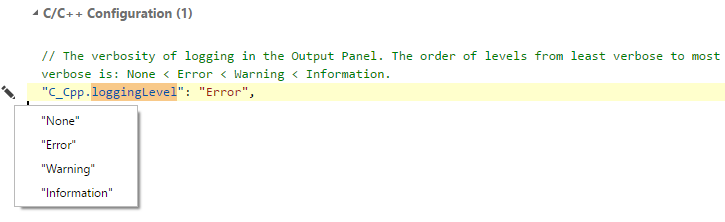
|
||||
|
||||
VS Code organizes the logging from different extensions to improve readability so you must select the "C/C++" option in the log filter selector to see logging from the C/C++ extension:
|
||||
|
||||
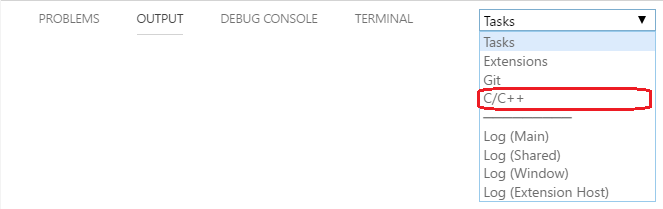
|
||||
|
||||
The documentation for logging has moved to https://code.visualstudio.com/docs/cpp/enable-logging-cpp.
|
||||
@@ -1,66 +1 @@
|
||||
# Frequently asked questions
|
||||
|
||||
* [How do I get IntelliSense to work correctly?](#how-do-i-get-intellisense-to-work-correctly)
|
||||
* [Why do I see red squiggles under Standard Library types?](#why-do-i-see-red-squiggles-under-standard-library-types)
|
||||
* [How do I get the new IntelliSense to work with MinGW on Windows?](#how-do-i-get-the-new-intellisense-to-work-with-mingw-on-windows)
|
||||
* [How do I get the new IntelliSense to work with the Windows Subsystem for Linux?](#how-do-i-get-the-new-intellisense-to-work-with-the-windows-subsystem-for-linux)
|
||||
* [What is the difference between `"includePath"` and `"browse.path"` in **c_cpp_properties.json**?](#what-is-the-difference-between-includepath-and-browsepath-in-c_cpp_propertiesjson)
|
||||
* [How do I re-create the IntelliSense database?](#how-do-i-re-create-the-intellisense-database)
|
||||
|
||||
## How do I get IntelliSense to work correctly?
|
||||
|
||||
There are two IntelliSense engines present in the extension: the "fuzzy" engine (or Tag Parser), and the new "Default" engine. If you are using version 0.11.0 or higher of the cpptools extension, then you can preview our new IntelliSense engine which has more accurate auto-complete suggestions and tooltips. To use the new engine, you need to ensure that `"C_Cpp.intelliSenseEngine"` is set to `"Default"` in your settings. Since the engine is still in preview it is not on by default for everyone yet.
|
||||
|
||||
After selecting the IntelliSense engine that you prefer, take a look at the Problems window in VS Code to see if you need to do any further configuration for your folder. For example, the Default engine will not provide squiggles and auto-complete suggestions for a translation unit (read: a source file and its dependencies) if the include path is not configured properly. You can select any of the problems in the window to navigate to the line when the problem was detected and a lightbulb will appear in the editor with some options (code actions) to help you resolve the problem:
|
||||
|
||||
1. Update your `includePath` (and preprocessor defines)
|
||||
2. Force semantic IntelliSense
|
||||
|
||||
#### Update your `includePath` (and preprocessor defines)
|
||||
|
||||
Selecting this option will open a file called **c_cpp_properties.json**. If you haven't created this file already, it will be created for you in the **.vscode** folder of your workspace.
|
||||
|
||||
Add the necessary paths to your include files to the `"includePath"` array. The `${workspaceRoot}` variable is available to use to get a relative path to the folder you have opened. Also add any required symbols that need to be defined to the `"defines"` array. Both "\<var\>" and "\<var\>=\<value\>" syntax is accepted. When you edit and save this file, the IntelliSense engine will reset and reparse source your source files and headers with the new settings.
|
||||
|
||||
#### Force semantic IntelliSense
|
||||
|
||||
If you want IntelliSense to operate on your files even when all #include directives do not resolve, then you can choose the `Force semantic IntelliSense` code action to always use the new IntelliSense engine. You can also set the `C_Cpp.intelliSenseEngineFallback` setting to `"Disabled"`.
|
||||
|
||||
## Why do I see red squiggles under Standard Library types?
|
||||
|
||||
The most common reason for this is missing include paths and defines. The easiest way to fix this on each platform is as follows:
|
||||
|
||||
**Linux/Mac**
|
||||
* Set `"intelliSenseMode": "clang-x64"` and `"compilerPath"` in **c_cpp_properties.json** to the path to your compiler.
|
||||
|
||||
**Windows**
|
||||
* If you are using a Microsoft compiler from Visual Studio, set `"intelliSenseMode": "msvc-x64"`, but don't add the `"compilerPath"` property to **c_cpp_properties.json**.
|
||||
* If you are using Clang for Windows, set `"intelliSenseMode": "msvc-x64"`, and `"compilerPath"` in **c_cpp_properties.json** to the path to your compiler.
|
||||
|
||||
## How do I get the new IntelliSense to work with MinGW on Windows?
|
||||
|
||||
The page discussing configuration with MinGW is [here](https://github.com/Microsoft/vscode-cpptools/blob/master/Documentation/LanguageServer/MinGW.md).
|
||||
|
||||
## How do I get the new IntelliSense to work with the Windows Subsystem for Linux?
|
||||
|
||||
The page discussing configuration with WSL is [here](https://github.com/Microsoft/vscode-cpptools/blob/master/Documentation/LanguageServer/Windows%20Subsystem%20for%20Linux.md).
|
||||
|
||||
## What is the difference between `"includePath"` and `"browse.path"` in **c_cpp_properties.json**?
|
||||
|
||||
Starting with version 0.11.0 of the cpptools extension, there are now two settings in the **c_cpp_properties.json** file. They are used by the different IntelliSense engines that we support and have slightly different meanings for the components that use them.
|
||||
|
||||
The active IntelliSense engine is controlled via the `"C_Cpp.intelliSenseEngine"` setting in your **settings.json** file. The valid values for this setting are `"Default"` and `"Tag Parser"`.
|
||||
|
||||
* #### `"includePath"`
|
||||
This array of path strings is used by the new "Default" IntelliSense engine that was introduced in version 0.11.0 of the extension. This new engine provides semantic-aware IntelliSense features and will be the eventual replacement for the Tag Parser that has been powering the extension since it was first released. It currently provides tooltips and error squiggles in the editor. The remaining features (e.g. code completion, signature help, go to definition, ...) are implemented using the Tag Parser's database, so it is still important to ensure that the browse.path setting is properly set.
|
||||
|
||||
The paths that you specify for this setting are the same paths that you would send to your compiler via the `-I` switch. When your source files are parsed, the IntelliSense engine will prepend these paths to the files specified by your #include directives while attempting to resolve them. These paths are **not** searched recursively.
|
||||
|
||||
* #### `"browse.path"`
|
||||
This array of path strings is used by the "Tag Parser" (a.k.a. "browse engine"). This engine will _recursively_ enumerate all files under the paths specified and track them as potential includes while tag parsing your project folder. To disable recursive enumeration of a path, you can append a `/*` to the path string.
|
||||
|
||||
When you open a workspace for the first time, the extension adds `${workspaceRoot}` to both arrays. If this is undesirable, you can open your **c_cpp_properties.json** file and remove it.
|
||||
|
||||
## How do I re-create the IntelliSense database?
|
||||
|
||||
Starting in version 0.12.3 of the extension, we added a command that will reset your IntelliSense database. Open the command palette and choose the "C/Cpp: Reset IntelliSense Database" command.
|
||||
The FAQs for the C/C++ extension has moved to https://code.visualstudio.com/docs/cpp/faq-cpp.
|
||||
@@ -1,44 +0,0 @@
|
||||
# IntelliSense engines
|
||||
|
||||
There are two IntelliSense engines used to power the C/C++ IntelliSense experience in VS Code.
|
||||
|
||||
* `"Default"` - Visual Studio's IntelliSense engine, which is the default engine that provides semantic-aware IntelliSense features
|
||||
* `"Tag Parser"` - the "fuzzy" IntelliSense engine that provides quick but "fuzzy" results, is used to provide the fallback experience if the default engine is unable to fully resolve include paths
|
||||
|
||||
Ultimately all the IntelliSense and code browsing features will be powered by the "Default" engine. The following features have been implemented so far:
|
||||
|
||||
* Auto-complete suggestions for class/struct/namespace members
|
||||
* Parameter hints
|
||||
* Quick info (hover over tooltip)
|
||||
* Error squiggles
|
||||
* Reference highlighting
|
||||
|
||||
The other IntelliSense features, such as global auto-complete, and code browsing features, such as Go to definition/declaration, are currently powered by the "Tag Parser" based engine.
|
||||
|
||||
### `includePath` and `browse.path`
|
||||
The two IntelliSense engines use two different settings in the **c_cpp_properties.json** file for specifying include paths. This file is located in the **.vscode** directory in the opened folder. You can create or open this file by either using the "C/Cpp: Edit Configurations" command in the command palette or by selecting "Edit "includePath" setting" in the lightbulb menu. Look for the following settings in the section where your current configuration is defined (by default there's one configuration per OS, such as "Win32 or "Mac").
|
||||
|
||||
* #### `"includePath"`
|
||||
This array of path strings is used by the "Default" IntelliSense engine. The paths that you specify for this setting are the same paths that you would send to your compiler via the -I switch. When your source files are parsed, the IntelliSense engine will prepend these paths to the files specified by your #include directives while attempting to resolve them. These paths are searched **non-recursively**.
|
||||
|
||||
* #### `"browse.path"`
|
||||
This array of path strings is used by the "Tag Parser" (a.k.a. "browse engine"). This engine will **recursively** enumerate all files under the paths specified and track them as potential includes while tag parsing your project folder. To disable recursive enumeration of a path, you can append a `/*` to the path string.
|
||||
|
||||
### How fallback works and how to control the behavior
|
||||
|
||||
The extension first tries to fully parse any opened file using the "Default" IntelliSense engine. If it discovers that it cannot find a header file or a dependency, it will fall back to the tag parser and provide the fuzzy IntelliSense behavior. The fallback affects a full translation unit (TU), not just a single open file. The Problems panel provides details about unresolved headers and dependencies. Other opened TUs will continue to use the "Default" IntelliSense engine provided that all #include dependencies are resolved.
|
||||
|
||||
We recognize that resolving all #includes may not be necessary for all projects and you may still want to experience the productivity benefits of using the "Default" semantic engine without customizing the default include path. For that, the “Force semantic IntelliSense” action can be chosen. When invoked, all unresolved #include squiggles will turn red and semantic member list and linting will be enabled in all files regardless of whether or not #include statements can be resolved.
|
||||
|
||||
### IntelliSense engine setting
|
||||
|
||||
We recommend using the "Default" engine for the best IntelliSense experience. However, it is possible to explicitly choose the IntelliSense engine by editing your [user or workspace settings](https://code.visualstudio.com/docs/getstarted/settings). The setting you should modify is `"C_Cpp.intelliSenseEngine"`. There are two values for this setting:
|
||||
|
||||
* `"Default"` - use Visual Studio's IntelliSense engine
|
||||
* `"Tag Parser"` - use the "fuzzy" IntelliSense engine
|
||||
|
||||
### See Also
|
||||
|
||||
[Configuring includePath for better IntelliSense results](https://github.com/Microsoft/vscode-cpptools/blob/master/Documentation/Getting%20started%20with%20IntelliSense%20configuration.md)
|
||||
|
||||
[**c_cpp_properties.json** reference guide](https://github.com/Microsoft/vscode-cpptools/blob/master/Documentation/LanguageServer/c_cpp_properties.json.md)
|
||||
@@ -1,32 +1,2 @@
|
||||
# MinGW
|
||||
|
||||
To use MinGW on Windows, we recommend you add the following configuration to your **c_cpp_properties.json** file. Select "C/Cpp: Edit Configurations" from the command palette to create this file if you haven't already.
|
||||
|
||||
## Extension version 0.17.0 and higher:
|
||||
|
||||
When you set the `compilerPath` property and change `intelliSenseMode` to `clang-x64`, you no longer need to copy the system include path or defines to `includePath`, `browse.path`, or `defines` to enable IntelliSense to work properly. For example:
|
||||
|
||||
```json
|
||||
{
|
||||
"name": "MinGW",
|
||||
"intelliSenseMode": "clang-x64",
|
||||
"compilerPath": "C:/mingw64/bin/gcc.exe",
|
||||
"includePath": [
|
||||
"${workspaceFolder}"
|
||||
],
|
||||
"defines": [],
|
||||
"browse": {
|
||||
"path": [
|
||||
"${workspaceFolder}"
|
||||
],
|
||||
"limitSymbolsToIncludedHeaders": true,
|
||||
"databaseFilename": ""
|
||||
},
|
||||
"cStandard": "c11",
|
||||
"cppStandard": "c++17"
|
||||
}
|
||||
```
|
||||
|
||||
## Extension version 0.16.1 and earlier:
|
||||
|
||||
If you have an older version of the C/C++ extension installed, use [these instructions](Archive/MinGW.md) instead.
|
||||
The documentation for Mingw-w64 has moved to https://code.visualstudio.com/docs/cpp/config-mingw.
|
||||
@@ -1,43 +1 @@
|
||||
# Windows Subsystem for Linux
|
||||
|
||||
> **Note:** If you are on **build 17110 of Windows or higher**, you must use version 0.17.0 or higher for IntelliSense to work. The Windows team turned on case-sensitive folders for the WSL environment and the C/C++ extension doesn't support case-sensitive folders until version 0.17.0.
|
||||
|
||||
To use the Windows Subsystem for Linux with this extension you need to add a configuration to your **c_cpp_properties.json** file which adds the necessary header paths from within the WSL filesystem to the `includePath`.
|
||||
|
||||
Select "C/Cpp: Edit Configurations" from the command palette to create the **c_cpp_properties.json** file if you haven't already.
|
||||
|
||||
## With extension version 0.17.0 and higher:
|
||||
|
||||
In **c_cpp_properties.json** you can directly address your WSL compiler and include paths by using *nix-style paths and we will do the conversion to Windows paths for you. If you have multiple distros installed, we disambiguate the `compilerPath` by picking the one marked as Default when you run `wslconfig.exe /l` in a CMD or PowerShell window. We continue to support Windows-style paths for these properties as outlined in the [archived instructions](Archive/Windows%20Subsystem%20for%20Linux.md) if you prefer to use those.
|
||||
|
||||
```json
|
||||
{
|
||||
"name": "WSL",
|
||||
"intelliSenseMode": "clang-x64",
|
||||
"compilerPath": "/usr/bin/gcc",
|
||||
"includePath": [
|
||||
"${workspaceFolder}",
|
||||
"/mnt/c/libraries/lib1/include",
|
||||
"C:/libraries/lib2/include"
|
||||
],
|
||||
"defines": [],
|
||||
"browse": {
|
||||
"path": [
|
||||
"${workspaceFolder}",
|
||||
"/mnt/c/libraries"
|
||||
],
|
||||
"limitSymbolsToIncludedHeaders": true,
|
||||
"databaseFilename": ""
|
||||
},
|
||||
"cStandard": "c11",
|
||||
"cppStandard": "c++17"
|
||||
}
|
||||
```
|
||||
|
||||
## Earlier versions of the extension:
|
||||
|
||||
If you are on a build of Windows prior to 17110 and you have an older version of the C/C++ extension installed, use [these instructions](Archive/Windows%20Subsystem%20for%20Linux.md) instead.
|
||||
|
||||
---
|
||||
|
||||
Remember to [heed the warnings of the Windows team about not creating or editing Linux files from a Windows app](https://blogs.msdn.microsoft.com/commandline/2016/11/17/do-not-change-linux-files-using-windows-apps-and-tools/)!
|
||||
The documentation for GCC on Windows Subsystem for Linux (WSL) has moved to https://code.visualstudio.com/docs/cpp/config-wsl.
|
||||
@@ -1,96 +1 @@
|
||||
# `c_cpp_properties.json` Reference Guide
|
||||
|
||||
> See also: [Customizing Default Settings](Customizing%20Default%20Settings.md)
|
||||
|
||||
### Example
|
||||
|
||||
```json
|
||||
{
|
||||
"env" : {
|
||||
"myDefaultIncludePath": [
|
||||
"${workspaceFolder}",
|
||||
"${workspaceFolder}/include"
|
||||
],
|
||||
"myCompilerPath": "/usr/local/bin/gcc-7"
|
||||
},
|
||||
"configurations": [
|
||||
{
|
||||
"name": "Mac",
|
||||
"intelliSenseMode": "clang-x64",
|
||||
"includePath": [ "${myDefaultIncludePath}", "/another/path" ],
|
||||
"macFrameworkPath": [ "/System/Library/Frameworks" ],
|
||||
"defines": [ "FOO", "BAR=100" ],
|
||||
"forcedInclude": [ "${workspaceFolder}/include/config.h" ],
|
||||
"compilerPath": "/usr/bin/clang",
|
||||
"cStandard": "c11",
|
||||
"cppStandard": "c++17",
|
||||
"compileCommands": "/path/to/compile_commands.json",
|
||||
"browse": {
|
||||
"path": [ "${workspaceFolder}" ],
|
||||
"limitSymbolsToIncludedHeaders": true,
|
||||
"databaseFilename": ""
|
||||
}
|
||||
}
|
||||
],
|
||||
"version": 4
|
||||
}
|
||||
```
|
||||
|
||||
## Top-level properties
|
||||
|
||||
* #### `env`
|
||||
An array of user-defined variables that will be available for substitution in the configurations via the standard environment variable syntax: `${<var>}` or `${env:<var>}`. Strings and arrays of strings are accepted.
|
||||
|
||||
* #### `configurations`
|
||||
An array of configuration objects that provide the IntelliSense engine with information about your project and your preferences. By default, the extension creates a configuration for you based on your operating system. You may also add additional configurations.
|
||||
|
||||
* #### `version`
|
||||
We recommend you don't edit this field. It tracks the current version of the **c_cpp_properties.json** file so that the extension knows what properties and settings should be present and how to upgrade this file to the latest version.
|
||||
|
||||
## Configuration properties
|
||||
|
||||
* #### `name`
|
||||
A friendly name for the configuration. "Linux", "Mac", and "Win32" are special names that instruct the extension to load that configuration by default on the associated operating system unless additional configurations have been created. The status bar in VS Code will show you which configuration is active. You can also click on the label in the status bar to change the active configuration.
|
||||
|
||||
* #### `intelliSenseMode`
|
||||
If `"C_Cpp.intelliSenseEngine"` is set to "Default" in your settings file, this property determines which mode the IntelliSense engine will run in. `"msvc-x64"` maps to Visual Studio mode with 64-bit pointer sizes. `"clang-x64"` maps to GCC/CLang mode with 64-bit pointer sizes. Windows uses `"msvc-x64"` by default and Linux/Mac use `"clang-x64"` by default.
|
||||
|
||||
* #### `includePath`
|
||||
If `"C_Cpp.intelliSenseEngine"` is set to "Default" in your settings file, this list of paths will be used by IntelliSense to search for headers included by your source files. This is basically the same as the list of paths you pass to your compiler with the `-I` switch. If a path ends with `/**` the IntelliSense engine will do a recursive search for includes starting from that directory. If on Windows with Visual Studio installed, or if a compiler is specified in the `compilerPath` setting, it is not necessary to list the system include paths in this list.
|
||||
|
||||
* #### `macFrameworkPath`
|
||||
If `"C_Cpp.intelliSenseEngine"` is set to "Default" in your settings file, this list of paths will be used by IntelliSense to search for framework headers included by your source files. This is basically the same as the list of paths you pass to your compiler with the `-F` switch; the IntelliSense engine will not do a recursive search in these paths for includes.
|
||||
|
||||
* #### `defines`
|
||||
If `"C_Cpp.intelliSenseEngine"` is set to "Default" in your settings file, this list of preprocessor symbols will be used by IntelliSense during the compilation of your source files. This is basically the same as the list of symbols you pass to your compiler with the `-D` switch. If on Windows with Visual Studio installed, or if a compiler is specified in the `compilerPath` setting, it is not necessary to list the system include paths in this list.
|
||||
|
||||
* #### `forcedInclude` (optional)
|
||||
A list of files that should be included before any other characters in the source file are processed. Files are included in the order listed.
|
||||
|
||||
* #### `compilerPath` (optional)
|
||||
The absolute path to the compiler you use to build your project. The extension will query the compiler to determine the system include paths and default defines to use for IntelliSense. Args can be added to modify the includes/defines used, e.g. `-nostdinc++`, `-m32`, etc., but paths with spaces must be surrounded by double quotes (`"`) if args are used.
|
||||
|
||||
* #### `cStandard`
|
||||
The C standard revision to use for IntelliSense in your project.
|
||||
|
||||
* #### `cppStandard`
|
||||
The C++ standard revision to use for IntelliSense in your project.
|
||||
|
||||
* #### `compileCommands` (optional)
|
||||
If `"C_Cpp.intelliSenseEngine"` is set to "Default" in your settings file, the includes and defines discovered in this file will be used instead of the values set for `includePath` and `defines`. If the compile commands database does not contain an entry for the translation unit that corresponds to the file you opened in the editor, then a warning message will appear and the extension will use the `includePath` and `defines` settings instead.
|
||||
|
||||
>For more information about the file format, see the [Clang documentation](https://clang.llvm.org/docs/JSONCompilationDatabase.html). Some build systems, such as CMake, [simplify generating this file](https://cmake.org/cmake/help/v3.5/variable/CMAKE_EXPORT_COMPILE_COMMANDS.html).
|
||||
|
||||
* #### `browse`
|
||||
The set of properties used when `"C_Cpp.intelliSenseEngine"` is set to `"Tag Parser"` (also referred to as "fuzzy" IntelliSense, or the "browse" engine). These properties are also used by the Go To Definition/Declaration features, or when the "Default" IntelliSense engine is unable to resolve the #includes in your source files.
|
||||
|
||||
### Browse properties
|
||||
|
||||
* #### `path`
|
||||
This list of paths will be used by the Tag Parser to search for headers included by your source files. The Tag Parser will automatically search all subfolders in these paths unless the path ends with a `/*` or `\*`. For example, `/usr/include` directs the Tag Parser to search the `include` folder and its subfolders for headers while `/usr/include/*` directs the Tag Parser not to look in any subfolders of `/usr/include`.
|
||||
|
||||
* #### `limitSymbolsToIncludedHeaders`
|
||||
When true, the Tag Parser will only parse code files that have been directly or indirectly included by a source file in `${workspaceFolder}`. When false, the Tag Parser will parse all code files found in the paths specified in the **path** list.
|
||||
|
||||
* #### `databaseFilename`
|
||||
When set, this instructs the extension to save the Tag Parser's symbol database somewhere other than the workspace's default storage location. If a relative path is specified, it will be made relative to the workspace's default storage location, not the workspace folder itself. The `${workspaceFolder}` variable can be used to specify a path relative to the workspace folder (e.g. `${workspaceFolder}/.vscode/browse.vc.db`)
|
||||
The documentation for c_cpp_properties.json has moved to https://code.visualstudio.com/docs/cpp/c-cpp-properties-schema-reference.
|
||||
@@ -0,0 +1 @@
|
||||
The documentation for enhanced colorization has moved to https://code.visualstudio.com/docs/cpp/colorization-cpp.
|
||||
@@ -3,12 +3,14 @@ node_modules
|
||||
|
||||
# ignore compliled typescript
|
||||
out
|
||||
dist
|
||||
|
||||
# ignore downloaded extension files and folders
|
||||
server
|
||||
debugAdapters
|
||||
LLVM
|
||||
bin/Microsoft.VSCode.CPP.*
|
||||
bin/vcmeta.dll
|
||||
|
||||
# ignore lock files
|
||||
install.lock
|
||||
@@ -17,4 +19,15 @@ install.lock
|
||||
*.vsix
|
||||
|
||||
# ignore vscode test
|
||||
.vscode-test/
|
||||
.vscode-test/
|
||||
|
||||
# ignore generated localization file
|
||||
**/nls.*.json
|
||||
**/*.nls.json
|
||||
**/*.nls.*.json
|
||||
|
||||
# ignore generate native header
|
||||
localized_string_ids.h
|
||||
|
||||
# ignore generate files. It will be generated when building
|
||||
src/nativeStrings.ts
|
||||
|
||||
@@ -3,7 +3,7 @@
|
||||
"version": "0.1.0",
|
||||
"configurations": [
|
||||
{
|
||||
"name": "Launch Extension",
|
||||
"name": "Launch Extension (development)",
|
||||
"type": "extensionHost",
|
||||
"request": "launch",
|
||||
"runtimeExecutable": "${execPath}",
|
||||
@@ -13,9 +13,68 @@
|
||||
"stopOnEntry": false,
|
||||
"sourceMaps": true,
|
||||
"outFiles": [
|
||||
"${workspaceFolder}/out/**/*.js"
|
||||
"${workspaceFolder}/dist/**/*.js"
|
||||
],
|
||||
"preLaunchTask": "compile",
|
||||
"preLaunchTask": "Compile Dev",
|
||||
},
|
||||
{
|
||||
"name": "Launch Extension (production)",
|
||||
"type": "extensionHost",
|
||||
"request": "launch",
|
||||
"runtimeExecutable": "${execPath}",
|
||||
"args": [
|
||||
"--extensionDevelopmentPath=${workspaceFolder}"
|
||||
],
|
||||
"stopOnEntry": false,
|
||||
"sourceMaps": true,
|
||||
"outFiles": [
|
||||
"${workspaceFolder}/dist/**/*.js"
|
||||
],
|
||||
"preLaunchTask": "TypeScript Compile",
|
||||
},
|
||||
{
|
||||
"name": "Launch Extension (do not build)",
|
||||
"type": "extensionHost",
|
||||
"request": "launch",
|
||||
"runtimeExecutable": "${execPath}",
|
||||
"args": [
|
||||
"--extensionDevelopmentPath=${workspaceFolder}"
|
||||
],
|
||||
"stopOnEntry": false,
|
||||
"sourceMaps": true,
|
||||
"outFiles": [
|
||||
"${workspaceFolder}/dist/**/*.js"
|
||||
]
|
||||
},
|
||||
{
|
||||
"name": "Launch Extension (watch, development)",
|
||||
"type": "extensionHost",
|
||||
"request": "launch",
|
||||
"runtimeExecutable": "${execPath}",
|
||||
"args": [
|
||||
"--extensionDevelopmentPath=${workspaceFolder}"
|
||||
],
|
||||
"stopOnEntry": false,
|
||||
"sourceMaps": true,
|
||||
"outFiles": [
|
||||
"${workspaceFolder}/dist/**/*.js"
|
||||
],
|
||||
"preLaunchTask": "Compile Dev Watch",
|
||||
},
|
||||
{
|
||||
"name": "Launch Extension (watch, production)",
|
||||
"type": "extensionHost",
|
||||
"request": "launch",
|
||||
"runtimeExecutable": "${execPath}",
|
||||
"args": [
|
||||
"--extensionDevelopmentPath=${workspaceFolder}"
|
||||
],
|
||||
"stopOnEntry": false,
|
||||
"sourceMaps": true,
|
||||
"outFiles": [
|
||||
"${workspaceFolder}/dist/**/*.js"
|
||||
],
|
||||
"preLaunchTask": "TypeScript Compile Watch",
|
||||
},
|
||||
{
|
||||
"name": "Launch Tests",
|
||||
@@ -31,7 +90,7 @@
|
||||
"outFiles": [
|
||||
"${workspaceFolder}/out/test/**/*.js"
|
||||
],
|
||||
"preLaunchTask": "compile"
|
||||
"preLaunchTask": "Pretest"
|
||||
},
|
||||
{
|
||||
"name": "Node Attach",
|
||||
@@ -47,13 +106,14 @@
|
||||
"args": [
|
||||
"${workspaceFolder}/test/integrationTests/testAssets/SimpleCppProject",
|
||||
"--extensionDevelopmentPath=${workspaceFolder}",
|
||||
"--extensionTestsPath=${workspaceFolder}/out/test/integrationTests"
|
||||
"--extensionTestsPath=${workspaceFolder}/out/test/integrationTests/languageServer"
|
||||
],
|
||||
"stopOnEntry": false,
|
||||
"sourceMaps": true,
|
||||
"outFiles": [
|
||||
"${workspaceFolder}/out/test/**/*.js"
|
||||
]
|
||||
],
|
||||
"preLaunchTask": "Pretest"
|
||||
},
|
||||
]
|
||||
}
|
||||
@@ -5,12 +5,11 @@
|
||||
"tasks": [
|
||||
{
|
||||
"label": "TypeScript Compile",
|
||||
"identifier": "compile",
|
||||
"group": {
|
||||
"kind": "build",
|
||||
"isDefault": true
|
||||
},
|
||||
"isBackground": true,
|
||||
"isBackground": false,
|
||||
"type": "shell",
|
||||
"presentation": {
|
||||
"echo": true,
|
||||
@@ -18,22 +17,20 @@
|
||||
"focus": false,
|
||||
"panel": "shared"
|
||||
},
|
||||
"command": "npm",
|
||||
"command": "yarn",
|
||||
"args": [
|
||||
"run",
|
||||
"compile",
|
||||
"--loglevel",
|
||||
"silent"
|
||||
],
|
||||
"problemMatcher": "$tsc-watch"
|
||||
]
|
||||
},
|
||||
{
|
||||
"label": "TypeScript Lint",
|
||||
"identifier": "tslint",
|
||||
"group": "build",
|
||||
"isBackground": false,
|
||||
"type": "shell",
|
||||
"command": "npm",
|
||||
"command": "yarn",
|
||||
"args": [
|
||||
"run",
|
||||
"tslint"
|
||||
@@ -53,7 +50,125 @@
|
||||
]
|
||||
},
|
||||
"dependsOn": [
|
||||
"compile"
|
||||
"Compile Dev"
|
||||
]
|
||||
},
|
||||
{
|
||||
"label": "Compile Dev",
|
||||
"group": "build",
|
||||
"isBackground": false,
|
||||
"type": "shell",
|
||||
"command": "yarn",
|
||||
"args": [
|
||||
"run",
|
||||
"compile-dev"
|
||||
]
|
||||
},
|
||||
{
|
||||
"label": "Pretest",
|
||||
"group": "build",
|
||||
"isBackground": false,
|
||||
"type": "shell",
|
||||
"command": "yarn",
|
||||
"args": [
|
||||
"run",
|
||||
"pretest"
|
||||
],
|
||||
"dependsOn": [
|
||||
"Compile Dev"
|
||||
]
|
||||
},
|
||||
{
|
||||
"label": "TypeScript Compile Watch",
|
||||
"group": {
|
||||
"kind": "build",
|
||||
"isDefault": true
|
||||
},
|
||||
"isBackground": true,
|
||||
"type": "shell",
|
||||
"presentation": {
|
||||
"echo": true,
|
||||
"reveal": "silent",
|
||||
"focus": false,
|
||||
"panel": "shared"
|
||||
},
|
||||
"command": "yarn",
|
||||
"args": [
|
||||
"run",
|
||||
"compile-watch",
|
||||
"--loglevel",
|
||||
"silent"
|
||||
],
|
||||
"problemMatcher": [
|
||||
{
|
||||
"owner": "typescript",
|
||||
"source": "ts",
|
||||
"applyTo": "closedDocuments",
|
||||
"fileLocation": "absolute",
|
||||
"severity": "error",
|
||||
"pattern": [
|
||||
{
|
||||
"regexp": "\\[tsl\\] ERROR in (.*)?\\((\\d+),(\\d+)\\)",
|
||||
"file": 1,
|
||||
"line": 2,
|
||||
"column": 3
|
||||
},
|
||||
{
|
||||
"regexp": "\\s*TS\\d+:\\s*(.*)",
|
||||
"message": 1
|
||||
}
|
||||
],
|
||||
"background": {
|
||||
"activeOnStart": true,
|
||||
"beginsPattern": {
|
||||
"regexp": "Compilation (.*?)starting…"
|
||||
},
|
||||
"endsPattern": {
|
||||
"regexp": "Compilation (.*?)finished"
|
||||
}
|
||||
}
|
||||
}
|
||||
]
|
||||
},
|
||||
{
|
||||
"label": "Compile Dev Watch",
|
||||
"group": "build",
|
||||
"isBackground": true,
|
||||
"type": "shell",
|
||||
"command": "yarn",
|
||||
"args": [
|
||||
"run",
|
||||
"compile-dev-watch"
|
||||
],
|
||||
"problemMatcher": [
|
||||
{
|
||||
"owner": "typescript",
|
||||
"source": "ts",
|
||||
"applyTo": "closedDocuments",
|
||||
"fileLocation": "absolute",
|
||||
"severity": "error",
|
||||
"pattern": [
|
||||
{
|
||||
"regexp": "\\[tsl\\] ERROR in (.*)?\\((\\d+),(\\d+)\\)",
|
||||
"file": 1,
|
||||
"line": 2,
|
||||
"column": 3
|
||||
},
|
||||
{
|
||||
"regexp": "\\s*TS\\d+:\\s*(.*)",
|
||||
"message": 1
|
||||
}
|
||||
],
|
||||
"background": {
|
||||
"activeOnStart": true,
|
||||
"beginsPattern": {
|
||||
"regexp": "Compilation (.*?)starting…"
|
||||
},
|
||||
"endsPattern": {
|
||||
"regexp": "Compilation (.*?)finished"
|
||||
}
|
||||
}
|
||||
}
|
||||
]
|
||||
}
|
||||
]
|
||||
|
||||
@@ -1,15 +1,42 @@
|
||||
obj/**
|
||||
|
||||
# ignore vscode settings for extension development
|
||||
.vscode/**
|
||||
typings/**
|
||||
out/test/**
|
||||
|
||||
# ignore binaries
|
||||
obj/**
|
||||
|
||||
# ignore source files
|
||||
tools/**
|
||||
notices/**
|
||||
test/**
|
||||
src/**
|
||||
**/*.map
|
||||
.gitignore
|
||||
|
||||
# ignore .js files that are webpacked or only used for development
|
||||
out/src/**
|
||||
out/tools/**
|
||||
|
||||
# ignore ts files in ui
|
||||
ui/*.ts
|
||||
|
||||
# ignore Azure-Pipelines files
|
||||
jobs/**
|
||||
|
||||
# ignore development files
|
||||
tsconfig.json
|
||||
test.tsconfig.json
|
||||
tslint.json
|
||||
webpack.config.js
|
||||
tscCompileList.txt
|
||||
gulpfile.js
|
||||
.gitattributes
|
||||
.gitignore
|
||||
CMakeLists.txt
|
||||
debugAdapters/install.lock*
|
||||
out/src/Debugger/copyScript.js
|
||||
tools/**
|
||||
out/tools/**
|
||||
notices/**
|
||||
typings/**
|
||||
**/*.map
|
||||
import_edge_strings.js
|
||||
localized_string_ids.h
|
||||
translations_auto_pr.js
|
||||
|
||||
# ignore i18n language files
|
||||
i18n/**
|
||||
|
||||
@@ -1,22 +1,423 @@
|
||||
# C/C++ for Visual Studio Code Change Log
|
||||
|
||||
## Version 0.26.3: January 22, 2020
|
||||
### Bug Fixes
|
||||
* IntelliSense bug fixes. [#2774](https://github.com/microsoft/vscode-cpptools/issues/2774)
|
||||
* Improve memory usage in projects with a large number of files. [#3326](https://github.com/microsoft/vscode-cpptools/issues/3326)
|
||||
* Fix a crash when failing to launch external executables on Linux and Mac. [#3607](https://github.com/microsoft/vscode-cpptools/issues/3607)
|
||||
* Update output of `C/C++: Log Diagnostics` to include the correct set of defines when custom configurations or compile commands are used. [#3631](https://github.com/microsoft/vscode-cpptools/issues/3631) [#4270](https://github.com/microsoft/vscode-cpptools/issues/4270)
|
||||
* Fix Insiders channel not working on remote targets. [#3874](https://github.com/microsoft/vscode-cpptools/issues/3874)
|
||||
* Fix `compile_commands.json` prompt appearing when a configuration provider is used. [#3972](https://github.com/microsoft/vscode-cpptools/issues/3972)
|
||||
* Improve IntelliSense performance with range-v3. [#4414](https://github.com/microsoft/vscode-cpptools/issues/4414)
|
||||
* Fix template members not being nested under the template type in the Outline view. [#4466](https://github.com/microsoft/vscode-cpptools/issues/4466)
|
||||
* Fix an issue in which failure to invoke a compiler could result in a hang on Linux and Mac. [#4627](https://github.com/microsoft/vscode-cpptools/issues/4627)
|
||||
* Fix custom configurations sometimes not being applied to headers. [#4649](https://github.com/microsoft/vscode-cpptools/issues/4649)
|
||||
* Fix headers opening into header-only TU's instead of TU's for candidate source files. [#4696](https://github.com/microsoft/vscode-cpptools/issues/4696)
|
||||
* Fix the missing description of `C_Cpp.clang_format_style`.
|
||||
* @Enna1 [PR 4734](https://github.com/microsoft/vscode-cpptools/pull/4734)
|
||||
* Fix Insiders channel not auto-downgrading after an Insiders vsix is unpublished. [#4760](https://github.com/microsoft/vscode-cpptools/issues/4760)
|
||||
* Fix compiler querying with more than 40 `compilerArgs`. [#4791](https://github.com/microsoft/vscode-cpptools/issues/4791)
|
||||
* Fix an issue in which files may be unnecessarily removed from the tag parser database on startup, if using a custom configuration provider, resulting in a large number of files being reparsed. [#4802](https://github.com/microsoft/vscode-cpptools/issues/4802)
|
||||
* Fix an issue in which `Build and Debug Active File` would fail to detect a compiler, without a compiler present in `compilerPath`. [#4834](https://github.com/microsoft/vscode-cpptools/issues/4834)
|
||||
* Add a version check for `-break-insert` so later versions of `lldb-mi` can be used as a `midebugger`. [MIEngine#946](https://github.com/microsoft/MIEngine/issues/946)
|
||||
* Fix clang-cl detection for system includes and defines.
|
||||
* Fix a bug that could cause the browse database threads to get stuck.
|
||||
|
||||
### Enhancements
|
||||
* If clang-format is found in the environment path, that version will take precedence over the copy of clang-format bundled with the extension. [#3569](https://github.com/microsoft/vscode-cpptools/issues/3569)
|
||||
* When tag parsing is complete, and includer/includee relationships become available, header-only TU's will be replaced with TU's for candidate source files, if available.
|
||||
|
||||
## Version 0.26.2: December 2, 2019
|
||||
### Enhancements
|
||||
* Reworked how a source file is selected for TU creation when opening a header file. [#2856](https://github.com/microsoft/vscode-cpptools/issues/2856)
|
||||
* Updated the default value of the `C_Cpp.intelliSenseCachePath` setting to a path under `XDG_CACHE_HOME` on Linux, or `~/Library/Cache` on MacOS. [#3979](https://github.com/microsoft/vscode-cpptools/issues/3979)
|
||||
* Reset memory usage of the IntelliSense process if it grows beyond a threshold. [#4119](https://github.com/microsoft/vscode-cpptools/issues/4119)
|
||||
* Add validation that the new symbol name provided to 'Rename Symbol' is a valid identifier. Add the setting `C_Cpp.renameRequiresIdentifier` to allow that verification to be disabled. [#4409](https://github.com/microsoft/vscode-cpptools/issues/4409)
|
||||
* Enable setting of breakpoints in CUDA sources.
|
||||
* Paul Taylor (@trxcllnt) [PR #4585](https://github.com/microsoft/vscode-cpptools/pull/4585)
|
||||
* Deferred TU creation until the file is visible in the editor. This avoids the overhead of TU creation when the file is opened by VS Code internally for IntelliSense operations. [#4458](https://github.com/microsoft/vscode-cpptools/issues/4458)
|
||||
|
||||
### Bug Fixes
|
||||
* Fix child process creation when the Windows code page is set to a language with non-ASCII characters and there are non-ASCII characters in the extension's install path. [#1560](https://github.com/microsoft/vscode-cpptools/issues/1560)
|
||||
* Fix path canonicalization of UNC paths to avoid duplicate files opening with different casing. [#2528](https://github.com/microsoft/vscode-cpptools/issues/2528), [#3980](https://github.com/microsoft/vscode-cpptools/issues/3980)
|
||||
* Fix header opening without IntelliSense due to creation of a TU from a source file that includes the header in an inactive region. [#4320](https://github.com/microsoft/vscode-cpptools/issues/4320)
|
||||
* Fix a hang in the extension process that can occur when using a scope named 'interface'. [#4470](https://github.com/microsoft/vscode-cpptools/issues/4470)
|
||||
* Fix an issue with the Rename UI that could cause the rename to not be applied. [#4504](https://github.com/microsoft/vscode-cpptools/issues/4504)
|
||||
* Show an error message when a Rename fails due to the symbol not being found. [#4510](https://github.com/microsoft/vscode-cpptools/issues/4510)
|
||||
* Fix `launch.json` creation due to localized strings containing quotes. [#4526](https://github.com/microsoft/vscode-cpptools/issues/4526)
|
||||
* Fix configuration error squiggles not being applied unless the setting was set in both `c_cpp_properties.json` and `settings.json`. [PR #4538](https://github.com/microsoft/vscode-cpptools/pull/4538)
|
||||
* Fix document symbol for Outline view and breadcrumbs on Windows 7. [#4536](https://github.com/microsoft/vscode-cpptools/issues/4536).
|
||||
* Add support for `"ms-vscode.cmake-tools"` `configurationProvider` id. [#4586](https://github.com/microsoft/vscode-cpptools/issues/4586).
|
||||
* Fix cancellation of Find All References sometimes resulting in an exception. [#2710](https://github.com/microsoft/vscode-cpptools/issues/2710)
|
||||
* Fix the sort order of files in the Find All References and Rename UI's. [#4615](https://github.com/microsoft/vscode-cpptools/issues/4615)
|
||||
* Fix localized Chinese strings not displaying on systems with case-sensitive file systems. [#4619](https://github.com/microsoft/vscode-cpptools/issues/4619)
|
||||
* Fix files with an extention of `.H` not correctly associating with C++. [#4632](https://github.com/microsoft/vscode-cpptools/issues/4632)
|
||||
* Fix -m64 or -m32 not being passed to gcc, causing the reported system includes and system defines to not match the requested `intelliSenseMode`. [#4635](https://github.com/microsoft/vscode-cpptools/issues/4635)
|
||||
|
||||
## Version 0.26.1: October 28, 2019
|
||||
### Bug Fixes
|
||||
* Fix `launch.json` creation when using non-English display languages. [#4464](https://github.com/microsoft/vscode-cpptools/issues/4464)
|
||||
* Fix CHS translation. [#4422](https://github.com/microsoft/vscode-cpptools/issues/4422)
|
||||
* Fix debugging hang when Windows 10 Beta Unicode (UTF-8) support is enabled. [#1527](https://github.com/microsoft/vscode-cpptools/issues/1527)
|
||||
|
||||
## Version 0.26.0: October 15, 2019
|
||||
### New Features
|
||||
* Add localization support (translated text) via `Configure Display Language`. [#7](https://github.com/microsoft/vscode-cpptools/issues/7)
|
||||
* Add `Rename Symbol` with a pending rename UI. [#296](https://github.com/microsoft/vscode-cpptools/issues/296), [PR #4277](https://github.com/microsoft/vscode-cpptools/pull/4277)
|
||||
* Add support for navigation breadcrumbs and nested symbols in the Outline view (and removed the Navigation status bar item). [#2230](https://github.com/microsoft/vscode-cpptools/issues/2230)
|
||||
* Add support for C++/CX (`/ZW`, `/ZW:nostdlib`, `/FI`, `/FU`, and `/AI` compiler arguments). [#3039](https://github.com/microsoft/vscode-cpptools/issues/3039)
|
||||
* Add a tree view UI for the other C++ references results. [#4079](https://github.com/microsoft/vscode-cpptools/issues/4079)
|
||||
|
||||
### Enhancements
|
||||
* App support for .rsp files in `compile_commands.json`. [#1718](https://github.com/microsoft/vscode-cpptools/issues/1718)
|
||||
* Add support for `SymbolLoadInfo` to `launch.json`. [#3324](https://github.com/microsoft/vscode-cpptools/issues/3324)
|
||||
* Enable `${workspaceFolder}` in `compilerPath` and `compilerArgs`. [#3440](https://github.com/microsoft/vscode-cpptools/issues/3440)
|
||||
* Add support for parsing more file types by default. [#3567](https://github.com/microsoft/vscode-cpptools/issues/3567)
|
||||
* Move status icons to the left to minimize shifting and change the red flame to use the foreground color. [#4198](https://github.com/microsoft/vscode-cpptools/issues/4198)
|
||||
|
||||
### Bug Fixes
|
||||
* Fix querying of non-ENU compilers. [#2874](https://github.com/microsoft/vscode-cpptools/issues/2874)
|
||||
* Fix IntelliSense error with `constexpr const char* s[] = { "" }`. [#2939](https://github.com/microsoft/vscode-cpptools/issues/2939)
|
||||
* Add support for C++20 designated initializers for cl and gcc. [#3491](https://github.com/Microsoft/vscode-cpptools/issues/3491)
|
||||
* Fix `Find All References` not confirming references of method overrides in an inheritance hierarchy. [#4078](https://github.com/microsoft/vscode-cpptools/issues/4078)
|
||||
* Fix missing references on the last line. [#4150](https://github.com/microsoft/vscode-cpptools/issues/4150)
|
||||
* Fix `Go to Definition` on implicit default constructors. [#4162](https://github.com/microsoft/vscode-cpptools/issues/4162)
|
||||
* Fix configuration prompts from appearing if a configuration provider is set. [#4168](https://github.com/microsoft/vscode-cpptools/issues/4168)
|
||||
* Fix vcpkg code action for missing includes with more than one forward slash. [PR #4172](https://github.com/microsoft/vscode-cpptools/pull/4172)
|
||||
* Fix parsing of `__has_include` (and other system macros) with gcc. [#4193](https://github.com/microsoft/vscode-cpptools/issues/4193)
|
||||
* Fix tag parse database not getting updated after changes occur to unopened files in the workspace. [#4211](https://github.com/microsoft/vscode-cpptools/issues/4211)
|
||||
* Fix `files.exclude` ending with `/` being treated like a per-file exclude (which aren't enabled by default). [#4262](https://github.com/microsoft/vscode-cpptools/issues/4262)
|
||||
* Fix `Find All References` incorrect results for string and comment references. [#4279](https://github.com/microsoft/vscode-cpptools/issues/4279)
|
||||
* Fix bug with forced includes in `compile_commands.json`. [#4293](https://github.com/microsoft/vscode-cpptools/issues/4293)
|
||||
* Fix `Find All References` giving `Not a Reference` for constructors of templated classes. [#4345](https://github.com/microsoft/vscode-cpptools/issues/4345)
|
||||
* Fix squiggles appearing after a multi-edit replace or rename. [#4351](https://github.com/microsoft/vscode-cpptools/issues/4351)
|
||||
* Fix `gcc-x86` and `clang-x86` modes. [#4353](https://github.com/microsoft/vscode-cpptools/issues/4353)
|
||||
* Fix crashes if the database can't be created. [#4359](https://github.com/microsoft/vscode-cpptools/issues/4359)
|
||||
* Fix bugs with comment references. [#4371](https://github.com/microsoft/vscode-cpptools/issues/4371), [#4372](https://github.com/microsoft/vscode-cpptools/issues/4372)
|
||||
|
||||
## Version 0.25.1: August 28, 2019
|
||||
### Bug Fixes
|
||||
* Fix `Switch Header/Source` for `.H` and `.C` targets. [#3048](https://github.com/microsoft/vscode-cpptools/issues/3048)
|
||||
* Fix `C_Cpp.updateChannel` not respecting `extensions.autoUpdate`. [#3632](https://github.com/microsoft/vscode-cpptools/issues/3632)
|
||||
* Fix duplicate content appearing after formatting of a new file (2nd fix). [#4091](https://github.com/microsoft/vscode-cpptools/issues/4091)
|
||||
* Fix links in `Log Diagnostics` output. [#4122](https://github.com/microsoft/vscode-cpptools/issues/4122)
|
||||
* Fix `NullReferenceException` when debugging if `"description"` is missing. [#4125](https://github.com/microsoft/vscode-cpptools/issues/4125)
|
||||
* Fix `files.exclude` processing when using `\\`. [#4127](https://github.com/microsoft/vscode-cpptools/issues/4127)
|
||||
* Fix bug when attaching to an elevated process on Linux. [#4133](https://github.com/microsoft/vscode-cpptools/issues/4133)
|
||||
* Fix IntelliSense-based `Go to Definition` failing for a nested class in a template class. [#4135](https://github.com/microsoft/vscode-cpptools/issues/4135)
|
||||
* Fix incorrect configuration squiggles with `compilerPath` when variables are used. [#4141](https://github.com/microsoft/vscode-cpptools/issues/4141)
|
||||
* @mistersandman [PR #4142](https://github.com/microsoft/vscode-cpptools/pull/4142)
|
||||
* Fix `executeReferenceProvider` when code is selected. [#4147](https://github.com/microsoft/vscode-cpptools/issues/4147)
|
||||
* Fix code action for resolving missing includes via the `vcpkg` dependency manager. [PR #4156](https://github.com/microsoft/vscode-cpptools/pull/4156)
|
||||
|
||||
## Version 0.25.0: August 21, 2019
|
||||
### New Features
|
||||
* Add `Find All References`. [#15](https://github.com/microsoft/vscode-cpptools/issues/15)
|
||||
* Add `-x86` options for `intelliSenseMode`. [#2275](https://github.com/microsoft/vscode-cpptools/issues/2275), [#2312](https://github.com/microsoft/vscode-cpptools/issues/2312)
|
||||
* Add `c++20` option to `cppStandard`. [#3448](https://github.com/microsoft/vscode-cpptools/issues/3448)
|
||||
* Add a code action for resolving missing includes via the `vcpkg` dependency manager. [PR #3791](https://github.com/microsoft/vscode-cpptools/pull/3791)
|
||||
|
||||
### Enhancements
|
||||
* Added support for compile commands:
|
||||
* `-iquote`. [#2088](https://github.com/microsoft/vscode-cpptools/issues/2088)
|
||||
* `-imacros`. [#2417](https://github.com/microsoft/vscode-cpptools/issues/2417)
|
||||
* `-idirafter`(`--include-directory-after` & `--include-directory-after=`). [#3713](https://github.com/microsoft/vscode-cpptools/issues/3713)
|
||||
* `-imsvc`. [#4032](https://github.com/microsoft/vscode-cpptools/issues/4032)
|
||||
* Switch to using VS Code's `Go to Declaration`. [#2959](https://github.com/microsoft/vscode-cpptools/issues/2959)
|
||||
* Added `compilerArgs` property setting. [PR #3950](https://github.com/microsoft/vscode-cpptools/pull/3950)
|
||||
* Added support for V3 API. [PR #3987](https://github.com/microsoft/vscode-cpptools/pull/3987)
|
||||
* Add `not supported` messages for ARM and Alpine containers. [PR #4027](https://github.com/microsoft/vscode-cpptools/pull/4027)
|
||||
* Add validation for paths from `env` variables. [#3912](https://github.com/microsoft/vscode-cpptools/issues/3912)
|
||||
|
||||
### Bug Fixes
|
||||
* Fix wrong type of `this` pointer. [#2303](https://github.com/microsoft/vscode-cpptools/issues/2303)
|
||||
* Fix previous cache path not deleted when new cache path is specified. Note that the VS Code bug [Microsoft/vscode#59391](https://github.com/microsoft/vscode/issues/59391) still occurs on the settings UI, but this fix should delete any incomplete path names as the extension receives changes from the cache path setting. [#3644](https://github.com/microsoft/vscode-cpptools/issues/3644).
|
||||
* Fix broken shell script when launch/attaching as root. [#3711](https://github.com/microsoft/vscode-cpptools/issues/3711)
|
||||
* Christian A. Jacobsen (@ChristianJacobsen) [PR MIEngine#906](https://github.com/microsoft/MIEngine/pull/906)
|
||||
* Fix ".H" files not appearing in include completion results on Linux/macOS. [#3744](https://github.com/microsoft/vscode-cpptools/issues/3744)
|
||||
* Fix `compile_commands.json` file changes not updated. [#3864](https://github.com/microsoft/vscode-cpptools/issues/3864).
|
||||
* Fix `Failed to parse` error message in the open file scenario. [#3888](https://github.com/microsoft/vscode-cpptools/issues/3888)
|
||||
* Fix loading the wrong symbols when creating or copying a file. [#3897](https://github.com/microsoft/vscode-cpptools/issues/3897)
|
||||
* Fix IntelliSense process crash in clang mode. [#3898](https://github.com/microsoft/vscode-cpptools/issues/3898)
|
||||
* Fix IntelliSense-based `Go to Definition` failing with `using namespace`. [#3902](https://github.com/microsoft/vscode-cpptools/issues/3902), [#4018](https://github.com/microsoft/vscode-cpptools/issues/4018)
|
||||
* Fix completion not showing results for smart pointers. [#3926](https://github.com/microsoft/vscode-cpptools/issues/3926), [#3930](https://github.com/microsoft/vscode-cpptools/issues/3930)
|
||||
* Fix `clang_format_path` cannot be set in workspace settings. [#3937](https://github.com/microsoft/vscode-cpptools/issues/3937)
|
||||
* Fix typos and grammar in documentation.
|
||||
* @pi1024e [PR #4014](https://github.com/microsoft/vscode-cpptools/pull/4014)
|
||||
* Fix NullReferenceException when unable to launch and an unresolved parameter exists in the string. This was causing a useless error message. [#4024](https://github.com/microsoft/vscode-cpptools/issues/4024), [#4090](https://github.com/microsoft/vscode-cpptools/issues/4090)
|
||||
* Fix debugger can't debug file whose folder path includes a parenthesis. [#4030](https://github.com/microsoft/vscode-cpptools/issues/4030)
|
||||
* Fix duplicate content appearing after formatting of a new file. [#4091](https://github.com/microsoft/vscode-cpptools/issues/4091)
|
||||
* Fix `files.exclude` bug on Windows. [#4095](https://github.com/microsoft/vscode-cpptools/issues/4095)
|
||||
* Fix NullReferenceException when `cwd` is null. [MIEngine#911](https://github.com/microsoft/MIEngine/issues/911)
|
||||
* Fix wrong IntelliSense for C++ types after editing within a function and after a lambda.
|
||||
|
||||
## Version 0.24.1: July 22, 2019
|
||||
### Bug Fixes
|
||||
* Fix an issue with the Outline not being populated when a file is opened. [#3877](https://github.com/microsoft/vscode-cpptools/issues/3877)
|
||||
* Update scopes used by semantic colorization. [PR# 3896](https://github.com/microsoft/vscode-cpptools/pull/3896)
|
||||
|
||||
## Version 0.24.0: July 3, 2019
|
||||
### New Features
|
||||
* Semantic colorization [Documentation](https://github.com/microsoft/vscode-cpptools/blob/master/Documentation/LanguageServer/colorization.md) [#230](https://github.com/microsoft/vscode-cpptools/issues/230)
|
||||
* Add `Rescan Workspace` command. [microsoft/vscode-cpptools-api#11](https://github.com/microsoft/vscode-cpptools-api/issues/11)
|
||||
|
||||
### Enhancements
|
||||
* Configuration UI editor improvements:
|
||||
* Add list of detected compiler paths. [PR #3708](https://github.com/microsoft/vscode-cpptools/pull/3708)
|
||||
* Enable selecting/editing of other configurations and add "Advanced Settings" section. [PR #3732](https://github.com/microsoft/vscode-cpptools/pull/3732)
|
||||
* Enable `envFile` for `cppdbg`. [PR #3723](https://github.com/microsoft/vscode-cpptools/pull/3723)
|
||||
* Change the default path value of `C_Cpp.intelliSenseCachePath`. [#3347](https://github.com/microsoft/vscode-cpptools/issues/3347) [#3664](https://github.com/microsoft/vscode-cpptools/issues/3664)
|
||||
* Change `C_Cpp.clang_format_path` to `machine` scope. [#3774](https://github.com/microsoft/vscode-cpptools/issues/3774)
|
||||
* Add validation to the advanced configuration UI settings. [PR #3838](https://github.com/microsoft/vscode-cpptools/pull/3838)
|
||||
* Add `Current Configuration` to `C/C++: Log Diagnostics`. [PR #3866](https://github.com/microsoft/vscode-cpptools/pull/3866)
|
||||
|
||||
### Bug Fixes
|
||||
* Fix for gdb `follow-fork-mode` `child` not working. [#2738](https://github.com/microsoft/vscode-cpptools/issues/2738)
|
||||
* Fix IntelliSense process crash on hover with certain arrays. [#3081](https://github.com/Microsoft/vscode-cpptools/issues/3081)
|
||||
* Fix IntelliSense-based `Go to Definition` for goto labels. [#3111](https://github.com/microsoft/vscode-cpptools/issues/3111)
|
||||
* Fix IntelliSense behaving incorrectly when files are opened with different casing on Windows. [#3229](https://github.com/microsoft/vscode-cpptools/issues/3229)
|
||||
* Fix user defined literals crashing IntelliSense in clang/gcc mode. [#3481](https://github.com/microsoft/vscode-cpptools/issues/3481)
|
||||
* Improve `sourceFileMap` to be more dynamic. [#3504](https://github.com/microsoft/vscode-cpptools/issues/3504)
|
||||
* Fix IntelliSense-based hover document comments being shown for invalid declarations not used by the current translation unit. [#3596](https://github.com/microsoft/vscode-cpptools/issues/3596)
|
||||
* Fix `Go to Definition` when is `void` missing in the parameter list of a function definition a .c file. [#3609](https://github.com/microsoft/vscode-cpptools/issues/3609)
|
||||
* Fix configuration validation of compiler path and IntelliSense mode compatibility for `clang-cl.exe` compiler. [#3637](https://github.com/microsoft/vscode-cpptools/issues/3637)
|
||||
* Fix resolving `${workspaceFolderBasename}` and add `${workspaceStorage}`. [#3642](https://github.com/microsoft/vscode-cpptools/issues/3642)
|
||||
* Fix IntelliSense-based `Go to Definition` performance issue due to extra database iteration. [#3655](https://github.com/microsoft/vscode-cpptools/issues/3655)
|
||||
* Fix `SourceRequest` causing debugging to stop with `NotImplementedException`. [#3662](https://github.com/microsoft/vscode-cpptools/issues/3662)
|
||||
* Fix typo in `intelliSenseMode` description.
|
||||
* Karsten Thoms (@kthoms) [PR #3682](https://github.com/microsoft/vscode-cpptools/pull/3682)
|
||||
* Fix invalid warning with typedef enums in .c files. [#3685](https://github.com/microsoft/vscode-cpptools/issues/3685)
|
||||
* Fix incorrect `keyword` completion occurring for pragma `#keyword`. [#3690](https://github.com/microsoft/vscode-cpptools/issues/3690)
|
||||
* Fix problem matcher to show fatal errors from GCC [#3712](https://github.com/microsoft/vscode-cpptools/issues/3712)
|
||||
* Fix multi-root folders with the same name sharing the same browse database. [PR #3715](https://github.com/microsoft/vscode-cpptools/pull/3715)
|
||||
* Fix `remoteProcessPicker` on Windows. [#3758](https://github.com/microsoft/vscode-cpptools/issues/3758)
|
||||
* Fix crash when tag parsing Objective-C code. [#3776](https://github.com/microsoft/vscode-cpptools/issues/3776)
|
||||
* Fix duplicate slashes getting added to `c_cpp_properties.json`. [PR #3778](https://github.com/microsoft/vscode-cpptools/pull/3778)
|
||||
* Fix `envFile` variable substitution. [#3836](https://github.com/microsoft/vscode-cpptools/issues/3836)
|
||||
* Fix missing headers popup. [PR #3840](https://github.com/microsoft/vscode-cpptools/pull/3840)
|
||||
* Fix multiple anonymous unions not showing correctly in Locals while debugging. [MIEngine#820](https://github.com/microsoft/MIEngine/issues/820)
|
||||
* Fix pause not working when using `DebugServer`/`MIDebuggerServerAddress` on Linux and macOS. [MIEngine#844](https://github.com/microsoft/MIEngine/issues/844)
|
||||
* Improvements to CPU and memory usage when editing.
|
||||
|
||||
## Version 0.23.1: May 13, 2019
|
||||
### Bug Fixes
|
||||
* Fix `launch.json` creation when `intelliSenseEngine` is `"Disabled"`. [#3583](https://github.com/microsoft/vscode-cpptools/issues/3583)
|
||||
* Fix C/C++ commands not working if the language service isn't activated. [#3615](https://github.com/microsoft/vscode-cpptools/issues/3615)
|
||||
* Fix missing extension `"Details"` page. [#3621](https://github.com/microsoft/vscode-cpptools/issues/3621)
|
||||
* Fix some random crashes related to IntelliSense inactive region processing.
|
||||
|
||||
## Version 0.23.0: May 6, 2019
|
||||
### New Features
|
||||
* Add a configuration UI editor to edit IntelliSense settings defined in the underlying `c_cpp_properties.json` file. [PR #3479](https://github.com/Microsoft/vscode-cpptools/pull/3479), [PR #3487](https://github.com/Microsoft/vscode-cpptools/pull/3487), [PR #3519](https://github.com/Microsoft/vscode-cpptools/pull/3519), [#3524](https://github.com/Microsoft/vscode-cpptools/issues/3524), [PR #3563](https://github.com/Microsoft/vscode-cpptools/pull/3563), [#3526](https://github.com/Microsoft/vscode-cpptools/issues/3526)
|
||||
* Add a new command `C/C++: Edit configurations (UI)` to open the UI editor.
|
||||
* Replace the `C/C++: Edit configurations...` command with `C/C++: Edit configurations (JSON)` to open `c_cpp_properties.json`.
|
||||
* The default whether to open the UI editor or JSON file is based on the `workbench.settings.editor` setting.
|
||||
* Add command `C/C++: Log Diagnostics` to log language service diagnostics. [PR #3489](https://github.com/Microsoft/vscode-cpptools/pull/3489)
|
||||
* Add support for `.env` files for `cppvsdbg`. [#3490](https://github.com/Microsoft/vscode-cpptools/issues/3490)
|
||||
|
||||
### Other Changes
|
||||
* Enable flag `/permissive-` as an argument to `compilerPath` with `cl.exe`. [#1589](https://github.com/Microsoft/vscode-cpptools/issues/1589), [#3446](https://github.com/Microsoft/vscode-cpptools/issues/3446)
|
||||
* Configuration squiggles for `c_cpp_properties.json` now validates if the setting values of `compilerPath` and `intelliSenseMode` match on Windows. [#2983](https://github.com/Microsoft/vscode-cpptools/issues/2983)
|
||||
* Enable `-fms-extensions` to be used as an argument to `compilerPath` on Linux/Mac. [#3063](https://github.com/Microsoft/vscode-cpptools/issues/3063)
|
||||
* Change the default value of `C_Cpp.intelliSenseEngineFallback` setting to `Disabled`. [#3165](https://github.com/Microsoft/vscode-cpptools/issues/3165)
|
||||
* Add squiggle when `compilerPath` uses spaces and arguments without `"`. [#3357](https://github.com/Microsoft/vscode-cpptools/issues/3357)
|
||||
* Change the `Disabled` value for `C_Cpp.errorSquiggles` to stop showing missing header squiggles. [#3361](https://github.com/Microsoft/vscode-cpptools/issues/3361)
|
||||
* Add `enableConfigurationSquiggles` setting to allow squiggles to be disabled for `c_cpp_properties.json`. [#3403](https://github.com/Microsoft/vscode-cpptools/issues/3403)
|
||||
* Switch to using the `installExtension` command for offline/insider vsix installing (to reduce install failures). [#3408](https://github.com/Microsoft/vscode-cpptools/issues/3408)
|
||||
* Add a better example to the description of `C_Cpp.clang_format_style` and `C_Cpp.clang_format_fallback_style`. [#3419](https://github.com/Microsoft/vscode-cpptools/issues/3419)
|
||||
* Add a new (default) value of `EnabledIfIncludesResolve` to `C_Cpp.errorSquiggles`, which only shows error squiggles if include headers are successfully resolved. [PR #3421](https://github.com/Microsoft/vscode-cpptools/pull/3421)
|
||||
* Disable debug heap by default with cppvsdbg. [#3484](https://github.com/Microsoft/vscode-cpptools/issues/3484)
|
||||
* Reported by Djoulihen (@Djoulihen)
|
||||
* Enable configuration squiggles for paths delimited by semicolons. [PR #3517](https://github.com/Microsoft/vscode-cpptools/pull/3517)
|
||||
* Don't show release notes if the extension has never been installed before. [#3533](https://github.com/Microsoft/vscode-cpptools/issues/3533)
|
||||
* Remove IntelliSense fallback code actions.
|
||||
|
||||
### Bug Fixes
|
||||
* Fix browsing for functions with BOOST_FOREACH. [#953](https://github.com/Microsoft/vscode-cpptools/issues/953)
|
||||
* Fix code action sometimes not appearing over a squiggled identifier. [#1436](https://github.com/microsoft/vscode-cpptools/issues/1436)
|
||||
* Work around issue with VS Code not treating `.C` files as C++ files [Microsoft/vscode#59369](https://github.com/Microsoft/vscode/issues/59369) -- `.C` files become associated by name in `files.associations`. [#2558](https://github.com/Microsoft/vscode-cpptools/issues/2558)
|
||||
* Fix various IntelliSense parsing bugs. [#2824](https://github.com/Microsoft/vscode-cpptools/issues/2824), [#3110](https://github.com/Microsoft/vscode-cpptools/issues/3110), [#3168](https://github.com/Microsoft/vscode-cpptools/issues/3168)
|
||||
* Preserve newlines in documentation comments. [#2937](https://github.com/Microsoft/vscode-cpptools/issues/2937)
|
||||
* Fix documentation comments above multi-line templates (and some other issues). [#3162](https://github.com/Microsoft/vscode-cpptools/issues/3162)
|
||||
* Fix "Extension causes high cpu load" due to module loading. [#3213](https://github.com/Microsoft/vscode-cpptools/issues/3213)
|
||||
* Fix auto-removal of compiler-provided paths in `includePath` when they end with a directory separator on Windows. [#3245](https://github.com/Microsoft/vscode-cpptools/issues/3245)
|
||||
* Fix duplicate compiler build tasks appearing when `compilerPath` has arguments. [PR #3360](https://github.com/Microsoft/vscode-cpptools/pull/3360)
|
||||
* Fix environment variables not resolving with `C_Cpp.intelliSenseCachePath`. [#3367](https://github.com/Microsoft/vscode-cpptools/issues/3367)
|
||||
* Fix the formatting of snippets text. [#3376](https://github.com/Microsoft/vscode-cpptools/issues/3376)
|
||||
* Fix the default `AccessModifierOffset` used when formatting. [#3376](https://github.com/Microsoft/vscode-cpptools/issues/3376)
|
||||
* Fix null reference during initialization when using custom configuration providers. [PR #3377](https://github.com/Microsoft/vscode-cpptools/pull/3377)
|
||||
* Fix symbol parsing when `__MINGW_ATTRIB_*` is used. [#3390](https://github.com/Microsoft/vscode-cpptools/issues/3390)
|
||||
* Fix `compile_commands.json` configuration prompt being disabled per user instead of per folder. [PR #3399](https://github.com/Microsoft/vscode-cpptools/pull/3399)
|
||||
* Fix `.cmd` and `.bat` files not working for `compilerPath` on Windows. [#3428](https://github.com/Microsoft/vscode-cpptools/issues/3428)
|
||||
* Fix `compilerPath` with arguments that are surrounded by quotes. [#3428](https://github.com/Microsoft/vscode-cpptools/issues/3428)
|
||||
* Fix documentation comments interpreting special characters as markdown. [#3441](https://github.com/Microsoft/vscode-cpptools/issues/3441)
|
||||
* Fix hover using the configuration of the active document instead of the hovered document. [#3452](https://github.com/Microsoft/vscode-cpptools/issues/3452)
|
||||
* Fix `c_cpp_properties.json` squiggles when the configuration name has regex characters. [PR #3478](https://github.com/Microsoft/vscode-cpptools/pull/3478)
|
||||
* Use the `editor.tabSize` setting instead of `2` when creating build tasks. [PR #3486](https://github.com/Microsoft/vscode-cpptools/pull/3486)
|
||||
* Fix some potential crashes on hover. [#3509](https://github.com/Microsoft/vscode-cpptools/issues/3509)
|
||||
* Fix for `NullReferenceException` occurring when `"args"` is not specified in `launch.json`. [#3532](https://github.com/Microsoft/vscode-cpptools/issues/3532)
|
||||
* Fix `Go to Definition` giving no results when IntelliSense doesn't find the symbol. [#3549](https://github.com/Microsoft/vscode-cpptools/issues/3549)
|
||||
* Fix configuration squiggles with trailing backslashes. [PR #3573](https://github.com/Microsoft/vscode-cpptools/pull/3573)
|
||||
* Fix `includePath` code actions, configuration prompts, and the `C/C++: Change configuration provider...` command. [PR #3576](https://github.com/Microsoft/vscode-cpptools/pull/3576)
|
||||
* Fix randomly occurring crash (that could occur when opening files while IntelliSense squiggles are pending).
|
||||
* Fix crash on hover (that could occur when document comments have blank lines).
|
||||
* Fix icon of parameters in completion results.
|
||||
|
||||
## Version 0.22.1: March 21, 2019
|
||||
* Fix `tasks.json` with single-line comments being overwritten when `Build and Debug Active File` is used. [#3327](https://github.com/Microsoft/vscode-cpptools/issues/3327)
|
||||
* Fix an invalid `compilerPath` property getting added to `tasks.json` after doing `Configure Task` with a C/C++ compiler.
|
||||
* Add IntelliSense caching for macOS 10.13 or later (0.22.0 only supported Windows and Linux).
|
||||
|
||||
## Version 0.22.0: March 19, 2019
|
||||
### Major Changes
|
||||
* Add warning squiggles for invalid properties and paths in `c_cpp_properties.json`. [#2799](https://github.com/Microsoft/vscode-cpptools/issues/2799), [PR #3283](https://github.com/Microsoft/vscode-cpptools/pull/3283)
|
||||
* Add C/C++ compiler build tasks for compiling the active source file, with support for `F5` debugging and the `Build and Debug Active File` context menu command. [PR #3118](https://github.com/Microsoft/vscode-cpptools/pull/3118), [PR #3244](https://github.com/Microsoft/vscode-cpptools/pull/3244)
|
||||
* Add AutoPCH support to reduce IntelliSense parsing time, with `C_Cpp.intelliSenseCachePath` and `C_Cpp.intelliSenseCacheSize` settings. It isn't enabled for Mac yet. [PR #3184](https://github.com/Microsoft/vscode-cpptools/pull/3184)
|
||||
|
||||
### Minor Changes
|
||||
* Fix IntelliSense not working on Windows when the username has a space in it and file `C:\Users\<firstname>` exists. [#1377](https://github.com/Microsoft/vscode-cpptools/issues/1377), [#2114](https://github.com/Microsoft/vscode-cpptools/issues/2114), [#2176](https://github.com/Microsoft/vscode-cpptools/issues/2176), [#3052](https://github.com/Microsoft/vscode-cpptools/issues/3052), [#3139](https://github.com/Microsoft/vscode-cpptools/issues/3139)
|
||||
* Enable `${command:cpptools.activeConfigName}` in tasks. [#1524](https://github.com/Microsoft/vscode-cpptools/issues/1524)
|
||||
* Fix bugs with squiggles and IntelliSense updating after edits. [#1779](https://github.com/Microsoft/vscode-cpptools/issues/1779), [#3124](https://github.com/Microsoft/vscode-cpptools/issues/3124), [#3260](https://github.com/Microsoft/vscode-cpptools/issues/3260)
|
||||
* Fix formatting (and other non-IntelliSense operations) being blocked by IntelliSense processing. [#1928](https://github.com/Microsoft/vscode-cpptools/issues/1928)
|
||||
* Fix completion when the start of an identifier matches a keyword. [#1986](https://github.com/Microsoft/vscode-cpptools/issues/1986)
|
||||
* Fix auto-removal of compiler-provided paths in `includePath`. [#2177](https://github.com/Microsoft/vscode-cpptools/issues/2177)
|
||||
* Fix crash on Windows when 8.3 filenames are used. [#2453](https://github.com/Microsoft/vscode-cpptools/issues/2453), [#3104](https://github.com/Microsoft/vscode-cpptools/issues/3104)
|
||||
* Add support for `Scope::Member` scoped symbol searches. [#2484](https://github.com/Microsoft/vscode-cpptools/issues/2484)
|
||||
* Fix signature help active parameter selection when parameter names are missing or subsets of each other. [#2952](https://github.com/Microsoft/vscode-cpptools/issues/2952)
|
||||
* Fix `--enable-pretty-printing` with `gdb` when complex objects are used as keys in maps. [#3024](https://github.com/Microsoft/vscode-cpptools/issues/3024)
|
||||
* Fix IntelliSense-based `Go to Definition` for `noexcept` methods. [#3060](https://github.com/Microsoft/vscode-cpptools/issues/3060)
|
||||
* Render macro hover expansions as C/C++. [#3075](https://github.com/Microsoft/vscode-cpptools/issues/3075)
|
||||
* Enable completion after `struct` when manually invoked. [#3080](https://github.com/Microsoft/vscode-cpptools/issues/3080)
|
||||
* Add `C_Cpp.suggestSnippets` setting to disable language server snippets. [#3083](https://github.com/Microsoft/vscode-cpptools/issues/3083)
|
||||
* Show a prompt for changing `C_Cpp.updateChannel` to `Insiders`. [#3089](https://github.com/Microsoft/vscode-cpptools/issues/3089)
|
||||
* lh123 (@lh123) [PR #3221](https://github.com/Microsoft/vscode-cpptools/pull/3221)
|
||||
* Fix `compilerPath` not getting priority over the `compile_commands.json` compiler. [#3102](https://github.com/Microsoft/vscode-cpptools/issues/3102)
|
||||
* Fix Linux `compile_commands.json` compiler querying with relative paths. [#3112](https://github.com/Microsoft/vscode-cpptools/issues/3112)
|
||||
* Allow `*` in `includePath` to apply to `browse.path` when `browse.path` is not specified. [#3121](https://github.com/Microsoft/vscode-cpptools/issues/3121)
|
||||
* Tucker Kern (@mill1000) [PR #3122](https://github.com/Microsoft/vscode-cpptools/pull/3122)
|
||||
* Disable `(` and `<` completion commit characters. [#3127](https://github.com/Microsoft/vscode-cpptools/issues/3127)
|
||||
* Add Chinese translations for command titles. [PR #3128](https://github.com/Microsoft/vscode-cpptools/pull/3128)
|
||||
* Fix remote process picker bug. [#2585](https://github.com/Microsoft/vscode-cpptools/issues/2585), [#3150](https://github.com/Microsoft/vscode-cpptools/issues/3150)
|
||||
* Fix command not found and empty `c_cpp_properties.json` if activation is too slow. [#3160](https://github.com/Microsoft/vscode-cpptools/issues/3160), [#3176](https://github.com/Microsoft/vscode-cpptools/issues/3176)
|
||||
* Fix `cppvsdbg` debugger showing `"An unspecified error has occurred."` for structured binding variables. [#3197](https://github.com/Microsoft/vscode-cpptools/issues/3197)
|
||||
* Fix bugs with the Insider reload prompt appearing when it shouldn't. [#3206](https://github.com/Microsoft/vscode-cpptools/issues/3206)
|
||||
* Fix variable expansion (e.g. `${env.HOME}`) not working when `${default}` is used in `c_cpp_properties.json`. [#3309](https://github.com/Microsoft/vscode-cpptools/issues/3309)
|
||||
* Fix other unreported IntelliSense engine bugs.
|
||||
|
||||
## Version 0.21.0: January 23, 2019
|
||||
### New Features
|
||||
* Add documentation comments for hover, completion, and signature help. [#399](https://github.com/Microsoft/vscode-cpptools/issues/399)
|
||||
* Add completion committing for methods after `(`. [#1184](https://github.com/Microsoft/vscode-cpptools/issues/1184)
|
||||
* Add macro expansions to hover. [#1734](https://github.com/Microsoft/vscode-cpptools/issues/1734)
|
||||
* Add support for `__int128_t` and `__uint128_t` types. [#1815](https://github.com/Microsoft/vscode-cpptools/issues/1815)
|
||||
* Add Italian translations for command titles.
|
||||
* Julien Russo (@Dotpys) [PR #2663](https://github.com/Microsoft/vscode-cpptools/pull/2663)
|
||||
* Add icons for operators, structs/unions, enum values, template arguments, and macros. [#2849](https://github.com/Microsoft/vscode-cpptools/issues/2849)
|
||||
* Change `#include` completion to show individual folders instead of the entire paths, fixing previous performance problems. [#2836](https://github.com/Microsoft/vscode-cpptools/issues/2836)
|
||||
* Add text `(declaration)`, `(typedef)`, `(type alias)`, and `(union)` to symbols. [#2851](https://github.com/Microsoft/vscode-cpptools/issues/2851)
|
||||
* Add a refresh button to the `Attach to Process` picker. [#2885](https://github.com/Microsoft/vscode-cpptools/issues/2885)
|
||||
* Matt Bise (@mbise1993) [PR #2895](https://github.com/Microsoft/vscode-cpptools/pull/2895)
|
||||
* Add completion committing for templates after `<`. [#2953](https://github.com/Microsoft/vscode-cpptools/issues/2953)
|
||||
|
||||
### Bug Fixes
|
||||
* Add the Microsoft digital signature to Windows binaries to avoid getting incorrectly flagged by virus scanners. [#1103](https://github.com/Microsoft/vscode-cpptools/issues/1103), [#2970](https://github.com/Microsoft/vscode-cpptools/issues/2970)
|
||||
* Fix bugs when UTF-8 characters > 1 byte are used. [#1504](https://github.com/Microsoft/vscode-cpptools/issues/1504), [#1525](https://github.com/Microsoft/vscode-cpptools/issues/1525), [#2034](https://github.com/Microsoft/vscode-cpptools/issues/2034), [#2082](https://github.com/Microsoft/vscode-cpptools/issues/2082), [#2883](https://github.com/Microsoft/vscode-cpptools/issues/2883)
|
||||
* Fix some IntelliSense process crashes. [#1785](https://github.com/Microsoft/vscode-cpptools/issues/1785), [#2913](https://github.com/Microsoft/vscode-cpptools/issues/2913)
|
||||
* Fix several incorrect IntelliSense error squiggles. [#1942](https://github.com/Microsoft/vscode-cpptools/issues/1942), [#2422](https://github.com/Microsoft/vscode-cpptools/issues/2422), [#2474](https://github.com/Microsoft/vscode-cpptools/issues/2474), [#2478](https://github.com/Microsoft/vscode-cpptools/issues/2478), [#2597](https://github.com/Microsoft/vscode-cpptools/issues/2597), [#2763](https://github.com/Microsoft/vscode-cpptools/issues/2763)
|
||||
* Fix some main process crashes. [#2505](https://github.com/Microsoft/vscode-cpptools/issues/2505), [#2768](https://github.com/Microsoft/vscode-cpptools/issues/2768)
|
||||
* Fix incorrect IntelliSense error with Mac clang 10.0 libraries. [#2608](https://github.com/Microsoft/vscode-cpptools/issues/2608)
|
||||
* Fix completion not working in template specializations. [#2620](https://github.com/Microsoft/vscode-cpptools/issues/2620)
|
||||
* Fix incorrect completions after Enter is used after struct, class, etc. [#2734](https://github.com/Microsoft/vscode-cpptools/issues/2734)
|
||||
* Fix memory "leak" when parsing a large workspace. [#2737](https://github.com/Microsoft/vscode-cpptools/issues/2737)
|
||||
* Fix IntelliSense-based `Go to Definition` with overloads that return a template with a default param (e.g. vector) [#2736](https://github.com/Microsoft/vscode-cpptools/issues/2736)
|
||||
* Fix `Go to Definition` when `__catch()`, `_NO_EXCEPT_DEBUG`, or `_LIBCPP_BEGIN_NAMESPACE_STD` is used. [#2761](https://github.com/Microsoft/vscode-cpptools/issues/2761), [#2766](https://github.com/Microsoft/vscode-cpptools/issues/2766)
|
||||
* Fix `Go to Definition` when `method(void)` is used. [#2802](https://github.com/Microsoft/vscode-cpptools/issues/2802)
|
||||
* Fix error `"TypeError: Cannot read property 'map' of undefined at asCompletionResult"`. [#2807](https://github.com/Microsoft/vscode-cpptools/issues/2807)
|
||||
* Fix quotes around defines not supported for custom configuration providers. [#2820](https://github.com/Microsoft/vscode-cpptools/issues/2820)
|
||||
* Fix PowerShell bug on Win7. [#2822](https://github.com/Microsoft/vscode-cpptools/issues/2822)
|
||||
* Fix Tag Parser completion details missing keywords (i.e. `using`, `class`, `#define`, etc.). [#2850](https://github.com/Microsoft/vscode-cpptools/issues/2850)
|
||||
* Fix problem with empty recursive include paths. [#2855](https://github.com/Microsoft/vscode-cpptools/issues/2855)
|
||||
* Fix `NullReferenceException` on debugger launch with VS Code Insiders. [#2858](https://github.com/Microsoft/vscode-cpptools/issues/2858), [PR Microsoft/MIEngine#810](https://github.com/Microsoft/MIEngine/pull/810)
|
||||
* Fix IntelliSense errors with template argument deduction. [#2907](https://github.com/Microsoft/vscode-cpptools/issues/2907), [#2912](https://github.com/Microsoft/vscode-cpptools/issues/2912)
|
||||
* Retry Insider VSIX downloading with `http.proxySupport` `"off"`. [#2927](https://github.com/Microsoft/vscode-cpptools/issues/2927)
|
||||
* Fix snippet completions being offered when they shouldn't be. [#2942](https://github.com/Microsoft/vscode-cpptools/issues/2942)
|
||||
* Set the `editor.wordBasedSuggestions` to `false` by default to prevent incorrect completions. [#2943](https://github.com/Microsoft/vscode-cpptools/issues/2943)
|
||||
* Fix IntelliSense-based `Go to Definition` for functions with function pointer parameters. [#2981](https://github.com/Microsoft/vscode-cpptools/issues/2981)
|
||||
* Fix `<` incorrectly triggering completions. [#2985](https://github.com/Microsoft/vscode-cpptools/issues/2985)
|
||||
* Fix recursive includes not adding paths used by `forcedInclude` files. [#2986](https://github.com/Microsoft/vscode-cpptools/issues/2986)
|
||||
* Fix crash when `//` is used in a recursive `includePath`. [#2987](https://github.com/Microsoft/vscode-cpptools/issues/2987)
|
||||
* Fix compiler in `compile_commands.json` not taking precedence over the `Cpp.default.compilerPath`. [#2793](https://github.com/Microsoft/vscode-cpptools/issues/2793)
|
||||
* Fix `#include` completion not working for symlinks. [#2843](https://github.com/Microsoft/vscode-cpptools/issues/2843)
|
||||
* Fix IntelliSense-based `Go to Definition` for `const` methods. [#3014](https://github.com/Microsoft/vscode-cpptools/issues/3014)
|
||||
* Support `C_Cpp.updateChannel` for VS Code Exploration builds.
|
||||
|
||||
## Version 0.20.1: October 31, 2018
|
||||
* Fix IntelliSense-based `Go to Declaration` when there's only a definition in a TU. [#2743](https://github.com/Microsoft/vscode-cpptools/issues/2743)
|
||||
* Fix `#include` completion for standalone header files. [#2744](https://github.com/Microsoft/vscode-cpptools/issues/2744)
|
||||
* Fix the highest hitting main process crash.
|
||||
* Fix IntelliSense process crash with completion.
|
||||
|
||||
## Version 0.20.0: October 30, 2018
|
||||
* Add IntegratedTerminal support for Linux and Windows. [#35](https://github.com/microsoft/vscode-cpptools/issues/35)
|
||||
* Unify Visual Studio Code debug protocol parsing by using a shared library with Visual Studio.
|
||||
* Fix IntelliSense-based `Go to Definition` on overloads (in the same TU). [#1071](https://github.com/Microsoft/vscode-cpptools/issues/1071)
|
||||
* Fix inactive regions not being disabled when falling back to the Tag Parser. [#2181](https://github.com/Microsoft/vscode-cpptools/issues/2181)
|
||||
* Fix `#include` completion not working with `compile_commands.json` or custom configuration providers. [#2242](https://github.com/Microsoft/vscode-cpptools/issues/2242)
|
||||
* Fix IntelliSense failing if recursive includes removes all paths. [#2442](https://github.com/Microsoft/vscode-cpptools/issues/2442)
|
||||
* Fix incorrect IntelliSense errors with MinGW (stop using `-fms-extensions` by default). [#2443](https://github.com/Microsoft/vscode-cpptools/issues/2443), [#2623](https://github.com/Microsoft/vscode-cpptools/issues/2623)
|
||||
* Fix error squiggles sometimes not updating after typing. [#2448](https://github.com/Microsoft/vscode-cpptools/issues/2448)
|
||||
* Add support for Mac framework paths in `compile_commands.json`. [#2508](https://github.com/Microsoft/vscode-cpptools/issues/2508)
|
||||
* Fix IntelliSense-based `Go to Definition` falling back to the Tag Parser for definitions not in the TU. [#2536](https://github.com/Microsoft/vscode-cpptools/issues/2536), [#2677](https://github.com/Microsoft/vscode-cpptools/issues/2677)
|
||||
* Fix IntelliSense-based `Go to Definition` on the identifier of a definition with no declaration. [#2573](https://github.com/Microsoft/vscode-cpptools/issues/2573)
|
||||
* Fix IntelliSense-based `Go to Definition` not falling back to the declaration (in certain cases). [#2574](https://github.com/Microsoft/vscode-cpptools/issues/2574)
|
||||
* Fix IntelliSense-based `Go to Definition` going to the wrong location after edits are made. [#2579](https://github.com/Microsoft/vscode-cpptools/issues/2579)
|
||||
* Fix `Go to Definition` when the `intelliSenseEngineFallback` is `Disabled` and `#include`s are missing. [#2583](https://github.com/Microsoft/vscode-cpptools/issues/2583)
|
||||
* Fix empty `C_Cpp.default.*` settings not being used. [#2584](https://github.com/Microsoft/vscode-cpptools/issues/2584)
|
||||
* Fix quoting around `ssh`'s command (for the debugger). [#2585](https://github.com/Microsoft/vscode-cpptools/issues/2585)
|
||||
* Fix crash on hover (and `Go to Definition`) when using the `Tag Parser`. [#2586](https://github.com/Microsoft/vscode-cpptools/issues/2586)
|
||||
* Fix errors when a workspace folder isn't open. [#2613](https://github.com/Microsoft/vscode-cpptools/issues/2613), [#2691](https://github.com/Microsoft/vscode-cpptools/issues/2691)
|
||||
* Fix `-isystem` without a space after getting ignored in `compile_comamands.json`. [#2629](https://github.com/Microsoft/vscode-cpptools/issues/2629)
|
||||
* Fix Insiders update channel installation bugs. [#2636](https://github.com/Microsoft/vscode-cpptools/issues/2636), [#2685](https://github.com/Microsoft/vscode-cpptools/issues/2685)
|
||||
* Fix IntelliSense-based `Go to Declaration` falling back to the Tag Parser if the definition is also in the TU. [#2642](https://github.com/Microsoft/vscode-cpptools/issues/2642)
|
||||
* Fix the `Disabled` `intelliSenseEngine` setting not working with custom configuration providers. [#2656](https://github.com/Microsoft/vscode-cpptools/issues/2656)
|
||||
|
||||
## Version 0.19.0: September 27, 2018
|
||||
* Change the symbol database to update without needing to save. [#202](https://github.com/Microsoft/vscode-cpptools/issues/202)
|
||||
* Enable IntelliSense-based `Go to Definition` for the current translation unit, including local variables and overloaded operators. [#255](https://github.com/Microsoft/vscode-cpptools/issues/255), [#979](https://github.com/Microsoft/vscode-cpptools/issues/979)
|
||||
* Improved the `Go to Definition` performance with large workspaces and files with lots of `#include`s. [#273](https://github.com/Microsoft/vscode-cpptools/issues/273)
|
||||
* Disable `Go to Definition` for invalid tokens, e.g. comments, strings, keywords, etc. [#559](https://github.com/Microsoft/vscode-cpptools/issues/559)
|
||||
* Add `C_Cpp.updateChannel` setting for easier access to Insider builds of the extension. [#1526](https://github.com/Microsoft/vscode-cpptools/issues/1526)
|
||||
* Add support for v2 of the configuration provider API. [#2237](https://github.com/Microsoft/vscode-cpptools/issues/2237)
|
||||
* Fix bug with parsing definitions in `compile_commands.json`. [#2305](https://github.com/Microsoft/vscode-cpptools/issues/2305)
|
||||
* Fix `sh` failure when attaching to a remote Linux process. [#2444](https://github.com/Microsoft/vscode-cpptools/issues/2444)
|
||||
* Fix incorrect default `cl.exe` macro. [PR #2468](https://github.com/Microsoft/vscode-cpptools/issues/2468)
|
||||
* Fix multiple bugs with the symbols in the Outline view not updating correctly. [#2477](https://github.com/Microsoft/vscode-cpptools/issues/2477), [#2500](https://github.com/Microsoft/vscode-cpptools/issues/2500), [#2504](https://github.com/Microsoft/vscode-cpptools/issues/2504)
|
||||
* Add support for `workspaceFolderBasename` expansion. [#2491](https://github.com/Microsoft/vscode-cpptools/issues/2491)
|
||||
* Gabriel Arjones (@g-arjones) [PR #2495](https://github.com/Microsoft/vscode-cpptools/pull/2495), [PR #2503](https://github.com/Microsoft/vscode-cpptools/pull/2503)
|
||||
* Fix bug with variable resolution. [#2532](https://github.com/Microsoft/vscode-cpptools/issues/2532)
|
||||
* Fix off-by-one bug with hover and `Go to Definition`. [#2535](https://github.com/Microsoft/vscode-cpptools/issues/2535)
|
||||
* Fix [Microsoft/vscode#54213](https://github.com/Microsoft/vscode/issues/54213)
|
||||
|
||||
## Version 0.18.1: August 17, 2018
|
||||
* Fix 0.18.0 regression causing non-MinGW compilers to use `-fms-extensions` on Windows. [#2424](https://github.com/Microsoft/vscode-cpptools/issues/2424), [#2425](https://github.com/Microsoft/vscode-cpptools/issues/2425)
|
||||
|
||||
## Version 0.18.0: August 17, 2018
|
||||
### New Features
|
||||
* Add the `C_Cpp.intelliSenseEngine` setting value of `Disabled` (for users who only use the debugger). [#785](https://github.com/Microsoft/vscode-cpptools/issues/785)
|
||||
* Add `C_Cpp.workspaceSymbols` setting with default `Just My Code` to filter out system header symbols. [#1119](https://github.com/Microsoft/vscode-cpptools/issues/1119), [#2320](https://github.com/Microsoft/vscode-cpptools/issues/2320)
|
||||
* Add `C_Cpp.inactiveRegionForegroundColor` and `C_Cpp.inactiveRegionBackgroundColor` settings. [#1620](https://github.com/Microsoft/vscode-cpptools/issues/1620), [#2212](https://github.com/Microsoft/vscode-cpptools/issues/2212)
|
||||
* John Patterson (@john-patterson) [PR 2308](https://github.com/Microsoft/vscode-cpptools/pull/2308)
|
||||
* John Patterson (@john-patterson) [PR #2308](https://github.com/Microsoft/vscode-cpptools/pull/2308)
|
||||
* Add `gcc-x64` `intelliSenseMode` and send the correct clang or gcc version to our parser, fixing various IntelliSense errors. [#2112](https://github.com/Microsoft/vscode-cpptools/issues/2112), [#2175](https://github.com/Microsoft/vscode-cpptools/issues/2175), [#2260](https://github.com/Microsoft/vscode-cpptools/issues/2260), [#2299](https://github.com/Microsoft/vscode-cpptools/issues/2299), [#2317](https://github.com/Microsoft/vscode-cpptools/issues/2317)
|
||||
* Make `Go to Definition` on the definition go to the declaration instead. [#2298](https://github.com/Microsoft/vscode-cpptools/issues/2298)
|
||||
* Add multi-pass environment variable resolution allowing variables defined in terms of other variables. [#2057](https://github.com/Microsoft/vscode-cpptools/issues/2057)
|
||||
* John Patterson (@john-patterson) [PR 2322](https://github.com/Microsoft/vscode-cpptools/pull/2322)
|
||||
* Allow users to use `~` for `${userProfile}` on Windows. [PR 2333](https://github.com/Microsoft/vscode-cpptools/pull/2333)
|
||||
* John Patterson (@john-patterson) [PR #2322](https://github.com/Microsoft/vscode-cpptools/pull/2322)
|
||||
* Allow users to use `~` for `${userProfile}` on Windows. [PR #2333](https://github.com/Microsoft/vscode-cpptools/pull/2333)
|
||||
* Add support for compiler flags `-fms-extensions` and `-fno-ms-extensions` on Windows (the default for MinGW-based compilers). [#2363](https://github.com/Microsoft/vscode-cpptools/issues/2363)
|
||||
* Make completion "show more results" (i.e. inaccessible members) when invoked a 2nd time. [#2386](https://github.com/Microsoft/vscode-cpptools/issues/2386)
|
||||
|
||||
### Bug Fixes
|
||||
* Fix attach to process for systems without `bash` by using `sh` instead. [#569](https://github.com/Microsoft/vscode-cpptools/issues/569)
|
||||
* Andy Neff (@andyneff) [PR 2340](https://github.com/Microsoft/vscode-cpptools/pull/2340)
|
||||
* Andy Neff (@andyneff) [PR #2340](https://github.com/Microsoft/vscode-cpptools/pull/2340)
|
||||
* Fix IntelliSense crash after hover or completion with `_Complex` types. [#689](https://github.com/Microsoft/vscode-cpptools/issues/689), [#1112](https://github.com/Microsoft/vscode-cpptools/issues/1112)
|
||||
* Fix `files.exclude` not working to exclude non-workspace folders from symbol parsing. [#1066](https://github.com/Microsoft/vscode-cpptools/issues/1066)
|
||||
* Fix `Switch Header/Source` to give results that match the parent folder name before using just the file name. [#1085](https://github.com/Microsoft/vscode-cpptools/issues/1085)
|
||||
@@ -29,7 +430,7 @@
|
||||
* Fix IntelliSense crash when the gcc-8 type_traits header is used. [#2323](https://github.com/Microsoft/vscode-cpptools/issues/2323), [#2328](https://github.com/Microsoft/vscode-cpptools/issues/2328)
|
||||
* Limit configuration popups to one at a time. [#2324](https://github.com/Microsoft/vscode-cpptools/issues/2324)
|
||||
* Don't show `includePath` code actions if compile commands or custom configuration providers are used. [#2334](https://github.com/Microsoft/vscode-cpptools/issues/2334)
|
||||
* Fix `Cpp.clang_format_path` not accepting environment variables. [#2344](https://github.com/Microsoft/vscode-cpptools/issues/2344)
|
||||
* Fix `C_Cpp.clang_format_path` not accepting environment variables. [#2344](https://github.com/Microsoft/vscode-cpptools/issues/2344)
|
||||
* Fix IntelliSense not working with non-ASCII characters in the WSL install path. [#2351](https://github.com/Microsoft/vscode-cpptools/issues/2351)
|
||||
* Filter out buggy IntelliSense error `"= delete" can only appear on the first declaration of a function`. [#2352](https://github.com/Microsoft/vscode-cpptools/issues/2352)
|
||||
* Fix IntelliSense failing with WSL if gcc is installed bug g++ isn't. [#2360](https://github.com/Microsoft/vscode-cpptools/issues/2360)
|
||||
@@ -59,10 +460,11 @@
|
||||
* Fix variables not resolving in `macFrameworkPath`. [#2234](https://github.com/Microsoft/vscode-cpptools/issues/2234)
|
||||
* Fix `Go to Definition` not working for macros followed by `.` or `->`. [#2245](https://github.com/Microsoft/vscode-cpptools/issues/2245)
|
||||
* Fix `#include` autocomplete with Mac framework headers. [#2251](https://github.com/Microsoft/vscode-cpptools/issues/2251)
|
||||
* Fix for debugging to support empty arguments for debuggee. [#2258](https://github.com/Microsoft/vscode-cpptools/issues/2258)
|
||||
* Fix debugging to support empty arguments for debuggee. [#2258](https://github.com/Microsoft/vscode-cpptools/issues/2258)
|
||||
* Fix `Go to Definition` bug (missing symbols outside the workspace). [#2281](https://github.com/Microsoft/vscode-cpptools/issues/2281)
|
||||
* Fix incorrect hover in enum definitions. [#2286](https://github.com/Microsoft/vscode-cpptools/issues/2286)
|
||||
* Add a setting to silence configuration provider warnings. [#2292](https://github.com/Microsoft/vscode-cpptools/issues/2292)
|
||||
* Fix for debugging async Visual C++ causing debugger to hang.
|
||||
* Fix debugging async Visual C++ causing debugger to hang.
|
||||
* Fix `main` snippet.
|
||||
|
||||
## Version 0.17.6: July 2, 2018
|
||||
@@ -97,9 +499,9 @@
|
||||
* On Windows, `compilerPath` now populates with the guessed `cl.exe` path, and the `MSVC` include path is based on the `cl.exe` path.
|
||||
* Fix files under a non-recursive `browse.path` being removed from the database.
|
||||
* Fix `*` not working in `browse.path` with WSL.
|
||||
* Fix for -break-insert main returning multiple bind points. [#729](https://github.com/Microsoft/MIEngine/pull/729)
|
||||
* Use -- instead of -x for gnome-terminal. [#733](https://github.com/Microsoft/MIEngine/pull/733)
|
||||
* Added `miDebuggerArgs` in order to pass arguments to the program in `miDebuggerPath`. [#720](https://github.com/Microsoft/MIEngine/pull/720)
|
||||
* Fix -break-insert main returning multiple bind points. [PR Microsoft/MIEngine#729](https://github.com/Microsoft/MIEngine/pull/729)
|
||||
* Use -- instead of -x for gnome-terminal. [PR Microsoft/MIEngine#733](https://github.com/Microsoft/MIEngine/pull/733)
|
||||
* Added `miDebuggerArgs` in order to pass arguments to the program in `miDebuggerPath`. [PR Microsoft/MIEngine#720](https://github.com/Microsoft/MIEngine/pull/720)
|
||||
|
||||
## Version 0.17.4: May 31, 2018
|
||||
* Fix infinite loop (caused by deadlock) when using recursive includes. [#2043](https://github.com/Microsoft/vscode-cpptools/issues/2043)
|
||||
@@ -204,9 +606,9 @@
|
||||
* Add `C_Cpp.exclusionPolicy` default to `checkFolders` to avoid expensive `files.exclude` checking on every file.
|
||||
|
||||
## Version 0.14.5: December 18, 2017
|
||||
* Fix for stackwalk `NullReferenceException`. [#1339](https://github.com/Microsoft/vscode-cpptools/issues/1339)
|
||||
* Fix for `-isystem` (or `-I`) not being used in `compile_commands.json` if there's a space after it. [#1343](https://github.com/Microsoft/vscode-cpptools/issues/1343)
|
||||
* Fix for header switching from `.cc` to `.hpp` files (and other cases). [#1341](https://github.com/Microsoft/vscode-cpptools/issues/1341)
|
||||
* Fix stackwalk `NullReferenceException`. [#1339](https://github.com/Microsoft/vscode-cpptools/issues/1339)
|
||||
* Fix `-isystem` (or `-I`) not being used in `compile_commands.json` if there's a space after it. [#1343](https://github.com/Microsoft/vscode-cpptools/issues/1343)
|
||||
* Fix header switching from `.cc` to `.hpp` files (and other cases). [#1341](https://github.com/Microsoft/vscode-cpptools/issues/1341)
|
||||
* Fix reload prompts not appearing in debugging scenarios (after the initial installation). [#1344](https://github.com/Microsoft/vscode-cpptools/issues/1344)
|
||||
* Add a "wait" message when commands are invoked during download/installation. [#1344](https://github.com/Microsoft/vscode-cpptools/issues/1344)
|
||||
* Prevent blank "C/C++ Configuration" from appearing when debugging is started but the language service is not. [#1353](https://github.com/Microsoft/vscode-cpptools/issues/1353)
|
||||
@@ -225,9 +627,9 @@
|
||||
* Improve performance for fetching call stacks with large arguments. [#363](https://github.com/Microsoft/vscode-cpptools/issues/363)
|
||||
|
||||
## Version 0.14.3: November 27, 2017
|
||||
* Fix for disappearing parameter hints tooltip. [#1165](https://github.com/Microsoft/vscode-cpptools/issues/1165)
|
||||
* Fix for parameter hints only showing up after the opening parenthesis. [#902](https://github.com/Microsoft/vscode-cpptools/issues/902), [#819](https://github.com/Microsoft/vscode-cpptools/issues/819)
|
||||
* Fix for customer reported crashes in the TypeScript extension code. [#1240](https://github.com/Microsoft/vscode-cpptools/issues/1240), [#1245](https://github.com/Microsoft/vscode-cpptools/issues/1245)
|
||||
* Fix disappearing parameter hints tooltip. [#1165](https://github.com/Microsoft/vscode-cpptools/issues/1165)
|
||||
* Fix parameter hints only showing up after the opening parenthesis. [#902](https://github.com/Microsoft/vscode-cpptools/issues/902), [#819](https://github.com/Microsoft/vscode-cpptools/issues/819)
|
||||
* Fix customer reported crashes in the TypeScript extension code. [#1240](https://github.com/Microsoft/vscode-cpptools/issues/1240), [#1245](https://github.com/Microsoft/vscode-cpptools/issues/1245)
|
||||
* Fix .browse.VC-#.db files being unnecessarily created when an shm file exists. [#1234](https://github.com/Microsoft/vscode-cpptools/issues/1234)
|
||||
* Fix language service to only activate after a C/C++ file is opened or a C/Cpp command is used (not onDebug).
|
||||
* Fix database resetting if shutdown got blocked by an IntelliSense operation. [#1260](https://github.com/Microsoft/vscode-cpptools/issues/1260)
|
||||
@@ -295,7 +697,7 @@
|
||||
* Support `${env:VAR}` syntax for environment variables in `c_cpp_properties.json`. [#1000](https://github.com/Microsoft/vscode-cpptools/issues/1000)
|
||||
* Support semicolon delimiters for include paths in `c_cpp_properties.json` to better support environment variables. [#1001](https://github.com/Microsoft/vscode-cpptools/issues/1001)
|
||||
* Add `__LITTLE_ENDIAN__=1` to default defines so that "endian.h" is not needed on Mac projects. [#1005](https://github.com/Microsoft/vscode-cpptools/issues/1005)
|
||||
* Fix for source code files on Windows with incorrect casing. [#984](https://github.com/Microsoft/vscode-cpptools/issues/984)
|
||||
* Fix source code files on Windows with incorrect casing. [#984](https://github.com/Microsoft/vscode-cpptools/issues/984)
|
||||
|
||||
## Version 0.12.3: August 17, 2017
|
||||
* Fix regression for paths containing multibyte characters. [#958](https://github.com/Microsoft/vscode-cpptools/issues/958)
|
||||
@@ -331,7 +733,7 @@
|
||||
* Update Microsoft Visual C++ debugger to Visual Studio 2017 released components.
|
||||
* Fix issue with showing wrong thread. [#550](https://github.com/Microsoft/vscode-cpptools/issues/550)
|
||||
* Fix issue with binaries compiled with /FASTLINK causing debugger to hang. [#484](https://github.com/Microsoft/vscode-cpptools/issues/484)
|
||||
* Fix issue in MinGW/Cygwin debugging where stop debugging causes VS Code to hang. [Microsoft/MIEngine#636](https://github.com/Microsoft/MIEngine/pull/636)
|
||||
* Fix issue in MinGW/Cygwin debugging where stop debugging causes VS Code to hang. [PR Microsoft/MIEngine#636](https://github.com/Microsoft/MIEngine/pull/636)
|
||||
|
||||
## Version 0.12.0: June 26, 2017
|
||||
* The default IntelliSense engine now provides semantic-aware autocomplete suggestions for `.`, `->`, and `::` operators. [#13](https://github.com/Microsoft/vscode-cpptools/issues/13)
|
||||
@@ -348,8 +750,8 @@
|
||||
* Fix `Go to Definition` not working until all `browse.path` files are re-scanned. [#788](https://github.com/Microsoft/vscode-cpptools/issues/788)
|
||||
|
||||
## Version 0.11.4: June 2, 2017
|
||||
* Fix for `System.Xml.Serialization.XmlSerializationReader threw an exception` when debugging on Linux. [#792](https://github.com/Microsoft/vscode-cpptools/issues/792)
|
||||
* Fix for escaping for `${workspaceRoot}` in `launch.json`.
|
||||
* Fix `System.Xml.Serialization.XmlSerializationReader threw an exception` when debugging on Linux. [#792](https://github.com/Microsoft/vscode-cpptools/issues/792)
|
||||
* Fix escaping for `${workspaceRoot}` in `launch.json`.
|
||||
|
||||
## Version 0.11.3: May 31, 2017
|
||||
* Fix `x86_64-pc-linux-gnu` and `x86_64-linux-gnu` paths missing from the default `includePath`.
|
||||
@@ -397,7 +799,7 @@
|
||||
|
||||
## Version 0.10.5: March 21, 2017
|
||||
* Fix a crash that randomly occurred when the size of a document increased. [#430](https://github.com/Microsoft/vscode-cpptools/issues/430)
|
||||
* Fix for browsing not working for Linux/Mac stdlib.h functions. [#578](https://github.com/Microsoft/vscode-cpptools/issues/578)
|
||||
* Fix browsing not working for Linux/Mac stdlib.h functions. [#578](https://github.com/Microsoft/vscode-cpptools/issues/578)
|
||||
* Additional fixes for switch header/source not respecting `files.exclude`. [#485](https://github.com/Microsoft/vscode-cpptools/issues/485)
|
||||
* Made `editor.quickSuggestions` dependent on `C_Cpp.autocomplete`. [#572](https://github.com/Microsoft/vscode-cpptools/issues/572)
|
||||
* We recommend you close and reopen your settings.json file anytime you change the `C_Cpp.autocomplete` setting. [More info here](https://github.com/Microsoft/vscode-cpptools/releases).
|
||||
@@ -477,7 +879,7 @@
|
||||
* Switch between header and source.
|
||||
* Control which files are processed under include path.
|
||||
|
||||
## Version 0.6.1: June 03, 2016
|
||||
## Version 0.6.1: June 3, 2016
|
||||
* Bug fixes.
|
||||
|
||||
## Version 0.6.0: May 24, 2016
|
||||
|
||||
@@ -1,27 +1,66 @@
|
||||
# C/C++ for Visual Studio Code
|
||||
This preview release of the extension adds language support for C/C++ to Visual Studio Code including:
|
||||
* Language service
|
||||
* Code Formatting (clang-format)
|
||||
* Auto-Completion (experimental)
|
||||
* Symbol Searching
|
||||
* Go to Definition/Declaration
|
||||
* Peek Definition/Declaration
|
||||
* Class/Method Navigation
|
||||
* Signature Help
|
||||
* Quick Info (Hover)
|
||||
* Error Squiggles
|
||||
* Debugging
|
||||
* Support for debugging Windows (PDB, MinGW/Cygwin), Linux and macOS applications
|
||||
* Line by line code stepping
|
||||
* Breakpoints (including conditional and function breakpoints)
|
||||
* Variable inspection
|
||||
* Multi-threaded debugging support
|
||||
* Core dump debugging support
|
||||
* Executing GDB or MI commands directly when using 'C++ (GDB/LLDB)' debugging environment
|
||||
* For help configuring the debugger see [Configuring launch.json for C/C++ debugging](https://github.com/Microsoft/vscode-cpptools/blob/master/launch.md)
|
||||
on our [GitHub page](https://github.com/Microsoft/vscode-cpptools).
|
||||
|
||||
You can find more detailed information about C/C++ support for Visual Studio Code at our [GitHub page](https://github.com/Microsoft/vscode-cpptools/tree/master/Documentation) and our [VS Code documentation page](https://code.visualstudio.com/docs/languages/cpp).
|
||||
#### [Repository](https://github.com/microsoft/vscode-cpptools) | [Issues](https://github.com/microsoft/vscode-cpptools/issues) | [Documentation](https://code.visualstudio.com/docs/languages/cpp) | [Code Samples](https://github.com/microsoft/vscode-cpptools/tree/master/Code%20Samples) | [Offline Installers](https://github.com/microsoft/vscode-cpptools/releases)
|
||||
|
||||
## Contact Us
|
||||
If you run into any issues or have suggestions for us, please file [issues and suggestions on GitHub](https://github.com/Microsoft/vscode-cpptools/issues). If you haven’t already provided us feedback, please take this [quick survey](https://www.research.net/r/VBVV6C6) to help shape this extension for your needs.
|
||||
[](https://aka.ms/vsls)
|
||||
|
||||
This preview release of the C/C++ extension adds language support for C/C++ to Visual Studio Code, including features such as IntelliSense and debugging.
|
||||
|
||||
## Overview and getting started
|
||||
* [C/C++ extension overview](https://code.visualstudio.com/docs/languages/cpp)
|
||||
* [Get Started with C++ and Windows Subsystem for Linux (WSL)](https://code.visualstudio.com/docs/cpp/config-wsl)
|
||||
* [Get Started with C++ and Mingw-w64](https://code.visualstudio.com/docs/cpp/config-mingw)
|
||||
* [Get Started with C++ and Clang/LLVM on macOS](https://code.visualstudio.com/docs/cpp/config-clang-mac)
|
||||
* [Get Started with C++ and Microsoft C++ compiler (MSVC)](https://code.visualstudio.com/docs/cpp/config-msvc)
|
||||
|
||||
## Quick links
|
||||
* [Editing features (IntelliSense)](https://code.visualstudio.com/docs/cpp/cpp-ide)
|
||||
* [IntelliSense configuration](https://code.visualstudio.com/docs/cpp/customize-default-settings-cpp)
|
||||
* [Enhanced colorization](https://code.visualstudio.com/docs/cpp/colorization-cpp)
|
||||
* [Debugging](https://code.visualstudio.com/docs/cpp/cpp-debug)
|
||||
* [Debug configuration](https://code.visualstudio.com/docs/cpp/launch-json-reference)
|
||||
* [Enable logging for IntelliSense or debugging](https://code.visualstudio.com/docs/cpp/enable-logging-cpp)
|
||||
|
||||
## Questions and feedback
|
||||
|
||||
**[FAQs](https://code.visualstudio.com/docs/cpp/faq-cpp)**
|
||||
<br>
|
||||
Check out the FAQs before filing a question.
|
||||
<br>
|
||||
|
||||
**[Provide feedback](https://github.com/microsoft/vscode-cpptools/issues/new/choose)**
|
||||
<br>
|
||||
File questions, issues, or feature requests for the extension.
|
||||
<br>
|
||||
|
||||
**[Known issues](https://github.com/Microsoft/vscode-cpptools/issues)**
|
||||
<br>
|
||||
If someone has already filed an issue that encompasses your feedback, please leave a 👍 or 👎 reaction on the issue to upvote or downvote it to help us prioritize the issue.
|
||||
<br>
|
||||
|
||||
**[Quick survey](https://www.research.net/r/VBVV6C6)**
|
||||
<br>
|
||||
Let us know what you think of the extension by taking the quick survey.
|
||||
|
||||
## Offline installation
|
||||
|
||||
The extension has platform-specific binary dependencies, therefore installation via the Marketplace requires an Internet connection in order to download additional dependencies. If you are working on a computer that does not have access to the Internet or is behind a strict firewall, you may need to use our platform-specific packages and install them by running VS Code's `"Install from VSIX..."` command. These "offline' packages are available at: https://github.com/Microsoft/vscode-cpptools/releases.
|
||||
|
||||
Package | Platform
|
||||
:--- | :---
|
||||
`cpptools-linux.vsix` | Linux 64-bit
|
||||
`cpptools-linux32.vsix` | Linux 32-bit
|
||||
`cpptools-osx.vsix` | macOS
|
||||
`cpptools-win32.vsix` | Windows 64-bit & 32-bit
|
||||
|
||||
## Contribution
|
||||
|
||||
Contributions are always welcome. Please see our [contributing guide](CONTRIBUTING.md) for more details.
|
||||
|
||||
## Microsoft Open Source Code of Conduct
|
||||
|
||||
This project has adopted the [Microsoft Open Source Code of Conduct](https://opensource.microsoft.com/codeofconduct/). For more information see the [Code of Conduct FAQ](https://opensource.microsoft.com/codeofconduct/faq/) or contact opencode@microsoft.com with any additional questions or comments.
|
||||
|
||||
## Data and telemetry
|
||||
|
||||
This extension collects usage data and sends it to Microsoft to help improve our products and services. Collection of telemetry is controlled via the same setting provided by Visual Studio Code: `"telemetry.enableTelemetry"`. Read our [privacy statement](https://privacy.microsoft.com/en-us/privacystatement) to learn more.
|
||||
@@ -1,261 +0,0 @@
|
||||
<!DOCTYPE html>
|
||||
<html>
|
||||
|
||||
<head>
|
||||
<STYLE type="text/css">
|
||||
body {
|
||||
padding: 10px 20px;
|
||||
line-height: 22px
|
||||
}
|
||||
|
||||
img {
|
||||
max-width: 100%;
|
||||
max-height: 100%
|
||||
}
|
||||
|
||||
a {
|
||||
text-decoration: none
|
||||
}
|
||||
|
||||
a:focus,
|
||||
input:focus,
|
||||
select:focus,
|
||||
textarea:focus {
|
||||
outline: 1px solid -webkit-focus-ring-color;
|
||||
outline-offset: -1px
|
||||
}
|
||||
|
||||
hr {
|
||||
border: 0;
|
||||
height: 2px;
|
||||
border-bottom: 2px solid
|
||||
}
|
||||
|
||||
h1 {
|
||||
padding-bottom: .3em;
|
||||
line-height: 1.2;
|
||||
border-bottom-width: 1px;
|
||||
border-bottom-style: solid
|
||||
}
|
||||
|
||||
h1,
|
||||
h2,
|
||||
h3 {
|
||||
font-weight: 400
|
||||
}
|
||||
|
||||
a:hover {
|
||||
text-decoration: underline
|
||||
}
|
||||
|
||||
table {
|
||||
border-collapse: collapse
|
||||
}
|
||||
|
||||
table > thead > tr > th {
|
||||
text-align: left
|
||||
}
|
||||
|
||||
table > thead > tr > th,
|
||||
table > thead > tr > td,
|
||||
table > tbody > tr > th,
|
||||
table > tbody > tr > td {
|
||||
padding: 5px 10px
|
||||
}
|
||||
|
||||
blockquote {
|
||||
margin: 0 7px 0 5px;
|
||||
padding: 0 16px 0 10px;
|
||||
border-left: 5px solid
|
||||
}
|
||||
|
||||
code {
|
||||
font-family: Menlo, Monaco, Consolas, "Droid Sans Mono", "Courier New", monospace, "Droid Sans Fallback";
|
||||
font-size: 14px;
|
||||
line-height: 19px
|
||||
}
|
||||
|
||||
.mac code {
|
||||
font-size: 12px;
|
||||
line-height: 18px
|
||||
}
|
||||
|
||||
code > div {
|
||||
padding: 16px;
|
||||
border-radius: 3px;
|
||||
overflow: auto
|
||||
}
|
||||
|
||||
.monaco-tokenized-source {
|
||||
white-space: pre
|
||||
}
|
||||
|
||||
/** Theming */
|
||||
|
||||
.vscode-light {
|
||||
color: #1e1e1e
|
||||
}
|
||||
|
||||
.vscode-dark {
|
||||
color: #ddd
|
||||
}
|
||||
|
||||
.vscode-high-contrast {
|
||||
color: #fff
|
||||
}
|
||||
|
||||
.vscode-light code {
|
||||
color: #a31515
|
||||
}
|
||||
|
||||
.vscode-dark code {
|
||||
color: #d7ba7d
|
||||
}
|
||||
|
||||
.vscode-light code > div {
|
||||
background-color: rgba(220, 220, 220, .4)
|
||||
}
|
||||
|
||||
.vscode-dark code > div {
|
||||
background-color: rgba(10, 10, 10, .4)
|
||||
}
|
||||
|
||||
.vscode-high-contrast code > div {
|
||||
background-color: #000
|
||||
}
|
||||
|
||||
.vscode-high-contrast h1 {
|
||||
border-color: #000
|
||||
}
|
||||
|
||||
.vscode-light table > thead > tr > th {
|
||||
border-color: rgba(0, 0, 0, .69)
|
||||
}
|
||||
|
||||
.vscode-dark table > thead > tr > th {
|
||||
border-color: rgba(255, 255, 255, .69)
|
||||
}
|
||||
|
||||
.vscode-light h1,
|
||||
.vscode-light hr,
|
||||
.vscode-light table > tbody > tr + tr > td {
|
||||
border-color: rgba(0, 0, 0, .18)
|
||||
}
|
||||
|
||||
.vscode-dark h1,
|
||||
.vscode-dark hr,
|
||||
.vscode-dark table > tbody > tr + tr > td {
|
||||
border-color: rgba(255, 255, 255, 0.18)
|
||||
}
|
||||
|
||||
.vscode-light blockquote,
|
||||
.vscode-dark blockquote {
|
||||
background: rgba(127, 127, 127, .1);
|
||||
border-color: rgba(0, 122, 204, .5)
|
||||
}
|
||||
|
||||
.vscode-high-contrast blockquote {
|
||||
background: transparent;
|
||||
border-color: #fff
|
||||
}
|
||||
|
||||
.main-content {
|
||||
width: 65%;
|
||||
vertical-align: top
|
||||
}
|
||||
|
||||
.sidebar {
|
||||
vertical-align: top
|
||||
}
|
||||
|
||||
.footer {
|
||||
padding: 25px;
|
||||
text-align: center
|
||||
}
|
||||
|
||||
.vscode-light table > tbody > tr > td.sidebar {
|
||||
background-color: rgba(0, 0, 0, 0.1);
|
||||
border-radius: 10px
|
||||
}
|
||||
|
||||
.vscode-dark table > tbody > tr > td.sidebar {
|
||||
background-color: rgba(255, 255, 255, 0.1);
|
||||
border-radius: 10px
|
||||
}
|
||||
|
||||
.vscode-light a {
|
||||
color: #4080D0
|
||||
}
|
||||
|
||||
.vscode-dark a {
|
||||
color: #a2c1e8
|
||||
}
|
||||
</STYLE>
|
||||
</head>
|
||||
|
||||
<body>
|
||||
<div>
|
||||
<div>
|
||||
<h1>Microsoft C/C++ Extension for VS Code</h1>
|
||||
</div>
|
||||
<table>
|
||||
<tr>
|
||||
<td class="main-content">
|
||||
<table>
|
||||
<tr>
|
||||
<td>
|
||||
<div>
|
||||
<h2 class="caption">June 2018 Update</h2>
|
||||
<div>Thank you for installing the C/C++ extension. In the June update, we focused on workspace configuration improvements.<br/>
|
||||
<br/>
|
||||
We dramatically improved the performance of recursive includes (e.g. using <code>${workspaceFolder}/**</code> in your <code>includePath</code>), we will prompt you to
|
||||
use compile_commands.json if it is found in your workspace, and we made the <code>browse.path</code> setting optional in the case that it is identical to your <code>includePath</code>.<br/>
|
||||
<br/>
|
||||
Additional features and bug fixes are detailed in the <a href="https://github.com/Microsoft/vscode-cpptools/releases">full release notes</a>.</div>
|
||||
</div>
|
||||
</td>
|
||||
</tr>
|
||||
</table>
|
||||
</td>
|
||||
<td class="sidebar">
|
||||
<table>
|
||||
<tr>
|
||||
<td>
|
||||
<div>
|
||||
<h3 class="caption">Getting Started</h3>
|
||||
<div><a href="https://github.com/Microsoft/vscode-cpptools/blob/master/Documentation/Getting%20started%20with%20IntelliSense%20configuration.md">Configuring IntelliSense</a></div>
|
||||
<div><a href="https://github.com/Microsoft/vscode-cpptools/blob/master/launch.md">Configuring Debugging</a></div>
|
||||
<div><a href="https://github.com/Microsoft/vscode-cpptools/blob/master/Documentation/LanguageServer/MinGW.md">IntelliSense for MinGW projects</a></div>
|
||||
<div><a href="https://github.com/Microsoft/vscode-cpptools/blob/master/Documentation/LanguageServer/Windows%20Subsystem%20for%20Linux.md">IntelliSense for Windows Subsystem for Linux projects</a></div>
|
||||
</div>
|
||||
</td>
|
||||
</tr>
|
||||
<tr>
|
||||
<td>
|
||||
<div>
|
||||
<h3 class="caption">Blog Posts</h3>
|
||||
<div><a href="https://blogs.msdn.microsoft.com/vcblog/2018/05/08/visual-studio-code-cc-extension-may-2018-update-intellisense-configuration-just-got-so-much-easier/">May 2018 Update</a></div>
|
||||
<div><a href="https://blogs.msdn.microsoft.com/vcblog/2018/03/29/visual-studio-code-cc-extension-march-2018-update/">March 2018 Update</a></div>
|
||||
<div><a href="https://blogs.msdn.microsoft.com/vcblog/2018/02/20/visual-studio-code-cc-extension-feb-2018-update/">February 2018 Update</a></div>
|
||||
<div><a href="https://blogs.msdn.microsoft.com/vcblog/2016/03/31/cc-extension-for-visual-studio-code/">C/C++ Extension anouncement</a></div>
|
||||
</div>
|
||||
</td>
|
||||
</tr>
|
||||
</table>
|
||||
</td>
|
||||
</tr>
|
||||
<tr>
|
||||
<td colspan="2" class="footer">
|
||||
<div>
|
||||
Having trouble with the extension? -
|
||||
<a href="https://github.com/Microsoft/vscode-cpptools/tree/master/Documentation">Browse the documentation</a> -
|
||||
<a href="https://www.github.com/Microsoft/vscode-cpptools/issues">Report an issue</a>
|
||||
</div>
|
||||
</td>
|
||||
</tr>
|
||||
|
||||
</table>
|
||||
</div>
|
||||
</body>
|
||||
|
||||
</html>
|
||||

@@ -0,0 +1 @@
|
||||
<svg xmlns="http://www.w3.org/2000/svg" width="16" height="16"><path d="M13.451 5.609l-.579-.939-1.068.812-.076.094c-.335.415-.927 1.341-1.124 2.876l-.021.165.033.163.071.345c0 1.654-1.346 3-3 3-.795 0-1.545-.311-2.107-.868-.563-.567-.873-1.317-.873-2.111 0-1.431 1.007-2.632 2.351-2.929v2.926s2.528-2.087 2.984-2.461h.012l3.061-2.582-4.919-4.1h-1.137v2.404c-3.429.318-6.121 3.211-6.121 6.721 0 1.809.707 3.508 1.986 4.782 1.277 1.282 2.976 1.988 4.784 1.988 3.722 0 6.75-3.028 6.75-6.75 0-1.245-.349-2.468-1.007-3.536z" fill="#F6F6F6"/><path d="M12.6 6.134l-.094.071c-.269.333-.746 1.096-.91 2.375.057.277.092.495.092.545 0 2.206-1.794 4-4 4-1.098 0-2.093-.445-2.817-1.164-.718-.724-1.163-1.718-1.163-2.815 0-2.206 1.794-4 4-4l.351.025v1.85s1.626-1.342 1.631-1.339l1.869-1.577-3.5-2.917v2.218l-.371-.03c-3.176 0-5.75 2.574-5.75 5.75 0 1.593.648 3.034 1.695 4.076 1.042 1.046 2.482 1.694 4.076 1.694 3.176 0 5.75-2.574 5.75-5.75-.001-1.106-.318-2.135-.859-3.012z" fill="#424242"/></svg>
|
||||
|
After Width: | Height: | Size: 986 B |

@@ -0,0 +1 @@
|
||||
<svg xmlns="http://www.w3.org/2000/svg" width="16" height="16"><path d="M13.451 5.609l-.579-.939-1.068.812-.076.094c-.335.415-.927 1.341-1.124 2.876l-.021.165.033.163.071.345c0 1.654-1.346 3-3 3-.795 0-1.545-.311-2.107-.868-.563-.567-.873-1.317-.873-2.111 0-1.431 1.007-2.632 2.351-2.929v2.926s2.528-2.087 2.984-2.461h.012l3.061-2.582-4.919-4.1h-1.137v2.404c-3.429.318-6.121 3.211-6.121 6.721 0 1.809.707 3.508 1.986 4.782 1.277 1.282 2.976 1.988 4.784 1.988 3.722 0 6.75-3.028 6.75-6.75 0-1.245-.349-2.468-1.007-3.536z" fill="#2D2D30"/><path d="M12.6 6.134l-.094.071c-.269.333-.746 1.096-.91 2.375.057.277.092.495.092.545 0 2.206-1.794 4-4 4-1.098 0-2.093-.445-2.817-1.164-.718-.724-1.163-1.718-1.163-2.815 0-2.206 1.794-4 4-4l.351.025v1.85s1.626-1.342 1.631-1.339l1.869-1.577-3.5-2.917v2.218l-.371-.03c-3.176 0-5.75 2.574-5.75 5.75 0 1.593.648 3.034 1.695 4.076 1.042 1.046 2.482 1.694 4.076 1.694 3.176 0 5.75-2.574 5.75-5.75-.001-1.106-.318-2.135-.859-3.012z" fill="#C5C5C5"/></svg>
|
||||
|
After Width: | Height: | Size: 986 B |

@@ -0,0 +1,3 @@
|
||||
<svg width="16" height="16" viewBox="0 0 16 16" fill="none" xmlns="http://www.w3.org/2000/svg">
|
||||
<path fill-rule="evenodd" clip-rule="evenodd" d="M8.00001 8.70708L11.6465 12.3535L12.3536 11.6464L8.70711 7.99998L12.3536 4.35353L11.6465 3.64642L8.00001 7.29287L4.35356 3.64642L3.64645 4.35353L7.2929 7.99998L3.64645 11.6464L4.35356 12.3535L8.00001 8.70708Z" fill="#C5C5C5"/>
|
||||
</svg>
|
||||
|
After Width: | Height: | Size: 380 B |

@@ -0,0 +1,3 @@
|
||||
<svg width="16" height="16" viewBox="0 0 16 16" fill="none" xmlns="http://www.w3.org/2000/svg">
|
||||
<path fill-rule="evenodd" clip-rule="evenodd" d="M7.99998 8.70708L11.6464 12.3535L12.3535 11.6464L8.70708 7.99998L12.3535 4.35353L11.6464 3.64642L7.99998 7.29287L4.35353 3.64642L3.64642 4.35353L7.29287 7.99998L3.64642 11.6464L4.35353 12.3535L7.99998 8.70708Z" fill="#424242"/>
|
||||
</svg>
|
||||
|
After Width: | Height: | Size: 381 B |

@@ -0,0 +1,3 @@
|
||||
<svg width="16" height="16" viewBox="0 0 16 16" fill="none" xmlns="http://www.w3.org/2000/svg">
|
||||
<path fill-rule="evenodd" clip-rule="evenodd" d="M14.4315 3.32316L5.96154 13.3232L5.17083 13.2874L1.82083 8.51736L2.63918 7.94264L5.617 12.1827L13.6685 2.67684L14.4315 3.32316Z" fill="#C5C5C5"/>
|
||||
</svg>
|
||||
|
After Width: | Height: | Size: 299 B |

@@ -0,0 +1,3 @@
|
||||
<svg width="16" height="16" viewBox="0 0 16 16" fill="none" xmlns="http://www.w3.org/2000/svg">
|
||||
<path fill-rule="evenodd" clip-rule="evenodd" d="M14.4315 3.32316L5.96151 13.3232L5.1708 13.2874L1.8208 8.51736L2.63915 7.94264L5.61697 12.1827L13.6684 2.67684L14.4315 3.32316Z" fill="#424242"/>
|
||||
</svg>
|
||||
|
After Width: | Height: | Size: 299 B |

@@ -0,0 +1,6 @@
|
||||
<svg width="16" height="16" viewBox="0 0 16 16" fill="none" xmlns="http://www.w3.org/2000/svg">
|
||||
<path d="M12 12.23V3.77L13.13 3H14V2H13L12.69 2.09L11.5 2.9L10.28 2.08L10 2H9V3H9.85L11 3.77V12.23L9.87 13H9V14H10L10.31 13.91L11.5 13.1L12.72 13.92L13 14H14V13H13.15L12 12.23Z" fill="#C5C5C5"/>
|
||||
<path d="M1 10.5V5.5L1.5 5H10V6H2V10H10V11H1.5L1 10.5Z" fill="#C5C5C5"/>
|
||||
<path d="M13 5H14.5L15 5.5V10.5L14.5 11H13V10H14V6H13V5Z" fill="#C5C5C5"/>
|
||||
<path d="M3 7.5V8.5L3.5 9H7.5L8 8.5V7.5L7.5 7H3.5L3 7.5Z" fill="#C5C5C5"/>
|
||||
</svg>
|
||||
|
After Width: | Height: | Size: 520 B |

@@ -0,0 +1,3 @@
|
||||
<svg width="16" height="16" viewBox="0 0 16 16" fill="none" xmlns="http://www.w3.org/2000/svg">
|
||||
<path d="M15 8H1V7H15V8Z" fill="#C5C5C5"/>
|
||||
</svg>
|
||||
|
After Width: | Height: | Size: 147 B |

@@ -0,0 +1,3 @@
|
||||
<svg width="16" height="16" viewBox="0 0 16 16" fill="none" xmlns="http://www.w3.org/2000/svg">
|
||||
<path d="M15 8H1V7H15V8Z" fill="#424242"/>
|
||||
</svg>
|
||||
|
After Width: | Height: | Size: 147 B |

@@ -0,0 +1,3 @@
|
||||
<svg width="16" height="16" viewBox="0 0 16 16" fill="none" xmlns="http://www.w3.org/2000/svg">
|
||||
<path d="M14 7V8H8V14H7V8H1V7H7V1H8V7H14Z" fill="#C5C5C5"/>
|
||||
</svg>
|
||||
|
After Width: | Height: | Size: 164 B |

@@ -0,0 +1,3 @@
|
||||
<svg width="16" height="16" viewBox="0 0 16 16" fill="none" xmlns="http://www.w3.org/2000/svg">
|
||||
<path d="M14 7V8H8V14H7V8H1V7H7V1H8V7H14Z" fill="#424242"/>
|
||||
</svg>
|
||||
|
After Width: | Height: | Size: 164 B |

@@ -0,0 +1,3 @@
|
||||
<svg width="16" height="16" viewBox="0 0 16 16" fill="none" xmlns="http://www.w3.org/2000/svg">
|
||||
<path fill-rule="evenodd" clip-rule="evenodd" d="M8.6 0.999985C10.2 1.09999 11.7 1.89999 12.8 2.99999C14.1 4.39999 14.8 6.09999 14.8 8.09999C14.8 9.69999 14.2 11.2 13.2 12.5C12.2 13.7 10.8 14.6 9.2 14.9C7.6 15.2 6 15 4.6 14.2C3.2 13.4 2.1 12.2 1.5 10.7C0.899997 9.19999 0.799997 7.49999 1.3 5.99999C1.8 4.39999 2.7 3.09999 4.1 2.19999C5.4 1.29999 7 0.899985 8.6 0.999985ZM9.1 13.9C10.4 13.6 11.6 12.9 12.5 11.8C13.3 10.7 13.8 9.39999 13.7 7.99999C13.7 6.39999 13.1 4.79999 12 3.69999C11 2.69999 9.8 2.09999 8.4 1.99999C7.1 1.89999 5.7 2.19999 4.6 2.99999C3.5 3.79999 2.7 4.89999 2.3 6.29999C1.9 7.59999 1.9 8.99999 2.5 10.3C3.1 11.6 4 12.6 5.2 13.3C6.4 14 7.8 14.2 9.1 13.9ZM7.89999 7.5L10.3 5L11 5.7L8.59999 8.2L11 10.7L10.3 11.4L7.89999 8.9L5.49999 11.4L4.79999 10.7L7.19999 8.2L4.79999 5.7L5.49999 5L7.89999 7.5Z" fill="#C5C5C5"/>
|
||||
</svg>
|
||||
|
After Width: | Height: | Size: 938 B |

@@ -0,0 +1,3 @@
|
||||
<svg width="16" height="16" viewBox="0 0 16 16" fill="none" xmlns="http://www.w3.org/2000/svg">
|
||||
<path fill-rule="evenodd" clip-rule="evenodd" d="M8.6 0.999985C10.2 1.09999 11.7 1.89999 12.8 2.99999C14.1 4.39999 14.8 6.09999 14.8 8.09999C14.8 9.69999 14.2 11.2 13.2 12.5C12.2 13.7 10.8 14.6 9.2 14.9C7.6 15.2 6 15 4.6 14.2C3.2 13.4 2.1 12.2 1.5 10.7C0.899997 9.19999 0.799997 7.49999 1.3 5.99999C1.8 4.39999 2.7 3.09999 4.1 2.19999C5.4 1.29999 7 0.899985 8.6 0.999985ZM9.1 13.9C10.4 13.6 11.6 12.9 12.5 11.8C13.3 10.7 13.8 9.39999 13.7 7.99999C13.7 6.39999 13.1 4.79999 12 3.69999C11 2.69999 9.8 2.09999 8.4 1.99999C7.1 1.89999 5.7 2.19999 4.6 2.99999C3.5 3.79999 2.7 4.89999 2.3 6.29999C1.9 7.59999 1.9 8.99999 2.5 10.3C3.1 11.6 4 12.6 5.2 13.3C6.4 14 7.8 14.2 9.1 13.9ZM7.89999 7.5L10.3 5L11 5.7L8.59999 8.2L11 10.7L10.3 11.4L7.89999 8.9L5.49999 11.4L4.79999 10.7L7.19999 8.2L4.79999 5.7L5.49999 5L7.89999 7.5Z" fill="#424242"/>
|
||||
</svg>
|
||||
|
After Width: | Height: | Size: 938 B |

@@ -0,0 +1,3 @@
|
||||
<svg width="16" height="16" viewBox="0 0 16 16" fill="none" xmlns="http://www.w3.org/2000/svg">
|
||||
<path fill-rule="evenodd" clip-rule="evenodd" d="M3.88999 2.10001C4.64422 1.60008 5.49452 1.26313 6.38647 1.11073C7.27842 0.958334 8.19236 0.993849 9.0698 1.215C9.94723 1.43616 10.7688 1.83808 11.482 2.39503C12.1951 2.95199 12.7842 3.65172 13.2113 4.44942C13.6385 5.24712 13.8944 6.12523 13.9627 7.02752C14.0309 7.92982 13.91 8.83643 13.6078 9.68932C13.3055 10.5422 12.8284 11.3226 12.2072 11.9805C11.5859 12.6384 10.8342 13.1594 9.99999 13.51C8.50784 14.1372 6.83537 14.1852 5.30975 13.6445C3.78413 13.1037 2.51514 12.0132 1.75104 10.5863C0.98694 9.15944 0.782709 7.49879 1.1783 5.92927C1.57389 4.35974 2.54084 2.99428 3.88999 2.10001V2.10001ZM4.43999 12.1C5.07945 12.5048 5.79556 12.7732 6.54353 12.8886C7.29149 13.0039 8.05522 12.9636 8.7869 12.7703C9.51859 12.5769 10.2025 12.2346 10.7958 11.7648C11.3892 11.2951 11.8792 10.7079 12.2352 10.04C12.5912 9.37217 12.8055 8.63804 12.8648 7.88355C12.9241 7.12907 12.827 6.37048 12.5796 5.65523C12.3323 4.93999 11.94 4.28349 11.4273 3.72681C10.9146 3.17013 10.2925 2.72525 9.59999 2.42001C8.59883 1.99909 7.49372 1.89102 6.42999 2.11001C5.36185 2.31864 4.38023 2.84114 3.61067 3.6107C2.84111 4.38026 2.31861 5.36188 2.10999 6.43001C1.89817 7.49512 2.00641 8.5991 2.42105 9.60279C2.8357 10.6065 3.53819 11.465 4.43999 12.07V12.1ZM8.40999 4.00001C8.14028 3.88903 7.85163 3.8313 7.55999 3.83001C7.26789 3.82666 6.97833 3.88457 6.70999 4.00001C6.45001 4.11281 6.2128 4.27208 6.00999 4.47001C5.81313 4.66782 5.65686 4.90222 5.54999 5.16001C5.43108 5.42373 5.37298 5.71081 5.37999 6.00001H6.24999C6.248 5.74166 6.32304 5.48858 6.46553 5.27306C6.60802 5.05755 6.8115 4.88938 7.04999 4.79001C7.21081 4.71926 7.3843 4.68184 7.55999 4.68001C7.7389 4.68186 7.91565 4.71925 8.07999 4.79001C8.3947 4.92458 8.64542 5.1753 8.77999 5.49001C8.84376 5.6526 8.87764 5.82538 8.87999 6.00001C8.87711 6.18102 8.83263 6.35895 8.74999 6.52001C8.65701 6.67565 8.54627 6.81995 8.41999 6.95001L7.99999 7.32001C7.84981 7.46018 7.70948 7.61054 7.57999 7.77001C7.44651 7.93638 7.33865 8.12176 7.25999 8.32001C7.16659 8.53418 7.12218 8.7665 7.12999 9.00001V9.44001H7.99999V9.00001C7.99806 8.81841 8.04282 8.63935 8.12999 8.48001C8.22217 8.32385 8.33299 8.17946 8.45999 8.05001C8.59275 7.90928 8.73295 7.77576 8.87999 7.65001C9.03016 7.50984 9.17049 7.35949 9.29999 7.20001C9.43347 7.03365 9.54132 6.84827 9.61999 6.65001C9.70505 6.44383 9.74921 6.22306 9.74999 6.00001C9.7487 5.70837 9.69097 5.41972 9.57999 5.15001C9.3446 4.63589 8.92809 4.2265 8.40999 4.00001ZM7.99999 11.22V10.34H7.12999V11.22H7.99999Z" fill="#C5C5C5"/>
|
||||
</svg>
|
||||
|
After Width: | Height: | Size: 2.6 KiB |

@@ -0,0 +1,3 @@
|
||||
<svg width="16" height="16" viewBox="0 0 16 16" fill="none" xmlns="http://www.w3.org/2000/svg">
|
||||
<path fill-rule="evenodd" clip-rule="evenodd" d="M3.89002 2.10001C4.64425 1.60008 5.49455 1.26313 6.3865 1.11073C7.27845 0.958334 8.19239 0.993849 9.06983 1.215C9.94726 1.43616 10.7689 1.83808 11.482 2.39503C12.1952 2.95199 12.7842 3.65172 13.2114 4.44942C13.6385 5.24712 13.8944 6.12523 13.9627 7.02752C14.031 7.92982 13.9101 8.83643 13.6078 9.68932C13.3055 10.5422 12.8285 11.3226 12.2072 11.9805C11.586 12.6384 10.8342 13.1594 10 13.51C8.50787 14.1372 6.8354 14.1852 5.30978 13.6445C3.78416 13.1037 2.51517 12.0132 1.75107 10.5863C0.986971 9.15944 0.78274 7.49879 1.17833 5.92927C1.57392 4.35974 2.54088 2.99428 3.89002 2.10001V2.10001ZM4.44002 12.1C5.07948 12.5048 5.79559 12.7732 6.54356 12.8886C7.29153 13.0039 8.05525 12.9636 8.78693 12.7703C9.51862 12.5769 10.2025 12.2346 10.7959 11.7648C11.3892 11.2951 11.8792 10.7079 12.2352 10.04C12.5912 9.37217 12.8056 8.63804 12.8648 7.88355C12.9241 7.12907 12.827 6.37048 12.5797 5.65523C12.3323 4.93999 11.94 4.28349 11.4273 3.72681C10.9146 3.17013 10.2925 2.72525 9.60002 2.42001C8.59886 1.99909 7.49375 1.89102 6.43002 2.11001C5.36188 2.31864 4.38026 2.84114 3.6107 3.6107C2.84114 4.38026 2.31864 5.36188 2.11002 6.43001C1.8982 7.49512 2.00644 8.5991 2.42108 9.60279C2.83573 10.6065 3.53822 11.465 4.44002 12.07V12.1ZM8.41002 4.00001C8.14031 3.88903 7.85166 3.8313 7.56002 3.83001C7.26792 3.82666 6.97836 3.88457 6.71002 4.00001C6.45004 4.11281 6.21283 4.27208 6.01002 4.47001C5.81316 4.66782 5.65689 4.90222 5.55002 5.16001C5.43111 5.42373 5.37301 5.71081 5.38002 6.00001H6.25002C6.24803 5.74166 6.32307 5.48858 6.46556 5.27306C6.60805 5.05755 6.81153 4.88938 7.05002 4.79001C7.21084 4.71926 7.38433 4.68184 7.56002 4.68001C7.73893 4.68186 7.91568 4.71925 8.08002 4.79001C8.39473 4.92458 8.64545 5.1753 8.78002 5.49001C8.84379 5.6526 8.87767 5.82538 8.88002 6.00001C8.87715 6.18102 8.83266 6.35895 8.75002 6.52001C8.65704 6.67565 8.5463 6.81995 8.42002 6.95001L8.00002 7.32001C7.84984 7.46018 7.70951 7.61054 7.58002 7.77001C7.44654 7.93638 7.33868 8.12176 7.26002 8.32001C7.16662 8.53418 7.12221 8.7665 7.13002 9.00001V9.44001H8.00002V9.00001C7.99809 8.81841 8.04285 8.63935 8.13002 8.48001C8.22221 8.32385 8.33302 8.17946 8.46002 8.05001C8.59278 7.90928 8.73298 7.77576 8.88002 7.65001C9.03019 7.50984 9.17052 7.35949 9.30002 7.20001C9.4335 7.03365 9.54135 6.84827 9.62002 6.65001C9.70509 6.44383 9.74924 6.22306 9.75002 6.00001C9.74873 5.70837 9.691 5.41972 9.58002 5.15001C9.34464 4.63589 8.92812 4.2265 8.41002 4.00001ZM8.00002 11.22V10.34H7.13002V11.22H8.00002Z" fill="#424242"/>
|
||||
</svg>
|
||||
|
After Width: | Height: | Size: 2.6 KiB |

@@ -0,0 +1,3 @@
|
||||
<svg width="16" height="16" viewBox="0 0 16 16" fill="none" xmlns="http://www.w3.org/2000/svg">
|
||||
<path fill-rule="evenodd" clip-rule="evenodd" d="M1.5 1H14.5L15 1.5V11.5L14.5 12H7.71L4.85 14.85L4 14.5V12H1.5L1 11.5V1.5L1.5 1ZM7.5 11H14V2H2V11H4.5L5 11.5V13.29L7.15 11.15L7.5 11ZM13 4H3V5H13V4ZM3 6H13V7H3V6ZM10 8H3V9H10V8Z" fill="#C5C5C5"/>
|
||||
</svg>
|
||||
|
After Width: | Height: | Size: 348 B |

@@ -0,0 +1,3 @@
|
||||
<svg width="16" height="16" viewBox="0 0 16 16" fill="none" xmlns="http://www.w3.org/2000/svg">
|
||||
<path fill-rule="evenodd" clip-rule="evenodd" d="M1.5 1H14.5L15 1.5V11.5L14.5 12H7.71L4.85 14.85L4 14.5V12H1.5L1 11.5V1.5L1.5 1ZM7.5 11H14V2H2V11H4.5L5 11.5V13.29L7.15 11.15L7.5 11ZM13 4H3V5H13V4ZM3 6H13V7H3V6ZM10 8H3V9H10V8Z" fill="#424242"/>
|
||||
</svg>
|
||||
|
After Width: | Height: | Size: 348 B |

@@ -0,0 +1,3 @@
|
||||
<svg width="16" height="16" viewBox="0 0 16 16" fill="none" xmlns="http://www.w3.org/2000/svg">
|
||||
<path d="M8 0.75C8.17188 0.75 8.33333 0.783854 8.48438 0.851562C8.63542 0.914062 8.76823 1.0026 8.88281 1.11719C8.9974 1.23177 9.08594 1.36458 9.14844 1.51562C9.21615 1.66667 9.25 1.82812 9.25 2C9.25 2.17188 9.21615 2.33333 9.14844 2.48438C9.08594 2.63542 8.9974 2.76823 8.88281 2.88281C8.76823 2.9974 8.63542 3.08854 8.48438 3.15625C8.33333 3.21875 8.17188 3.25 8 3.25C7.82812 3.25 7.66667 3.21875 7.51562 3.15625C7.36458 3.08854 7.23177 2.9974 7.11719 2.88281C7.0026 2.76823 6.91146 2.63542 6.84375 2.48438C6.78125 2.33333 6.75 2.17188 6.75 2C6.75 1.82812 6.78125 1.66667 6.84375 1.51562C6.91146 1.36458 7.0026 1.23177 7.11719 1.11719C7.23177 1.0026 7.36458 0.914062 7.51562 0.851562C7.66667 0.783854 7.82812 0.75 8 0.75ZM2.63281 3.75781C2.63281 3.60156 2.66146 3.45573 2.71875 3.32031C2.77604 3.1849 2.85417 3.06771 2.95312 2.96875C3.05729 2.86458 3.17708 2.78385 3.3125 2.72656C3.45312 2.66406 3.60156 2.63281 3.75781 2.63281C3.91406 2.63281 4.0599 2.66406 4.19531 2.72656C4.33073 2.78385 4.44792 2.86458 4.54688 2.96875C4.65104 3.06771 4.73177 3.1849 4.78906 3.32031C4.85156 3.45573 4.88281 3.60156 4.88281 3.75781C4.88281 3.91406 4.85156 4.0625 4.78906 4.20312C4.73177 4.33854 4.65104 4.45833 4.54688 4.5625C4.44792 4.66146 4.33073 4.73958 4.19531 4.79688C4.0599 4.85417 3.91406 4.88281 3.75781 4.88281C3.60156 4.88281 3.45312 4.85417 3.3125 4.79688C3.17708 4.73958 3.05729 4.66146 2.95312 4.5625C2.85417 4.45833 2.77604 4.33854 2.71875 4.20312C2.66146 4.0625 2.63281 3.91406 2.63281 3.75781ZM2 7C2.14062 7 2.27083 7.02604 2.39062 7.07812C2.51042 7.13021 2.61458 7.20312 2.70312 7.29688C2.79688 7.38542 2.86979 7.48958 2.92188 7.60938C2.97396 7.72917 3 7.85938 3 8C3 8.14062 2.97396 8.27083 2.92188 8.39062C2.86979 8.51042 2.79688 8.61719 2.70312 8.71094C2.61458 8.79948 2.51042 8.86979 2.39062 8.92188C2.27083 8.97396 2.14062 9 2 9C1.85938 9 1.72917 8.97396 1.60938 8.92188C1.48958 8.86979 1.38281 8.79948 1.28906 8.71094C1.20052 8.61719 1.13021 8.51042 1.07812 8.39062C1.02604 8.27083 1 8.14062 1 8C1 7.85938 1.02604 7.72917 1.07812 7.60938C1.13021 7.48958 1.20052 7.38542 1.28906 7.29688C1.38281 7.20312 1.48958 7.13021 1.60938 7.07812C1.72917 7.02604 1.85938 7 2 7ZM2.88281 12.2422C2.88281 12.1224 2.90625 12.0104 2.95312 11.9062C3 11.7969 3.0625 11.7031 3.14062 11.625C3.21875 11.5469 3.3099 11.4844 3.41406 11.4375C3.52344 11.3906 3.63802 11.3672 3.75781 11.3672C3.8776 11.3672 3.98958 11.3906 4.09375 11.4375C4.20312 11.4844 4.29688 11.5469 4.375 11.625C4.45312 11.7031 4.51562 11.7969 4.5625 11.9062C4.60938 12.0104 4.63281 12.1224 4.63281 12.2422C4.63281 12.362 4.60938 12.4766 4.5625 12.5859C4.51562 12.6901 4.45312 12.7812 4.375 12.8594C4.29688 12.9375 4.20312 13 4.09375 13.0469C3.98958 13.0938 3.8776 13.1172 3.75781 13.1172C3.63802 13.1172 3.52344 13.0938 3.41406 13.0469C3.3099 13 3.21875 12.9375 3.14062 12.8594C3.0625 12.7812 3 12.6901 2.95312 12.5859C2.90625 12.4766 2.88281 12.362 2.88281 12.2422ZM8 13.25C8.20833 13.25 8.38542 13.3229 8.53125 13.4688C8.67708 13.6146 8.75 13.7917 8.75 14C8.75 14.2083 8.67708 14.3854 8.53125 14.5312C8.38542 14.6771 8.20833 14.75 8 14.75C7.79167 14.75 7.61458 14.6771 7.46875 14.5312C7.32292 14.3854 7.25 14.2083 7.25 14C7.25 13.7917 7.32292 13.6146 7.46875 13.4688C7.61458 13.3229 7.79167 13.25 8 13.25ZM11.6172 12.2422C11.6172 12.0651 11.6771 11.9167 11.7969 11.7969C11.9167 11.6771 12.0651 11.6172 12.2422 11.6172C12.4193 11.6172 12.5677 11.6771 12.6875 11.7969C12.8073 11.9167 12.8672 12.0651 12.8672 12.2422C12.8672 12.4193 12.8073 12.5677 12.6875 12.6875C12.5677 12.8073 12.4193 12.8672 12.2422 12.8672C12.0651 12.8672 11.9167 12.8073 11.7969 12.6875C11.6771 12.5677 11.6172 12.4193 11.6172 12.2422ZM14 7.5C14.1354 7.5 14.2526 7.54948 14.3516 7.64844C14.4505 7.7474 14.5 7.86458 14.5 8C14.5 8.13542 14.4505 8.2526 14.3516 8.35156C14.2526 8.45052 14.1354 8.5 14 8.5C13.8646 8.5 13.7474 8.45052 13.6484 8.35156C13.5495 8.2526 13.5 8.13542 13.5 8C13.5 7.86458 13.5495 7.7474 13.6484 7.64844C13.7474 7.54948 13.8646 7.5 14 7.5ZM12.2422 2.38281C12.4297 2.38281 12.6068 2.41927 12.7734 2.49219C12.9401 2.5651 13.0859 2.66406 13.2109 2.78906C13.3359 2.91406 13.4349 3.0599 13.5078 3.22656C13.5807 3.39323 13.6172 3.57031 13.6172 3.75781C13.6172 3.94531 13.5807 4.1224 13.5078 4.28906C13.4349 4.45573 13.3359 4.60156 13.2109 4.72656C13.0859 4.85156 12.9401 4.95052 12.7734 5.02344C12.6068 5.09635 12.4297 5.13281 12.2422 5.13281C12.0547 5.13281 11.8776 5.09635 11.7109 5.02344C11.5443 4.95052 11.3984 4.85156 11.2734 4.72656C11.1484 4.60156 11.0495 4.45573 10.9766 4.28906C10.9036 4.1224 10.8672 3.94531 10.8672 3.75781C10.8672 3.57031 10.9036 3.39323 10.9766 3.22656C11.0495 3.0599 11.1484 2.91406 11.2734 2.78906C11.3984 2.66406 11.5443 2.5651 11.7109 2.49219C11.8776 2.41927 12.0547 2.38281 12.2422 2.38281Z" fill="#C5C5C5"/>
|
||||
</svg>
|
||||
|
After Width: | Height: | Size: 4.8 KiB |

@@ -0,0 +1,3 @@
|
||||
<svg width="16" height="16" viewBox="0 0 16 16" fill="none" xmlns="http://www.w3.org/2000/svg">
|
||||
<path d="M8 0.75C8.17188 0.75 8.33333 0.783854 8.48438 0.851562C8.63542 0.914062 8.76823 1.0026 8.88281 1.11719C8.9974 1.23177 9.08594 1.36458 9.14844 1.51562C9.21615 1.66667 9.25 1.82812 9.25 2C9.25 2.17188 9.21615 2.33333 9.14844 2.48438C9.08594 2.63542 8.9974 2.76823 8.88281 2.88281C8.76823 2.9974 8.63542 3.08854 8.48438 3.15625C8.33333 3.21875 8.17188 3.25 8 3.25C7.82812 3.25 7.66667 3.21875 7.51562 3.15625C7.36458 3.08854 7.23177 2.9974 7.11719 2.88281C7.0026 2.76823 6.91146 2.63542 6.84375 2.48438C6.78125 2.33333 6.75 2.17188 6.75 2C6.75 1.82812 6.78125 1.66667 6.84375 1.51562C6.91146 1.36458 7.0026 1.23177 7.11719 1.11719C7.23177 1.0026 7.36458 0.914062 7.51562 0.851562C7.66667 0.783854 7.82812 0.75 8 0.75ZM2.63281 3.75781C2.63281 3.60156 2.66146 3.45573 2.71875 3.32031C2.77604 3.1849 2.85417 3.06771 2.95312 2.96875C3.05729 2.86458 3.17708 2.78385 3.3125 2.72656C3.45312 2.66406 3.60156 2.63281 3.75781 2.63281C3.91406 2.63281 4.0599 2.66406 4.19531 2.72656C4.33073 2.78385 4.44792 2.86458 4.54688 2.96875C4.65104 3.06771 4.73177 3.1849 4.78906 3.32031C4.85156 3.45573 4.88281 3.60156 4.88281 3.75781C4.88281 3.91406 4.85156 4.0625 4.78906 4.20312C4.73177 4.33854 4.65104 4.45833 4.54688 4.5625C4.44792 4.66146 4.33073 4.73958 4.19531 4.79688C4.0599 4.85417 3.91406 4.88281 3.75781 4.88281C3.60156 4.88281 3.45312 4.85417 3.3125 4.79688C3.17708 4.73958 3.05729 4.66146 2.95312 4.5625C2.85417 4.45833 2.77604 4.33854 2.71875 4.20312C2.66146 4.0625 2.63281 3.91406 2.63281 3.75781ZM2 7C2.14062 7 2.27083 7.02604 2.39062 7.07812C2.51042 7.13021 2.61458 7.20312 2.70312 7.29688C2.79688 7.38542 2.86979 7.48958 2.92188 7.60938C2.97396 7.72917 3 7.85938 3 8C3 8.14062 2.97396 8.27083 2.92188 8.39062C2.86979 8.51042 2.79688 8.61719 2.70312 8.71094C2.61458 8.79948 2.51042 8.86979 2.39062 8.92188C2.27083 8.97396 2.14062 9 2 9C1.85938 9 1.72917 8.97396 1.60938 8.92188C1.48958 8.86979 1.38281 8.79948 1.28906 8.71094C1.20052 8.61719 1.13021 8.51042 1.07812 8.39062C1.02604 8.27083 1 8.14062 1 8C1 7.85938 1.02604 7.72917 1.07812 7.60938C1.13021 7.48958 1.20052 7.38542 1.28906 7.29688C1.38281 7.20312 1.48958 7.13021 1.60938 7.07812C1.72917 7.02604 1.85938 7 2 7ZM2.88281 12.2422C2.88281 12.1224 2.90625 12.0104 2.95312 11.9062C3 11.7969 3.0625 11.7031 3.14062 11.625C3.21875 11.5469 3.3099 11.4844 3.41406 11.4375C3.52344 11.3906 3.63802 11.3672 3.75781 11.3672C3.8776 11.3672 3.98958 11.3906 4.09375 11.4375C4.20312 11.4844 4.29688 11.5469 4.375 11.625C4.45312 11.7031 4.51562 11.7969 4.5625 11.9062C4.60938 12.0104 4.63281 12.1224 4.63281 12.2422C4.63281 12.362 4.60938 12.4766 4.5625 12.5859C4.51562 12.6901 4.45312 12.7812 4.375 12.8594C4.29688 12.9375 4.20312 13 4.09375 13.0469C3.98958 13.0938 3.8776 13.1172 3.75781 13.1172C3.63802 13.1172 3.52344 13.0938 3.41406 13.0469C3.3099 13 3.21875 12.9375 3.14062 12.8594C3.0625 12.7812 3 12.6901 2.95312 12.5859C2.90625 12.4766 2.88281 12.362 2.88281 12.2422ZM8 13.25C8.20833 13.25 8.38542 13.3229 8.53125 13.4688C8.67708 13.6146 8.75 13.7917 8.75 14C8.75 14.2083 8.67708 14.3854 8.53125 14.5312C8.38542 14.6771 8.20833 14.75 8 14.75C7.79167 14.75 7.61458 14.6771 7.46875 14.5312C7.32292 14.3854 7.25 14.2083 7.25 14C7.25 13.7917 7.32292 13.6146 7.46875 13.4688C7.61458 13.3229 7.79167 13.25 8 13.25ZM11.6172 12.2422C11.6172 12.0651 11.6771 11.9167 11.7969 11.7969C11.9167 11.6771 12.0651 11.6172 12.2422 11.6172C12.4193 11.6172 12.5677 11.6771 12.6875 11.7969C12.8073 11.9167 12.8672 12.0651 12.8672 12.2422C12.8672 12.4193 12.8073 12.5677 12.6875 12.6875C12.5677 12.8073 12.4193 12.8672 12.2422 12.8672C12.0651 12.8672 11.9167 12.8073 11.7969 12.6875C11.6771 12.5677 11.6172 12.4193 11.6172 12.2422ZM14 7.5C14.1354 7.5 14.2526 7.54948 14.3516 7.64844C14.4505 7.7474 14.5 7.86458 14.5 8C14.5 8.13542 14.4505 8.2526 14.3516 8.35156C14.2526 8.45052 14.1354 8.5 14 8.5C13.8646 8.5 13.7474 8.45052 13.6484 8.35156C13.5495 8.2526 13.5 8.13542 13.5 8C13.5 7.86458 13.5495 7.7474 13.6484 7.64844C13.7474 7.54948 13.8646 7.5 14 7.5ZM12.2422 2.38281C12.4297 2.38281 12.6068 2.41927 12.7734 2.49219C12.9401 2.5651 13.0859 2.66406 13.2109 2.78906C13.3359 2.91406 13.4349 3.0599 13.5078 3.22656C13.5807 3.39323 13.6172 3.57031 13.6172 3.75781C13.6172 3.94531 13.5807 4.1224 13.5078 4.28906C13.4349 4.45573 13.3359 4.60156 13.2109 4.72656C13.0859 4.85156 12.9401 4.95052 12.7734 5.02344C12.6068 5.09635 12.4297 5.13281 12.2422 5.13281C12.0547 5.13281 11.8776 5.09635 11.7109 5.02344C11.5443 4.95052 11.3984 4.85156 11.2734 4.72656C11.1484 4.60156 11.0495 4.45573 10.9766 4.28906C10.9036 4.1224 10.8672 3.94531 10.8672 3.75781C10.8672 3.57031 10.9036 3.39323 10.9766 3.22656C11.0495 3.0599 11.1484 2.91406 11.2734 2.78906C11.3984 2.66406 11.5443 2.5651 11.7109 2.49219C11.8776 2.41927 12.0547 2.38281 12.2422 2.38281Z" fill="#424242"/>
|
||||
</svg>
|
||||
|
After Width: | Height: | Size: 4.8 KiB |

@@ -0,0 +1,3 @@
|
||||
<svg width="24" height="24" viewBox="0 0 24 24" fill="none" xmlns="http://www.w3.org/2000/svg">
|
||||
<path fill-rule="evenodd" clip-rule="evenodd" d="M11.1052 4.5613L7.67505 7.98827L6.54072 6.86834L8.61098 4.78848H3.81131C3.17483 4.78848 2.56442 5.04132 2.11436 5.49138C1.6643 5.94144 1.41147 6.55184 1.41147 7.18832C1.41147 7.8248 1.6643 8.43521 2.11436 8.88527C2.56442 9.33532 3.17483 9.58816 3.81131 9.58816H4.70085V11.1881H3.8209C2.7921 11.142 1.8207 10.7009 1.10896 9.95661C0.397222 9.21231 0 8.22216 0 7.19232C0 6.16249 0.397222 5.17234 1.10896 4.42803C1.8207 3.68373 2.7921 3.24263 3.8209 3.19659H8.62058L6.54072 1.13112L7.67505 0L11.1052 3.43177V4.5613ZM16.6201 24H7.0207L6.22075 23.2V10.4121L7.0207 9.61215H16.6201L17.42 10.4121V23.2L16.6201 24ZM7.82064 22.4001H15.8201V11.212H7.82064V22.4001ZM13.4203 1.6015H23.0196L23.8196 2.40145V15.1878L23.0196 15.9877H19.0199V14.3878H22.2197V3.20139H14.2202V7.98828H12.6203V2.40145L13.4203 1.6015ZM14.2202 12.7879H9.42053V14.3878H14.2202V12.7879ZM9.42053 15.9877H14.2202V17.5876H9.42053V15.9877ZM14.2202 19.1875H9.42053V20.7874H14.2202V19.1875ZM15.8201 4.78848H20.6198V6.38838H15.8201V4.78848ZM20.6198 11.188H19.0199V12.7879H20.6198V11.188ZM17.2824 8.01228V7.98828H20.6198V9.58817H18.8583L17.2824 8.01228Z" fill="white"/>
|
||||
</svg>
|
||||
|
After Width: | Height: | Size: 1.2 KiB |

@@ -0,0 +1,3 @@
|
||||
<svg width="24" height="24" viewBox="0 0 24 24" fill="none" xmlns="http://www.w3.org/2000/svg">
|
||||
<path fill-rule="evenodd" clip-rule="evenodd" d="M11.1052 4.5613L7.67505 7.98827L6.54072 6.86834L8.61098 4.78848H3.81131C3.17483 4.78848 2.56442 5.04132 2.11436 5.49138C1.6643 5.94144 1.41147 6.55184 1.41147 7.18832C1.41147 7.8248 1.6643 8.43521 2.11436 8.88527C2.56442 9.33532 3.17483 9.58816 3.81131 9.58816H4.70085V11.1881H3.8209C2.7921 11.142 1.8207 10.7009 1.10896 9.95661C0.397222 9.21231 0 8.22216 0 7.19232C0 6.16249 0.397222 5.17234 1.10896 4.42803C1.8207 3.68373 2.7921 3.24263 3.8209 3.19659H8.62058L6.54072 1.13112L7.67505 0L11.1052 3.43177V4.5613ZM16.6201 24H7.0207L6.22075 23.2V10.4121L7.0207 9.61215H16.6201L17.42 10.4121V23.2L16.6201 24ZM7.82064 22.4001H15.8201V11.212H7.82064V22.4001ZM13.4203 1.6015H23.0196L23.8196 2.40145V15.1878L23.0196 15.9877H19.0199V14.3878H22.2197V3.20139H14.2202V7.98828H12.6203V2.40145L13.4203 1.6015ZM14.2202 12.7879H9.42053V14.3878H14.2202V12.7879ZM9.42053 15.9877H14.2202V17.5876H9.42053V15.9877ZM14.2202 19.1875H9.42053V20.7874H14.2202V19.1875ZM15.8201 4.78848H20.6198V6.38838H15.8201V4.78848ZM20.6198 11.188H19.0199V12.7879H20.6198V11.188ZM17.2824 8.01228V7.98828H20.6198V9.58817H18.8583L17.2824 8.01228Z" fill="#424242"/>
|
||||
</svg>
|
||||
|
After Width: | Height: | Size: 1.2 KiB |

@@ -0,0 +1 @@
|
||||
<svg xmlns="http://www.w3.org/2000/svg" viewBox="0 0 16 16"><defs><style>.canvas{fill:none;opacity:0;}.dark-default{fill:#c5c5c5;fill-rule:evenodd;}</style></defs><title>group-by-ref-type_16x</title><g id="canvas"><path class="canvas" d="M16,16H0V0H16Z"/></g><g id="Layer_1" data-name="Layer 1"><path class="dark-default" d="M1.5,1h2V2H2V14H3.5v1h-2L1,14.5V1.5ZM14,3V7H10V6H8V7H5V4H8V5h2V3ZM7,5H6V6H7Zm6-1H11V6h2ZM10,9h4v4H10V11H8v1H5V9H8v1h2ZM7,10H6v1H7Zm4,2h2V10H11Z"/></g></svg>
|
||||
|
After Width: | Height: | Size: 481 B |

@@ -0,0 +1 @@
|
||||
<svg xmlns="http://www.w3.org/2000/svg" viewBox="0 0 16 16"><defs><style>.canvas{fill:none;opacity:0;}.dark-default{fill:#424242;fill-rule:evenodd;}</style></defs><title>group-by-ref-type_16x</title><g id="canvas"><path class="canvas" d="M16,16H0V0H16Z"/></g><g id="Layer_1" data-name="Layer 1"><path class="dark-default" d="M1.5,1h2V2H2V14H3.5v1h-2L1,14.5V1.5ZM14,3V7H10V6H8V7H5V4H8V5h2V3ZM7,5H6V6H7Zm6-1H11V6h2ZM10,9h4v4H10V11H8v1H5V9H8v1h2ZM7,10H6v1H7Zm4,2h2V10H11Z"/></g></svg>
|
||||
|
After Width: | Height: | Size: 481 B |

@@ -0,0 +1,3 @@
|
||||
<svg width="16" height="16" viewBox="0 0 16 16" fill="none" xmlns="http://www.w3.org/2000/svg">
|
||||
<path fill-rule="evenodd" clip-rule="evenodd" d="M11 1V5H15V6H11L11 10H15V11H11V15H10V11H6V15H5L5 11H1V10H5L5 6H1V5H5L5 1H6V5H10V1H11ZM6 6L6 10H10L10 6H6Z" fill="#C5C5C5"/>
|
||||
</svg>
|
||||
|
After Width: | Height: | Size: 277 B |

@@ -0,0 +1,3 @@
|
||||
<svg width="16" height="16" viewBox="0 0 16 16" fill="none" xmlns="http://www.w3.org/2000/svg">
|
||||
<path fill-rule="evenodd" clip-rule="evenodd" d="M11 1V5H15V6H11L11 10H15V11H11V15H10V11H6V15H5L5 11H1V10H5L5 6H1V5H5L5 1H6V5H10V1H11ZM6 6L6 10H10L10 6H6Z" fill="#424242"/>
|
||||
</svg>
|
||||
|
After Width: | Height: | Size: 277 B |

@@ -0,0 +1,3 @@
|
||||
<svg width="16" height="16" viewBox="0 0 16 16" fill="none" xmlns="http://www.w3.org/2000/svg">
|
||||
<path fill-rule="evenodd" clip-rule="evenodd" d="M8 1C9.61948 1.00012 11.1888 1.56176 12.4406 2.58924C13.6924 3.61671 14.5492 5.04644 14.8651 6.63483C15.1809 8.22321 14.9362 9.87197 14.1727 11.3002C13.4092 12.7284 12.1741 13.8477 10.6779 14.4673C9.18163 15.087 7.51682 15.1687 5.9671 14.6985C4.41739 14.2283 3.07865 13.2353 2.17899 11.8887C1.27933 10.5421 0.874413 8.92518 1.03324 7.31351C1.19206 5.70183 1.90479 4.19509 3.05 3.05C3.70006 2.40001 4.47178 1.88442 5.32111 1.53268C6.17043 1.18094 7.08072 0.999934 8 1V1ZM2 8C2.00142 9.41722 2.50446 10.7882 3.42 11.87L11.87 3.42C10.9981 2.68012 9.93297 2.20479 8.8 2.05C7.95183 1.93589 7.08907 2.00455 6.26963 2.25136C5.45019 2.49817 4.69303 2.91742 4.04897 3.48097C3.40491 4.04452 2.88886 4.73933 2.53546 5.51876C2.18206 6.29818 1.99949 7.1442 2 8V8ZM14 8C13.9986 6.58278 13.4955 5.21181 12.58 4.13L4.13 12.58C4.99597 13.338 6.06166 13.8309 7.2 14C8.05235 14.1147 8.91941 14.0448 9.7424 13.7951C10.5654 13.5454 11.3251 13.1217 11.97 12.5526C12.6149 11.9836 13.1299 11.2826 13.4801 10.4971C13.8304 9.71162 14.0077 8.86001 14 8V8Z" fill="#C5C5C5"/>
|
||||
</svg>
|
||||
|
After Width: | Height: | Size: 1.2 KiB |

@@ -0,0 +1,3 @@
|
||||
<svg width="16" height="16" viewBox="0 0 16 16" fill="none" xmlns="http://www.w3.org/2000/svg">
|
||||
<path fill-rule="evenodd" clip-rule="evenodd" d="M8.00003 1C9.61951 1.00012 11.1888 1.56176 12.4407 2.58924C13.6925 3.61671 14.5493 5.04644 14.8651 6.63483C15.1809 8.22321 14.9363 9.87197 14.1728 11.3002C13.4092 12.7284 12.1742 13.8477 10.6779 14.4673C9.18166 15.087 7.51685 15.1687 5.96713 14.6985C4.41742 14.2283 3.07868 13.2353 2.17902 11.8887C1.27936 10.5421 0.874443 8.92518 1.03327 7.31351C1.19209 5.70183 1.90482 4.19509 3.05003 3.05C3.70009 2.40001 4.47181 1.88442 5.32114 1.53268C6.17046 1.18094 7.08075 0.999934 8.00003 1V1ZM2.00003 8C2.00145 9.41722 2.5045 10.7882 3.42003 11.87L11.87 3.42C10.9982 2.68012 9.933 2.20479 8.80003 2.05C7.95187 1.93589 7.08911 2.00455 6.26966 2.25136C5.45022 2.49817 4.69306 2.91742 4.049 3.48097C3.40494 4.04452 2.88889 4.73933 2.53549 5.51876C2.18209 6.29818 1.99952 7.1442 2.00003 8V8ZM14 8C13.9986 6.58278 13.4956 5.21181 12.58 4.13L4.13003 12.58C4.996 13.338 6.06169 13.8309 7.20003 14C8.05239 14.1147 8.91944 14.0448 9.74243 13.7951C10.5654 13.5454 11.3251 13.1217 11.97 12.5526C12.6149 11.9836 13.1299 11.2826 13.4802 10.4971C13.8304 9.71162 14.0077 8.86001 14 8V8Z" fill="#424242"/>
|
||||
</svg>
|
||||
|
After Width: | Height: | Size: 1.2 KiB |

@@ -0,0 +1,3 @@
|
||||
<svg width="16" height="16" viewBox="0 0 16 16" fill="none" xmlns="http://www.w3.org/2000/svg">
|
||||
<path fill-rule="evenodd" clip-rule="evenodd" d="M2.25001 6.93C2.23588 6.31838 2.39205 5.71488 2.70108 5.18688C3.0101 4.65889 3.45982 4.22719 4.00001 3.94L3.46001 3C2.69257 3.41672 2.0561 4.0386 1.62169 4.79617C1.18728 5.55374 0.972035 6.41717 1.00001 7.29C1.00001 8.69 1.53001 9.46 2.47001 9.46C2.64083 9.46386 2.8105 9.43119 2.96768 9.36419C3.12486 9.29719 3.26591 9.19739 3.38141 9.07148C3.49691 8.94556 3.58419 8.79644 3.63741 8.63407C3.69063 8.47171 3.70856 8.29985 3.69001 8.13C3.69551 7.96784 3.6678 7.80626 3.60857 7.6552C3.54934 7.50414 3.45984 7.36679 3.34558 7.25159C3.23131 7.13639 3.0947 7.04577 2.94413 6.98531C2.79355 6.92485 2.63221 6.89582 2.47001 6.9V6.9C2.39543 6.89574 2.32072 6.90593 2.25001 6.93ZM5.69001 6.93C5.67355 6.31419 5.83084 5.7062 6.14387 5.17563C6.45691 4.64506 6.91303 4.21338 7.46001 3.93V3.93L6.90001 3C6.13257 3.41672 5.4961 4.0386 5.06169 4.79617C4.62728 5.55374 4.41204 6.41717 4.44001 7.29C4.44001 8.69 4.97001 9.46 5.90001 9.46C6.0712 9.46368 6.24123 9.43098 6.39884 9.36407C6.55646 9.29715 6.69808 9.19754 6.81434 9.07183C6.9306 8.94612 7.01886 8.79716 7.07328 8.6348C7.12769 8.47244 7.14703 8.30039 7.13001 8.13C7.13413 7.96735 7.10513 7.80556 7.04477 7.65447C6.98442 7.50338 6.89397 7.36613 6.77892 7.25109C6.66387 7.13604 6.52663 7.04559 6.37554 6.98523C6.22444 6.92488 6.06266 6.89588 5.90001 6.9V6.9C5.82868 6.89517 5.75713 6.90539 5.69001 6.93V6.93ZM13.75 8.77C13.7665 9.38581 13.6092 9.9938 13.2961 10.5244C12.9831 11.0549 12.527 11.4866 11.98 11.77L12.54 12.71C13.3113 12.2926 13.9505 11.6678 14.3852 10.9061C14.82 10.1445 15.0329 9.27638 15 8.4C15 7.01 14.47 6.23 13.53 6.23C13.3592 6.22614 13.1895 6.25881 13.0323 6.32581C12.8752 6.39281 12.7341 6.49261 12.6186 6.61852C12.5031 6.74444 12.4158 6.89356 12.3626 7.05593C12.3094 7.21829 12.2915 7.39015 12.31 7.56C12.3045 7.72216 12.3322 7.88374 12.3914 8.0348C12.4507 8.18586 12.5402 8.32321 12.6544 8.43841C12.7687 8.55361 12.9053 8.64423 13.0559 8.70469C13.2065 8.76515 13.3678 8.79418 13.53 8.79C13.6039 8.79282 13.6778 8.7861 13.75 8.77ZM10.31 8.77C10.3289 9.38625 10.1726 9.99521 9.85927 10.5262C9.54598 11.0572 9.08853 11.4885 8.54001 11.77L9.10001 12.71C9.87133 12.2926 10.5105 11.6678 10.9452 10.9061C11.38 10.1445 11.5929 9.27638 11.56 8.4C11.56 7 11 6.23 10.1 6.23C9.92881 6.22632 9.75879 6.25902 9.60117 6.32593C9.44355 6.39285 9.30193 6.49246 9.18567 6.61817C9.06941 6.74388 8.98115 6.89284 8.92674 7.0552C8.87232 7.21756 8.85298 7.38961 8.87001 7.56C8.86589 7.72265 8.89489 7.88444 8.95524 8.03553C9.0156 8.18662 9.10605 8.32387 9.22109 8.43891C9.33614 8.55396 9.47338 8.64441 9.62448 8.70477C9.77557 8.76512 9.93736 8.79412 10.1 8.79C10.1706 8.79326 10.2413 8.78653 10.31 8.77Z" fill="#C5C5C5"/>
|
||||
</svg>
|
||||
|
After Width: | Height: | Size: 2.7 KiB |

@@ -0,0 +1,3 @@
|
||||
<svg width="16" height="16" viewBox="0 0 16 16" fill="none" xmlns="http://www.w3.org/2000/svg">
|
||||
<path fill-rule="evenodd" clip-rule="evenodd" d="M2.24998 6.93C2.23585 6.31838 2.39202 5.71488 2.70105 5.18688C3.01007 4.65889 3.45979 4.22719 3.99998 3.94L3.45998 3C2.69254 3.41672 2.05607 4.0386 1.62166 4.79617C1.18725 5.55374 0.972005 6.41717 0.999976 7.29C0.999976 8.69 1.52998 9.46 2.46998 9.46C2.6408 9.46386 2.81047 9.43119 2.96765 9.36419C3.12482 9.29719 3.26588 9.19739 3.38138 9.07148C3.49688 8.94556 3.58416 8.79644 3.63738 8.63407C3.6906 8.47171 3.70853 8.29985 3.68998 8.13C3.69548 7.96784 3.66777 7.80626 3.60854 7.6552C3.54931 7.50414 3.45981 7.36679 3.34555 7.25159C3.23128 7.13639 3.09467 7.04577 2.9441 6.98531C2.79352 6.92485 2.63218 6.89582 2.46998 6.9V6.9C2.39539 6.89574 2.32069 6.90593 2.24998 6.93ZM5.68998 6.93C5.67352 6.31419 5.83081 5.7062 6.14384 5.17563C6.45687 4.64506 6.913 4.21338 7.45998 3.93V3.93L6.89998 3C6.13254 3.41672 5.49606 4.0386 5.06166 4.79617C4.62725 5.55374 4.412 6.41717 4.43998 7.29C4.43998 8.69 4.96998 9.46 5.89998 9.46C6.07117 9.46368 6.24119 9.43098 6.39881 9.36407C6.55643 9.29715 6.69805 9.19754 6.81431 9.07183C6.93057 8.94612 7.01883 8.79716 7.07325 8.6348C7.12766 8.47244 7.147 8.30039 7.12998 8.13C7.1341 7.96735 7.1051 7.80556 7.04474 7.65447C6.98439 7.50338 6.89394 7.36613 6.77889 7.25109C6.66384 7.13604 6.5266 7.04559 6.37551 6.98523C6.22441 6.92488 6.06263 6.89588 5.89998 6.9V6.9C5.82865 6.89517 5.7571 6.90539 5.68998 6.93V6.93ZM13.75 8.77C13.7664 9.38581 13.6091 9.9938 13.2961 10.5244C12.9831 11.0549 12.527 11.4866 11.98 11.77L12.54 12.71C13.3113 12.2926 13.9505 11.6678 14.3852 10.9061C14.8199 10.1445 15.0329 9.27638 15 8.4C15 7.01 14.47 6.23 13.53 6.23C13.3592 6.22614 13.1895 6.25881 13.0323 6.32581C12.8751 6.39281 12.7341 6.49261 12.6186 6.61852C12.5031 6.74444 12.4158 6.89356 12.3626 7.05593C12.3094 7.21829 12.2914 7.39015 12.31 7.56C12.3045 7.72216 12.3322 7.88374 12.3914 8.0348C12.4506 8.18586 12.5401 8.32321 12.6544 8.43841C12.7687 8.55361 12.9053 8.64423 13.0559 8.70469C13.2064 8.76515 13.3678 8.79418 13.53 8.79C13.6039 8.79282 13.6778 8.7861 13.75 8.77ZM10.31 8.77C10.3288 9.38625 10.1725 9.99521 9.85924 10.5262C9.54594 11.0572 9.0885 11.4885 8.53998 11.77L9.09998 12.71C9.8713 12.2926 10.5105 11.6678 10.9452 10.9061C11.3799 10.1445 11.5929 9.27638 11.56 8.4C11.56 7 11 6.23 10.1 6.23C9.92878 6.22632 9.75876 6.25902 9.60114 6.32593C9.44352 6.39285 9.3019 6.49246 9.18564 6.61817C9.06938 6.74388 8.98112 6.89284 8.92671 7.0552C8.87229 7.21756 8.85295 7.38961 8.86998 7.56C8.86586 7.72265 8.89486 7.88444 8.95521 8.03553C9.01557 8.18662 9.10602 8.32387 9.22106 8.43891C9.33611 8.55396 9.47335 8.64441 9.62444 8.70477C9.77554 8.76512 9.93733 8.79412 10.1 8.79C10.1706 8.79326 10.2413 8.78653 10.31 8.77Z" fill="#424242"/>
|
||||
</svg>
|
||||
|
After Width: | Height: | Size: 2.7 KiB |

@@ -0,0 +1 @@
|
||||
<svg xmlns="http://www.w3.org/2000/svg" viewBox="0 0 16 16"><defs><style>.canvas{fill:none;opacity:0;}.dark-default{fill:#c5c5c5;fill-rule:evenodd;}</style></defs><title>ungroup-by-ref-type_16x</title><g id="canvas"><path class="canvas" d="M16,16H0V0H16Z"/></g><g id="Layer_1" data-name="Layer 1"><path class="dark-default" d="M2.86,1,4.93,3.08l-.7.7L3,2.56V7H2V2.55L.79,3.78.08,3.07,2.15,1ZM15,3V7H11V6H9V7H6V4H9V5h2V3ZM8,5H7V6H8Zm6-1H12V6h2ZM11,9h4v4H11V11H9v1H6V9H9v1h2ZM8,10H7v1H8Zm4,2h2V10H12ZM3,13.45V9H2v4.44L.78,12.22l-.71.7L2.15,15h.7l2.07-2.07-.7-.71Z"/></g></svg>
|
||||
|
After Width: | Height: | Size: 574 B |

@@ -0,0 +1 @@
|
||||
<svg xmlns="http://www.w3.org/2000/svg" viewBox="0 0 16 16"><defs><style>.canvas{fill:none;opacity:0;}.dark-default{fill:#424242;fill-rule:evenodd;}</style></defs><title>ungroup-by-ref-type_16x</title><g id="canvas"><path class="canvas" d="M16,16H0V0H16Z"/></g><g id="Layer_1" data-name="Layer 1"><path class="dark-default" d="M2.86,1,4.93,3.08l-.7.7L3,2.56V7H2V2.55L.79,3.78.08,3.07,2.15,1ZM15,3V7H11V6H9V7H6V4H9V5h2V3ZM8,5H7V6H8Zm6-1H12V6h2ZM11,9h4v4H11V11H9v1H6V9H9v1h2ZM8,10H7v1H8Zm4,2h2V10H12ZM3,13.45V9H2v4.44L.78,12.22l-.71.7L2.15,15h.7l2.07-2.07-.7-.71Z"/></g></svg>
|
||||
|
After Width: | Height: | Size: 574 B |
@@ -0,0 +1,7 @@
|
||||
{
|
||||
"defaults": [
|
||||
"--pack_alignment",
|
||||
"8"
|
||||
],
|
||||
"defaults_op" : "merge"
|
||||
}
|
||||
@@ -0,0 +1,17 @@
|
||||
{
|
||||
"defaults": [
|
||||
"-D_MSC_EXTENSIONS",
|
||||
"--microsoft",
|
||||
"--microsoft_bugs",
|
||||
"--microsoft_version",
|
||||
"1924",
|
||||
"--pack_alignment",
|
||||
"8",
|
||||
"-D_MSC_VER=1924",
|
||||
"-D_MSC_FULL_VER=192428314",
|
||||
"-D_MSC_BUILD=0",
|
||||
"-D_M_IX86=600",
|
||||
"-D_M_IX86_FP=2"
|
||||
],
|
||||
"defaults_op": "merge"
|
||||
}
|
||||
@@ -0,0 +1,7 @@
|
||||
{
|
||||
"defaults": [
|
||||
"--pack_alignment",
|
||||
"8"
|
||||
],
|
||||
"defaults_op" : "merge"
|
||||
}
|
||||
@@ -4,14 +4,14 @@
|
||||
"--microsoft",
|
||||
"--microsoft_bugs",
|
||||
"--microsoft_version",
|
||||
"1914",
|
||||
"1924",
|
||||
"--pack_alignment",
|
||||
"8",
|
||||
"-D_MSC_VER=1914",
|
||||
"-D_MSC_FULL_VER=191426428",
|
||||
"-D_MSC_VER=1924",
|
||||
"-D_MSC_FULL_VER=192428314",
|
||||
"-D_MSC_BUILD=0",
|
||||
"-D_M_IX86=600",
|
||||
"-D_M_IX86_FP=2"
|
||||
],
|
||||
"defaults_op" : "merge"
|
||||
"defaults_op": "merge"
|
||||
}
|
||||
@@ -0,0 +1,7 @@
|
||||
{
|
||||
"defaults": [
|
||||
"--pack_alignment",
|
||||
"8"
|
||||
],
|
||||
"defaults_op" : "merge"
|
||||
}
|
||||
@@ -0,0 +1,17 @@
|
||||
{
|
||||
"defaults": [
|
||||
"-D_MSC_EXTENSIONS",
|
||||
"--microsoft",
|
||||
"--microsoft_bugs",
|
||||
"--microsoft_version",
|
||||
"1924",
|
||||
"--pack_alignment",
|
||||
"8",
|
||||
"-D_MSC_VER=1924",
|
||||
"-D_MSC_FULL_VER=192428314",
|
||||
"-D_MSC_BUILD=0",
|
||||
"-D_M_IX86=600",
|
||||
"-D_M_IX86_FP=2"
|
||||
],
|
||||
"defaults_op": "merge"
|
||||
}
|
||||
@@ -4,15 +4,15 @@
|
||||
"--microsoft",
|
||||
"--microsoft_bugs",
|
||||
"--microsoft_version",
|
||||
"1914",
|
||||
"1924",
|
||||
"--pack_alignment",
|
||||
"8",
|
||||
"-D_CPPUNWIND=1",
|
||||
"-D_MSC_VER=1914",
|
||||
"-D_MSC_FULL_VER=191426428",
|
||||
"-D_MSC_VER=1924",
|
||||
"-D_MSC_FULL_VER=192428314",
|
||||
"-D_MSC_BUILD=0",
|
||||
"-D_M_X64=100",
|
||||
"-D_AMD64=100"
|
||||
"-D_M_AMD64=100"
|
||||
],
|
||||
"defaults_op" : "merge"
|
||||
"defaults_op": "merge"
|
||||
}
|
||||
@@ -4,15 +4,15 @@
|
||||
"--microsoft",
|
||||
"--microsoft_bugs",
|
||||
"--microsoft_version",
|
||||
"1914",
|
||||
"1924",
|
||||
"--pack_alignment",
|
||||
"8",
|
||||
"-D_CPPUNWIND=1",
|
||||
"-D_MSC_VER=1914",
|
||||
"-D_MSC_FULL_VER=191426428",
|
||||
"-D_MSC_VER=1924",
|
||||
"-D_MSC_FULL_VER=192428314",
|
||||
"-D_MSC_BUILD=0",
|
||||
"-D_M_X64=100",
|
||||
"-D_AMD64=100"
|
||||
"-D_M_AMD64=100"
|
||||
],
|
||||
"defaults_op" : "merge"
|
||||
"defaults_op": "merge"
|
||||
}
|
||||
@@ -4,15 +4,15 @@
|
||||
"--microsoft",
|
||||
"--microsoft_bugs",
|
||||
"--microsoft_version",
|
||||
"1914",
|
||||
"1924",
|
||||
"--pack_alignment",
|
||||
"8",
|
||||
"-D_CPPUNWIND=1",
|
||||
"-D_MSC_VER=1914",
|
||||
"-D_MSC_FULL_VER=191426428",
|
||||
"-D_MSC_VER=1924",
|
||||
"-D_MSC_FULL_VER=192428314",
|
||||
"-D_MSC_BUILD=0",
|
||||
"-D_M_X64=100",
|
||||
"-D_AMD64=100"
|
||||
"-D_M_AMD64=100"
|
||||
],
|
||||
"defaults_op" : "merge"
|
||||
"defaults_op": "merge"
|
||||
}
|
||||
@@ -15,9 +15,16 @@
|
||||
"type": "string"
|
||||
},
|
||||
"compilerPath": {
|
||||
"description": "Full path of the compiler being used, e.g. /usr/bin/gcc, to enable more accurate IntelliSense. Args can be added to modify the includes/defines used, e.g. -nostdinc++, -m32, etc., but paths with spaces must be surrounded with \\\" if args are used.",
|
||||
"description": "Full path of the compiler being used, e.g. /usr/bin/gcc, to enable more accurate IntelliSense.",
|
||||
"type": "string"
|
||||
},
|
||||
"compilerArgs": {
|
||||
"description": "Compiler arguments to modify the includes or defines used, e.g. -nostdinc++, -m32, etc.",
|
||||
"type": "array",
|
||||
"items": {
|
||||
"type": "string"
|
||||
}
|
||||
},
|
||||
"cStandard": {
|
||||
"description": "Version of the C language standard to use for IntelliSense.",
|
||||
"type": "string",
|
||||
@@ -37,6 +44,7 @@
|
||||
"c++11",
|
||||
"c++14",
|
||||
"c++17",
|
||||
"c++20",
|
||||
"${default}"
|
||||
]
|
||||
},
|
||||
@@ -71,12 +79,15 @@
|
||||
}
|
||||
},
|
||||
"intelliSenseMode": {
|
||||
"description": "If set, it overrides the default mode used by the IntelliSense engine. Windows defaults to msvc-x64, Linux defaults to gcc-x64, and Mac default to clang-x64.",
|
||||
"description": "The IntelliSense mode to use that maps to an architecture-specific variant of MSVC, gcc, or Clang. If not set or if set to ${default}, the extension will choose the default for that platform. Windows defaults to msvc-x64, Linux defaults to gcc-x64, and macOS defaults to clang-x64.",
|
||||
"type": "string",
|
||||
"enum": [
|
||||
"msvc-x64",
|
||||
"gcc-x64",
|
||||
"clang-x64",
|
||||
"msvc-x86",
|
||||
"gcc-x86",
|
||||
"clang-x86",
|
||||
"${default}"
|
||||
]
|
||||
},
|
||||
@@ -112,16 +123,18 @@
|
||||
"type": "string"
|
||||
}
|
||||
}
|
||||
}
|
||||
},
|
||||
"additionalProperties": false
|
||||
}
|
||||
}
|
||||
},
|
||||
"additionalProperties": false
|
||||
}
|
||||
},
|
||||
"env": {
|
||||
"type": "object",
|
||||
"description": "Custom variables that can be reused anywhere in this file using the ${variable} or ${env:variable} syntax.",
|
||||
"patternProperties": {
|
||||
"(?!^workspaceFolder$)(?!^workspaceRoot$)(?!^default$)(^.+$)": {
|
||||
"(?!^workspaceFolder$)(?!^workspaceRoot$)(?!^workspaceFolderBasename$)(?!^default$)(^.+$)": {
|
||||
"oneOf": [
|
||||
{
|
||||
"type": "string"
|
||||
@@ -140,6 +153,11 @@
|
||||
"version": {
|
||||
"type": "integer",
|
||||
"description": "Version of the configuration file. This property is managed by the extension. Please do not change it."
|
||||
},
|
||||
"enableConfigurationSquiggles": {
|
||||
"type": "boolean",
|
||||
"default": true,
|
||||
"description": "Controls whether the extension will report errors detected in c_cpp_properties.json."
|
||||
}
|
||||
},
|
||||
"properties": {
|
||||
@@ -151,10 +169,14 @@
|
||||
},
|
||||
"version": {
|
||||
"$ref": "#/definitions/version"
|
||||
},
|
||||
"enableConfigurationSquiggles": {
|
||||
"$ref": "#/definitions/enableConfigurationSquiggles"
|
||||
}
|
||||
},
|
||||
"required": [
|
||||
"configurations",
|
||||
"version"
|
||||
]
|
||||
],
|
||||
"additionalProperties": false
|
||||
}
|
||||
|
||||
@@ -1,140 +0,0 @@
|
||||
{
|
||||
"class": {
|
||||
"prefix": "class",
|
||||
"body": "\nclass ${1:${TM_FILENAME_BASE}}\n{\nprivate:\n\t${2:/* data */}\npublic:\n\t${1}(${3:/* args */});\n\t~${1}();\n};\n\n${1}::${1}(${3})\n{\n}\n\n${1}::~${1}()\n{\n}\n",
|
||||
"description": "Code snippet for class",
|
||||
"scope": "source.c++, source.objc++"
|
||||
},
|
||||
"classi": {
|
||||
"prefix": "classi",
|
||||
"body": "\nclass ${1:${TM_FILENAME_BASE}}\n{\nprivate:\n\t${2:/* data */}\npublic:\n\t${1}(${3:/* args */}) { $0}\n\t~${1}() { }\n};",
|
||||
"description": "Code snippet for class with inlined constructor/destructor",
|
||||
"scope": "source.c++, source.objc++"
|
||||
},
|
||||
"classt": {
|
||||
"prefix": "classt",
|
||||
"body": "\ntemplate<typename T>\nclass ${1:${TM_FILENAME_BASE}}\n{\nprivate:\n\tT ${2:/* data */}\npublic:\n\t${1}(T ${3:/* args */});\n};\n",
|
||||
"description": "Code snippet for class template",
|
||||
"scope": "source.c++, source.objc++"
|
||||
},
|
||||
"struct": {
|
||||
"prefix": "struct",
|
||||
"body": "\nstruct ${1:${TM_FILENAME_BASE}}\n{\n\t${0:/* data */}\n};\n",
|
||||
"description": "Code snippet for struct",
|
||||
"scope": "source.c, source.objc, source.c++, source.objc++"
|
||||
},
|
||||
"union": {
|
||||
"prefix": "union",
|
||||
"body": "\nunion ${1:${TM_FILENAME_BASE}}\n{\n\t${0:/* data */}\n};\n",
|
||||
"description": "Code snippet for union",
|
||||
"scope": "source.c, source.objc, source.c++, source.objc++"
|
||||
},
|
||||
"if": {
|
||||
"prefix": "if",
|
||||
"body": "\nif (${1:/* condition */}) {\n\t${0:/* code */}\n}\n",
|
||||
"description": "Code snippet for if()",
|
||||
"scope": "source.c, source.objc, source.c++, source.objc++"
|
||||
},
|
||||
"ifel": {
|
||||
"prefix": "ifel",
|
||||
"body": "\nif (${1:/* condition */}) {\n\t${2:/* code */}\n}\nelse {\n\t${0:/* code */}\n}\n",
|
||||
"description": "Code snippet for if() else",
|
||||
"scope": "source.c, source.objc, source.c++, source.objc++"
|
||||
},
|
||||
"ifelif": {
|
||||
"prefix": "ifelif",
|
||||
"body": "\nif (${1:/* condition */}) {\n\t${2:/* code */}\n}\nelse if(${3:/* condition */}) {\n\t${4:/* code */}\n}\nelse {\n\t${0:/* code */}\n}\n",
|
||||
"description": "Code snippet for if() else if() else",
|
||||
"scope": "source.c, source.objc, source.c++, source.objc++"
|
||||
},
|
||||
"else": {
|
||||
"prefix": "else",
|
||||
"body": "\nelse\n{\n\t${0:/* code */}\n}\n",
|
||||
"description": "Code snippet for else",
|
||||
"scope": "source.c, source.objc, source.c++, source.objc++"
|
||||
},
|
||||
"elif": {
|
||||
"prefix": "elif",
|
||||
"body": "\nelse if (${1:/* condition */})\n{\n\t${0:/* code */}\n}\n",
|
||||
"description": "Code snippet for else if ()",
|
||||
"scope": "source.c, source.objc, source.c++, source.objc++"
|
||||
},
|
||||
"switch": {
|
||||
"prefix": "switch",
|
||||
"body": "\nswitch (${1:expression})\n{\n\tcase ${2:/* constant-expression */}:\n\t\t${3:/* code */}\n\t\tbreak;\n\n\tdefault:\n\t\tbreak;\n}",
|
||||
"description": "Code snippet for switch",
|
||||
"scope": "source.c, source.objc, source.c++, source.objc++"
|
||||
},
|
||||
"main": {
|
||||
"prefix": "main",
|
||||
"body": "main(int argc, char const *argv[])\n{\n\t${1:/* code */}\n\treturn 0;\n}\n",
|
||||
"description": "Code snippet for main()",
|
||||
"scope": "source.c, source.objc, source.c++, source.objc++"
|
||||
},
|
||||
"do": {
|
||||
"prefix": "do_",
|
||||
"body": "\ndo\n{\n\t${0:/* code */}\n} while (${1:/* condition */});\n",
|
||||
"description": "Code snippet for do while loop",
|
||||
"scope": "source.c, source.objc, source.c++, source.objc++"
|
||||
},
|
||||
"for": {
|
||||
"prefix": "for",
|
||||
"body": "\nfor(${1:size_t} ${2:i} = 0; $2 < ${3:count}; ${4:$2++})\n{\n\t${0:/* code */}\n}\n",
|
||||
"description": "Code snippet for for loop",
|
||||
"scope": "source.c, source.objc, source.c++, source.objc++"
|
||||
},
|
||||
"forr": {
|
||||
"prefix": "forr",
|
||||
"body": "\nfor(int ${1:i} = ${2:length} - 1; $1 >= 0; ${3:$1--})\n{\n\t${0:/* code */}\n}\n",
|
||||
"description": "Code snippet for reverse for loop",
|
||||
"scope": "source.c, source.objc, source.c++, source.objc++"
|
||||
},
|
||||
"foreach": {
|
||||
"prefix": "foreach",
|
||||
"body": "\nfor(${1:object} = ${2:var} in ${3:collection})\n{\n\t${0:/* code */}\n}\n",
|
||||
"description": "Code snippet for foreach loop",
|
||||
"scope": "source.c, source.objc, source.c++, source.objc++"
|
||||
},
|
||||
"forrange": {
|
||||
"prefix": "forrange",
|
||||
"body": "\nfor(auto&& ${1:i} : ${2:v})\n{\n\t$0\n}\n",
|
||||
"description": "Code snippet for range-based forloop",
|
||||
"scope": "source.c, source.objc, source.c++, source.objc++"
|
||||
},
|
||||
"while": {
|
||||
"prefix": "while",
|
||||
"body": "\nwhile(${1:/* condition */}){\n\t${2:/* code */}\n}\n",
|
||||
"description": "Code snippet for while loop",
|
||||
"scope": "source.c, source.objc, source.c++, source.objc++"
|
||||
},
|
||||
"ifd": {
|
||||
"prefix": "ifnd",
|
||||
"body": "\n#if defined($1)\n\n${0}\n\n#endif // $1\n",
|
||||
"description": "Code snippet for if defined()",
|
||||
"scope": "source.c, source.objc, source.c++, source.objc++"
|
||||
},
|
||||
"ifnd": {
|
||||
"prefix": "ifnd",
|
||||
"body": "\n#if !defined($1)\n#define ${1:MACRO}\n\n${0}\n\n#endif // $1\n",
|
||||
"description": "Code snippet for if !defined()",
|
||||
"scope": "source.c, source.objc, source.c++, source.objc++"
|
||||
},
|
||||
"mitl": {
|
||||
"prefix": "mitl",
|
||||
"body": "\n// The MIT License (MIT)\n\n// Copyright (c) ${1:YEAR} ${2:NAME}\n\n// Permission is hereby granted, free of charge, to any person obtaining a\n// copy of this software and associated documentation files (the \"Software\"),\n// to deal in the Software without restriction, including without limitation\n// the rights to use, copy, modify, merge, publish, distribute, sublicense,\n// and/or sell copies of the Software, and to permit persons to whom the\n// Software is furnished to do so, subject to the following conditions:\n//\n// The above copyright notice and this permission notice shall be included in\n// all copies or substantial portions of the Software.\n//\n// THE SOFTWARE IS PROVIDED \"AS IS\", WITHOUT WARRANTY OF ANY KIND, EXPRESS\n// OR IMPLIED, INCLUDING BUT NOT LIMITED TO THE WARRANTIES OF MERCHANTABILITY,\n// FITNESS FOR A PARTICULAR PURPOSE AND NONINFRINGEMENT. IN NO EVENT SHALL THE\n// AUTHORS OR COPYRIGHT HOLDERS BE LIABLE FOR ANY CLAIM, DAMAGES OR OTHER\n// LIABILITY, WHETHER IN AN ACTION OF CONTRACT, TORT OR OTHERWISE, ARISING\n// FROM, OUT OF OR IN CONNECTION WITH THE SOFTWARE OR THE USE OR OTHER\n// DEALINGS IN THE SOFTWARE.\n\n${0:/* code */}\n",
|
||||
"description": "Code snippet for MIT License",
|
||||
"scope": ""
|
||||
},
|
||||
"namesp": {
|
||||
"prefix": "namesp",
|
||||
"body": "\nnamespace ${1:name}\n{\n\t$0\n} // $1\n",
|
||||
"description": "Code snippet for namespace",
|
||||
"scope": "source.c++, source.objc++"
|
||||
},
|
||||
"try": {
|
||||
"prefix": "try",
|
||||
"body": "\ntry\n{\n\t${1:/* code */}\n}\ncatch(${2:const std::exception& e})\n{\n\t${0:std::cerr << e.what() << '\\n';}\n}\n",
|
||||
"description": "Code snippet for try catch block",
|
||||
"scope": "source.c++, source.objc++, source.c++11"
|
||||
}
|
||||
}
|
||||
@@ -1,5 +1,7 @@
|
||||
{
|
||||
"intelliSenseEngine_default_percentage": 100,
|
||||
"defaultIntelliSenseEngine": 100,
|
||||
"recursiveIncludes": 100
|
||||
"recursiveIncludes": 100,
|
||||
"gotoDefIntelliSense": 100,
|
||||
"enhancedColorization": 100
|
||||
}
|
||||
@@ -10,52 +10,83 @@ const env = require('gulp-env')
|
||||
const tslint = require('gulp-tslint');
|
||||
const mocha = require('gulp-mocha');
|
||||
const fs = require('fs');
|
||||
const optionsSchemaGenerator = require('./out/tools/GenerateOptionsSchema');
|
||||
const nls = require('vscode-nls-dev');
|
||||
const path = require('path');
|
||||
const minimist = require('minimist');
|
||||
const es = require('event-stream');
|
||||
const sourcemaps = require('gulp-sourcemaps');
|
||||
const ts = require('gulp-typescript');
|
||||
const typescript = require('typescript');
|
||||
const tsProject = ts.createProject('./tsconfig.json', { typescript });
|
||||
const filter = require('gulp-filter');
|
||||
const vinyl = require('vinyl');
|
||||
const parse5 = require('parse5');
|
||||
const traverse = require('parse5-traverse');
|
||||
const jsonc = require('jsonc-parser'); // Used to allow comments in nativeStrings.json
|
||||
|
||||
gulp.task('unitTests', () => {
|
||||
|
||||
// Patterns to find HTML files
|
||||
const htmlFilesPatterns = [
|
||||
"ui/**/*.html"
|
||||
];
|
||||
|
||||
const jsonSchemaFilesPatterns = [
|
||||
"*.schema.json"
|
||||
];
|
||||
|
||||
const languages = [
|
||||
{ id: "zh-tw", folderName: "cht", transifexId: "zh-hant" },
|
||||
{ id: "zh-cn", folderName: "chs", transifexId: "zh-hans" },
|
||||
{ id: "fr", folderName: "fra" },
|
||||
{ id: "de", folderName: "deu" },
|
||||
{ id: "it", folderName: "ita" },
|
||||
{ id: "es", folderName: "esn" },
|
||||
{ id: "ja", folderName: "jpn" },
|
||||
{ id: "ko", folderName: "kor" },
|
||||
{ id: "ru", folderName: "rus" },
|
||||
//{ id: "bg", folderName: "bul" }, // VS Code supports Bulgarian, but VS is not currently localized for it
|
||||
//{ id: "hu", folderName: "hun" }, // VS Code supports Hungarian, but VS is not currently localized for it
|
||||
{ id: "pt-br", folderName: "ptb", transifexId: "pt-BR" },
|
||||
{ id: "tr", folderName: "trk" },
|
||||
{ id: "cs", folderName: "csy" },
|
||||
{ id: "pl", folderName: "plk" }
|
||||
];
|
||||
|
||||
gulp.task('unitTests', (done) => {
|
||||
env.set({
|
||||
CODE_TESTS_PATH: "./out/test/unitTests",
|
||||
});
|
||||
|
||||
gulp.src('./test/runVsCodeTestsWithAbsolutePaths.js', {read: false})
|
||||
return gulp.src('./test/runVsCodeTestsWithAbsolutePaths.js', {read: false})
|
||||
.pipe(mocha({ ui: "tdd" }))
|
||||
.once('error', err => process.exit(1))
|
||||
.once('end', () => process.exit())
|
||||
});
|
||||
|
||||
gulp.task('integrationTests', () => {
|
||||
env.set({
|
||||
CODE_TESTS_PATH: "./out/test/integrationTests",
|
||||
CODE_TESTS_WORKSPACE: "./test/integrationTests/testAssets/SimpleCppProject"
|
||||
.once('error', err => {
|
||||
done();
|
||||
process.exit(1);
|
||||
})
|
||||
.once('end', () => {
|
||||
done();
|
||||
process.exit();
|
||||
});
|
||||
|
||||
gulp.src('./test/runVsCodeTestsWithAbsolutePaths.js', {read: false})
|
||||
.pipe(mocha({ ui: "tdd" }))
|
||||
.once('error', err => process.exit(1))
|
||||
.once('end', () => process.exit())
|
||||
});
|
||||
|
||||
gulp.task('allTests', ['unitTests', 'integrationTests']);
|
||||
|
||||
/// Misc Tasks
|
||||
const allTypeScript = [
|
||||
'src/**/*.ts',
|
||||
'tools/**/*.ts',
|
||||
'!**/*.d.ts',
|
||||
'!**/typings**'
|
||||
];
|
||||
|
||||
const lintReporter = (output, file, options) => {
|
||||
//emits: src/helloWorld.c:5:3: warning: implicit declaration of function ‘prinft’
|
||||
var relativeBase = file.base.substring(file.cwd.length + 1).replace('\\', '/');
|
||||
let relativeBase = file.base.substring(file.cwd.length + 1).replace('\\', '/');
|
||||
output.forEach(e => {
|
||||
var message = relativeBase + e.name + ':' + (e.startPosition.line + 1) + ':' + (e.startPosition.character + 1) + ': ' + e.failure;
|
||||
let message = relativeBase + e.name + ':' + (e.startPosition.line + 1) + ':' + (e.startPosition.character + 1) + ': ' + e.failure;
|
||||
console.log('[tslint] ' + message);
|
||||
});
|
||||
};
|
||||
|
||||
gulp.task('tslint', () => {
|
||||
gulp.src(allTypeScript)
|
||||
return gulp.src(allTypeScript)
|
||||
.pipe(tslint({
|
||||
program: require('tslint').Linter.createProgram("./tsconfig.json"),
|
||||
configuration: "./tslint.json"
|
||||
@@ -66,14 +97,463 @@ gulp.task('tslint', () => {
|
||||
}))
|
||||
});
|
||||
|
||||
gulp.task('pr-check', () => {
|
||||
gulp.task('pr-check', (done) => {
|
||||
const packageJson = JSON.parse(fs.readFileSync('./package.json').toString());
|
||||
if (packageJson.activationEvents.length !== 1 && packageJson.activationEvents[0] !== '*') {
|
||||
console.log('Please make sure to not check in package.json that has been rewritten by the extension activation. If you intended to have changes in package.json, please only check-in your changes. If you did not, please run `git checkout -- package.json`.');
|
||||
done();
|
||||
process.exit(1);
|
||||
}
|
||||
|
||||
done();
|
||||
});
|
||||
|
||||
gulp.task('generateOptionsSchema', () => {
|
||||
optionsSchemaGenerator.generateOptionsSchema();
|
||||
});
|
||||
|
||||
// ****************************
|
||||
// Command: translations-export
|
||||
// The following is used to export and XLF file containing english strings for translations.
|
||||
// The result will be written to: ../vscode-extensions-localization-export/ms-vscode/
|
||||
// ****************************
|
||||
|
||||
const translationProjectName = "vscode-extensions";
|
||||
const translationExtensionName = "vscode-cpptools";
|
||||
|
||||
function removePathPrefix(path, prefix) {
|
||||
if (!prefix) {
|
||||
return path;
|
||||
}
|
||||
if (!path.startsWith(prefix)) {
|
||||
return path;
|
||||
}
|
||||
if (path === prefix) {
|
||||
return "";
|
||||
}
|
||||
let ch = prefix.charAt(prefix.length - 1);
|
||||
if (ch === '/' || ch === '\\') {
|
||||
return path.substr(prefix.length);
|
||||
}
|
||||
ch = path.charAt(prefix.length);
|
||||
if (ch === '/' || ch === '\\') {
|
||||
return path.substr(prefix.length + 1);
|
||||
}
|
||||
return path;
|
||||
}
|
||||
|
||||
// Helper to traverse HTML tree
|
||||
// nodeCallback(locId, node) is invoked for nodes
|
||||
// attributeCallback(locId, attribute) is invoked for attribtues
|
||||
const traverseHtml = (contents, nodeCallback, attributeCallback) => {
|
||||
const htmlTree = parse5.parse(contents);
|
||||
traverse(htmlTree, {
|
||||
pre(node, parent) {
|
||||
if (node.attrs) {
|
||||
// Check if content text should be localized based on presense of data-loc-id attribute
|
||||
let locId = node.attrs.find(attribute => attribute.name.toLowerCase() == "data-loc-id");
|
||||
if (locId) {
|
||||
nodeCallback(locId.value, node);
|
||||
}
|
||||
// Check if an attribute should be localized based on presense of data-loc-id-<attribute_name> attribute
|
||||
node.attrs.forEach(attribute => {
|
||||
const dataLocIdAttributePrefix = "data-loc-id-";
|
||||
if (attribute.name.startsWith(dataLocIdAttributePrefix))
|
||||
{
|
||||
let targetAttributeName = attribute.name.substring(dataLocIdAttributePrefix.length);
|
||||
let targetAttribute = node.attrs.find(a => a.name == targetAttributeName);
|
||||
if (targetAttribute) {
|
||||
attributeCallback(attribute.value, targetAttribute);
|
||||
}
|
||||
}
|
||||
});
|
||||
}
|
||||
}
|
||||
});
|
||||
return htmlTree;
|
||||
};
|
||||
|
||||
// Traverses the HTML document looking for node and attributes containing data-loc-id, to localize
|
||||
// Outputs *.nls.json files containing strings to localize.
|
||||
const processHtmlFiles = () => {
|
||||
return es.through(function (file) {
|
||||
let localizationJsonContents = {};
|
||||
let localizationMetadataContents = {
|
||||
messages: [],
|
||||
keys: [],
|
||||
filePath: removePathPrefix(file.path, file.cwd)
|
||||
};
|
||||
let nodeCallback = (locId, node) => {
|
||||
let subNodeCount = 0;
|
||||
let text = "";
|
||||
node.childNodes.forEach((childNode) => {
|
||||
if (childNode.nodeName == "#text") {
|
||||
text += childNode.value;
|
||||
} else {
|
||||
text += `{${subNodeCount++}}`;
|
||||
}
|
||||
});
|
||||
localizationJsonContents[locId.value] = text;
|
||||
localizationMetadataContents.keys.push(locId);
|
||||
localizationMetadataContents.messages.push(text);
|
||||
};
|
||||
let attributeCallback = (locId, attribute) => {
|
||||
localizationJsonContents[locId] = attribute.value;
|
||||
localizationMetadataContents.keys.push(locId);
|
||||
localizationMetadataContents.messages.push(attribute.value);
|
||||
};
|
||||
traverseHtml(file.contents.toString(), nodeCallback, attributeCallback);
|
||||
this.queue(new vinyl({
|
||||
path: path.join(file.path + '.nls.json'),
|
||||
contents: Buffer.from(JSON.stringify(localizationJsonContents, null, '\t'), 'utf8')
|
||||
}));
|
||||
this.queue(new vinyl({
|
||||
path: path.join(file.path + '.nls.metadata.json'),
|
||||
contents: Buffer.from(JSON.stringify(localizationMetadataContents, null, '\t'), 'utf8')
|
||||
}));
|
||||
});
|
||||
};
|
||||
|
||||
// descriptionCallback(path, value, parent) is invoked for attribtues
|
||||
const traverseJson = (jsonTree, descriptionCallback, prefixPath) => {
|
||||
for (let fieldName in jsonTree) {
|
||||
if (jsonTree[fieldName] !== null) {
|
||||
if (typeof(jsonTree[fieldName]) == "string" && fieldName === "description") {
|
||||
descriptionCallback(prefixPath, jsonTree[fieldName], jsonTree);
|
||||
} else if (typeof(jsonTree[fieldName]) == "object") {
|
||||
let path = prefixPath;
|
||||
if (path !== "")
|
||||
path = path + ".";
|
||||
path = path + fieldName;
|
||||
traverseJson(jsonTree[fieldName], descriptionCallback, path);
|
||||
}
|
||||
}
|
||||
}
|
||||
};
|
||||
|
||||
// Traverses schema json files looking for "description" fields to localized.
|
||||
// The path to the "description" field is used to create a localization key.
|
||||
const processJsonSchemaFiles = () => {
|
||||
return es.through(function (file) {
|
||||
let jsonTree = JSON.parse(file.contents.toString());
|
||||
let localizationJsonContents = {};
|
||||
let filePath = removePathPrefix(file.path, file.cwd);
|
||||
let localizationMetadataContents = {
|
||||
messages: [],
|
||||
keys: [],
|
||||
filePath: filePath
|
||||
};
|
||||
let descriptionCallback = (path, value, parent) => {
|
||||
let locId = filePath + "." + path;
|
||||
localizationJsonContents[locId] = value;
|
||||
localizationMetadataContents.keys.push(locId);
|
||||
localizationMetadataContents.messages.push(value);
|
||||
};
|
||||
traverseJson(jsonTree, descriptionCallback, "");
|
||||
this.queue(new vinyl({
|
||||
path: path.join(file.path + '.nls.json'),
|
||||
contents: Buffer.from(JSON.stringify(localizationJsonContents, null, '\t'), 'utf8')
|
||||
}));
|
||||
this.queue(new vinyl({
|
||||
path: path.join(file.path + '.nls.metadata.json'),
|
||||
contents: Buffer.from(JSON.stringify(localizationMetadataContents, null, '\t'), 'utf8')
|
||||
}));
|
||||
});
|
||||
};
|
||||
|
||||
gulp.task("translations-export", (done) => {
|
||||
|
||||
// Transpile the TS to JS, and let vscode-nls-dev scan the files for calls to localize.
|
||||
let jsStream = tsProject.src()
|
||||
.pipe(sourcemaps.init())
|
||||
.pipe(tsProject()).js
|
||||
.pipe(nls.createMetaDataFiles());
|
||||
|
||||
// Scan html files for tags with the data-loc-id attribute
|
||||
let htmlStream = gulp.src(htmlFilesPatterns)
|
||||
.pipe(processHtmlFiles());
|
||||
|
||||
let jsonSchemaStream = gulp.src(jsonSchemaFilesPatterns)
|
||||
.pipe(processJsonSchemaFiles());
|
||||
|
||||
// Merge files from all source streams
|
||||
es.merge(jsStream, htmlStream, jsonSchemaStream)
|
||||
|
||||
// Filter down to only the files we need
|
||||
.pipe(filter(['**/*.nls.json', '**/*.nls.metadata.json']))
|
||||
|
||||
// Consoldate them into nls.metadata.json, which the xlf is built from.
|
||||
.pipe(nls.bundleMetaDataFiles('ms-vscode.cpptools', '.'))
|
||||
|
||||
// filter down to just the resulting metadata files
|
||||
.pipe(filter(['**/nls.metadata.header.json', '**/nls.metadata.json']))
|
||||
|
||||
// Add package.nls.json, used to localized package.json
|
||||
.pipe(gulp.src(["package.nls.json"]))
|
||||
|
||||
// package.nls.json and nls.metadata.json are used to generate the xlf file
|
||||
// Does not re-queue any files to the stream. Outputs only the XLF file
|
||||
.pipe(nls.createXlfFiles(translationProjectName, translationExtensionName))
|
||||
.pipe(gulp.dest(path.join("..", `${translationProjectName}-localization-export`)))
|
||||
.pipe(es.wait(() => {
|
||||
done();
|
||||
}));
|
||||
});
|
||||
|
||||
|
||||
// ****************************
|
||||
// Command: translations-import
|
||||
// The following is used to import an XLF file containing all language strings.
|
||||
// This results in a i18n directory, which should be checked in.
|
||||
// ****************************
|
||||
|
||||
// Imports translations from raw localized MLCP strings to VS Code .i18n.json files
|
||||
gulp.task("translations-import", (done) => {
|
||||
let options = minimist(process.argv.slice(2), {
|
||||
string: "location",
|
||||
default: {
|
||||
location: "../vscode-translations-import"
|
||||
}
|
||||
});
|
||||
es.merge(languages.map((language) => {
|
||||
let id = language.transifexId || language.id;
|
||||
return gulp.src(path.join(options.location, id, translationProjectName, `${translationExtensionName}.xlf`))
|
||||
.pipe(nls.prepareJsonFiles())
|
||||
.pipe(gulp.dest(path.join("./i18n", language.folderName)));
|
||||
}))
|
||||
.pipe(es.wait(() => {
|
||||
done();
|
||||
}));
|
||||
});
|
||||
|
||||
|
||||
// ****************************
|
||||
// Command: translations-generate
|
||||
// The following is used to import an i18n directory structure and generate files used at runtime.
|
||||
// ****************************
|
||||
|
||||
// Generate package.nls.*.json files from: ./i18n/*/package.i18n.json
|
||||
// Outputs to root path, as these nls files need to be along side package.json
|
||||
const generateAdditionalLocFiles = () => {
|
||||
return gulp.src(['package.nls.json'])
|
||||
.pipe(nls.createAdditionalLanguageFiles(languages, 'i18n'))
|
||||
.pipe(gulp.dest('.'));
|
||||
};
|
||||
|
||||
// Generates ./dist/nls.bundle.<language_id>.json from files in ./i18n/** *//<src_path>/<filename>.i18n.json
|
||||
// Localized strings are read from these files at runtime.
|
||||
const generateSrcLocBundle = () => {
|
||||
// Transpile the TS to JS, and let vscode-nls-dev scan the files for calls to localize.
|
||||
return tsProject.src()
|
||||
.pipe(sourcemaps.init())
|
||||
.pipe(tsProject()).js
|
||||
.pipe(nls.createMetaDataFiles())
|
||||
.pipe(nls.createAdditionalLanguageFiles(languages, "i18n"))
|
||||
.pipe(nls.bundleMetaDataFiles('ms-vscode.cpptools', 'dist'))
|
||||
.pipe(nls.bundleLanguageFiles())
|
||||
.pipe(filter(['**/nls.bundle.*.json', '**/nls.metadata.header.json', '**/nls.metadata.json']))
|
||||
.pipe(gulp.dest('dist'));
|
||||
};
|
||||
|
||||
const generateLocalizedHtmlFiles = () => {
|
||||
return es.through(function (file) {
|
||||
let relativePath = removePathPrefix(file.path, file.cwd);
|
||||
languages.map((language) => {
|
||||
let stringTable = {};
|
||||
// Try to open i18n file for this file
|
||||
let relativePath = removePathPrefix(file.path, file.cwd);
|
||||
let locFile = path.join("./i18n", language.folderName, relativePath + ".i18n.json");
|
||||
if (fs.existsSync(locFile)) {
|
||||
stringTable = jsonc.parse(fs.readFileSync(locFile).toString());
|
||||
}
|
||||
// Entire file is scanned and modified, then serialized for that language.
|
||||
// Even if no translations are available, we still write new files to dist/html/...
|
||||
|
||||
// Rewrite child nodes to fill in {0}, {1}, etc., in localized string.
|
||||
let nodeCallback = (locId, node) => {
|
||||
let locString = stringTable[locId];
|
||||
if (locString) {
|
||||
let nonTextChildNodes = node.childNodes.filter(childNode => childNode.nodeName != "#text");
|
||||
let textParts = locString.split(/\{[0-9]+\}/);
|
||||
let matchParts = locString.match(/\{[0-9]+\}/g);
|
||||
let newChildNodes = [];
|
||||
let i = 0;
|
||||
for (; i < textParts.length - 1; i ++) {
|
||||
if (textParts[i] != "") {
|
||||
newChildNodes.push({ nodeName: "#text", value: textParts[i]});
|
||||
}
|
||||
let childIndex = matchParts[i].match(/[0-9]+/);
|
||||
newChildNodes.push(nonTextChildNodes[childIndex]);
|
||||
}
|
||||
if (textParts[i] != "") {
|
||||
newChildNodes.push({ nodeName: "#text", value: textParts[i]});
|
||||
}
|
||||
node.childNodes = newChildNodes;
|
||||
}
|
||||
};
|
||||
let attributeCallback = (locId, attribute) => {
|
||||
let value = stringTable[locId];
|
||||
if (value) {
|
||||
attribute.value = value;
|
||||
}
|
||||
};
|
||||
let htmlTree = traverseHtml(file.contents.toString(), nodeCallback, attributeCallback);
|
||||
let newContent = parse5.serialize(htmlTree);
|
||||
this.queue(new vinyl({
|
||||
path: path.join("html", language.id, relativePath),
|
||||
contents: Buffer.from(newContent, 'utf8')
|
||||
}));
|
||||
});
|
||||
|
||||
// Special case - put the original in an 'en' directory to simplify referring code
|
||||
this.queue(new vinyl({
|
||||
path: path.join("html/en/", relativePath),
|
||||
contents: file.contents
|
||||
}));
|
||||
});
|
||||
};
|
||||
|
||||
// Generate localized versions of HTML files
|
||||
// Check for cooresponding localized json file in i18n
|
||||
// Generate new version of the HTML file in dist/html/<language_id>/<path>
|
||||
const generateHtmlLoc = () => {
|
||||
return gulp.src(htmlFilesPatterns)
|
||||
.pipe(generateLocalizedHtmlFiles())
|
||||
.pipe(gulp.dest('dist'));
|
||||
};
|
||||
|
||||
const generateLocalizedJsonSchemaFiles = () => {
|
||||
return es.through(function (file) {
|
||||
let jsonTree = JSON.parse(file.contents.toString());
|
||||
languages.map((language) => {
|
||||
let stringTable = {};
|
||||
// Try to open i18n file for this file
|
||||
let relativePath = removePathPrefix(file.path, file.cwd);
|
||||
let locFile = path.join("./i18n", language.folderName, relativePath + ".i18n.json");
|
||||
if (fs.existsSync(locFile)) {
|
||||
stringTable = jsonc.parse(fs.readFileSync(locFile).toString());
|
||||
}
|
||||
// Entire file is scanned and modified, then serialized for that language.
|
||||
// Even if no translations are available, we still write new files to dist/schema/...
|
||||
let keyPrefix = relativePath + ".";
|
||||
keyPrefix = keyPrefix.replace(/\\/g, "/");
|
||||
let descriptionCallback = (path, value, parent) => {
|
||||
if (stringTable[keyPrefix + path]) {
|
||||
parent.description = stringTable[keyPrefix + path];
|
||||
}
|
||||
};
|
||||
traverseJson(jsonTree, descriptionCallback, "");
|
||||
let newContent = JSON.stringify(jsonTree, null, '\t');
|
||||
this.queue(new vinyl({
|
||||
path: path.join("schema", language.id, relativePath),
|
||||
contents: Buffer.from(newContent, 'utf8')
|
||||
}));
|
||||
});
|
||||
});
|
||||
};
|
||||
|
||||
// Generate localized versions of JSON schema files
|
||||
// Check for cooresponding localized json file in i18n
|
||||
// Generate new version of the JSON schema file in dist/schema/<language_id>/<path>
|
||||
const generateJsonSchemaLoc = () => {
|
||||
return gulp.src(jsonSchemaFilesPatterns)
|
||||
.pipe(generateLocalizedJsonSchemaFiles())
|
||||
.pipe(gulp.dest('dist'));
|
||||
};
|
||||
|
||||
gulp.task('translations-generate', gulp.series(generateSrcLocBundle, generateAdditionalLocFiles, generateHtmlLoc, generateJsonSchemaLoc));
|
||||
|
||||
|
||||
// ****************************
|
||||
// Command: generate-native-strings
|
||||
// The following is used to generate nativeStrings.ts and localized_string_ids.h from ./src/nativeStrings.json
|
||||
// If adding localized strings to the native side, start by adding it to nativeStrings.json and use this to generate the others.
|
||||
// ****************************
|
||||
|
||||
// A gulp task to parse ./src/nativeStrings.json and generate nativeStrings.ts, and localized_string_ids.h
|
||||
gulp.task("generate-native-strings", (done) => {
|
||||
const stringTable = jsonc.parse(fs.readFileSync('./src/nativeStrings.json').toString());
|
||||
|
||||
let nativeEnumContent = ""
|
||||
let nativeStringTableContent = "";
|
||||
let typeScriptSwitchContent = "";
|
||||
|
||||
let stringIndex = 1;
|
||||
for (let property in stringTable) {
|
||||
let stringName = property;
|
||||
let stringValue = stringTable[property];
|
||||
|
||||
// Add to native enum
|
||||
nativeEnumContent += ` ${property} = ${stringIndex},\n`;
|
||||
|
||||
// Add to native string table
|
||||
nativeStringTableContent += ` ${JSON.stringify(stringTable[property])},\n`;
|
||||
|
||||
// Add to TypeScript switch
|
||||
// Skip empty strings, which can be used to prevent enum/index reordering
|
||||
if (stringTable[property] != "") {
|
||||
typeScriptSwitchContent += ` case ${stringIndex}:\n message = localize(${JSON.stringify(property)}, ${JSON.stringify(stringTable[property])}`;
|
||||
let argIndex = 0;
|
||||
for (;;) {
|
||||
if (!stringValue.includes(`{${argIndex}}`)) {
|
||||
break;
|
||||
}
|
||||
typeScriptSwitchContent += `, stringArgs[${argIndex}]`;
|
||||
++argIndex;
|
||||
}
|
||||
typeScriptSwitchContent += ");\n break;\n";
|
||||
}
|
||||
++stringIndex;
|
||||
};
|
||||
|
||||
let typeScriptContent = `/* --------------------------------------------------------------------------------------------
|
||||
* Copyright (c) Microsoft Corporation. All Rights Reserved.
|
||||
* See 'LICENSE' in the project root for license information.
|
||||
* ------------------------------------------------------------------------------------------ */
|
||||
|
||||
// ****** This file is generated from nativeStrings.json. Do not edit this file directly. ******
|
||||
|
||||
'use strict';
|
||||
|
||||
import * as nls from 'vscode-nls';
|
||||
|
||||
nls.config({ messageFormat: nls.MessageFormat.bundle, bundleFormat: nls.BundleFormat.standalone })();
|
||||
const localize: nls.LocalizeFunc = nls.loadMessageBundle();
|
||||
|
||||
export function lookupString(stringId: number, stringArgs?: string[]): string {
|
||||
let message: string;
|
||||
switch (stringId) {
|
||||
case 0:
|
||||
message = ""; // Special case for blank string
|
||||
break;
|
||||
${typeScriptSwitchContent}
|
||||
default:
|
||||
console.assert(\"Unrecognized string ID\");
|
||||
break;
|
||||
}
|
||||
return message;
|
||||
}
|
||||
`;
|
||||
console.log("Writing file: ./src/nativeStrings.ts");
|
||||
fs.writeFileSync("./src/nativeStrings.ts", typeScriptContent, 'utf8');
|
||||
|
||||
let nativeContents = `/* --------------------------------------------------------------------------------------------
|
||||
* Copyright (c) Microsoft Corporation. All Rights Reserved.
|
||||
* See 'LICENSE' in the project root for license information.
|
||||
* ------------------------------------------------------------------------------------------ */
|
||||
|
||||
// ****** This file is generated from nativeStrings.json. Do not edit this file directly. ******
|
||||
|
||||
#pragma once
|
||||
|
||||
enum class localized_string_id
|
||||
{
|
||||
blank = 0,
|
||||
${nativeEnumContent}};
|
||||
|
||||
inline static const char* localizable_strings[] = {
|
||||
"",
|
||||
${nativeStringTableContent}};
|
||||
`;
|
||||
|
||||
console.log("Writing file: localized_string_ids.h -- If changed, copy to VS repo: src/vc/designtime/vscode/Common/generated/");
|
||||
fs.writeFileSync("localized_string_ids.h", nativeContents, 'utf8');
|
||||
done();
|
||||
});
|
||||
|
||||
@@ -0,0 +1,26 @@
|
||||
/*---------------------------------------------------------------------------------------------
|
||||
* Copyright (c) Microsoft Corporation. All rights reserved.
|
||||
* Licensed under the MIT License. See License.txt in the project root for license information.
|
||||
*--------------------------------------------------------------------------------------------*/
|
||||
// Do not edit this file. It is machine generated.
|
||||
{
|
||||
"c_cpp_properties.schema.json.definitions.configurations.items.properties.name": "配置标识符。Mac、Linux 和 Win32 是将在这些平台上自动选定的特殊配置标识符,但标识符可为任何内容。",
|
||||
"c_cpp_properties.schema.json.definitions.configurations.items.properties.compilerPath": "正在使用以便启用更准确的 IntelliSense 的编译器的完整路径,例如 /usr/bin/gcc。",
|
||||
"c_cpp_properties.schema.json.definitions.configurations.items.properties.compilerArgs": "用于修改所使用的包含或定义的编译器参数,例如 -nostdinc++、-m32 等。",
|
||||
"c_cpp_properties.schema.json.definitions.configurations.items.properties.cStandard": "要用于 IntelliSense 的 C 语言标准的版本。",
|
||||
"c_cpp_properties.schema.json.definitions.configurations.items.properties.cppStandard": "要用于 IntelliSense 的 C++ 语言标准的版本。",
|
||||
"c_cpp_properties.schema.json.definitions.configurations.items.properties.compileCommands": "工作区的 compile_commands.json 文件的完整路径。",
|
||||
"c_cpp_properties.schema.json.definitions.configurations.items.properties.includePath": "IntelliSense 在搜索包含的标头时要使用的路径列表。不按递归方式搜索这些路径。",
|
||||
"c_cpp_properties.schema.json.definitions.configurations.items.properties.macFrameworkPath": "Intellisense 引擎在 Mac 框架中搜索包含的标头时要使用的路径的列表。仅在 Mac 配置中受支持。",
|
||||
"c_cpp_properties.schema.json.definitions.configurations.items.properties.windowsSdkVersion": "要在 Windows 上使用的 Windows SDK 包含路径的版本,例如 \"10.0.17134.0\"。",
|
||||
"c_cpp_properties.schema.json.definitions.configurations.items.properties.defines": "分析文件时 IntelliSense 引擎要使用的预处理器定义的列表。(可选)使用 = 设置值,例如 VERSION=1。",
|
||||
"c_cpp_properties.schema.json.definitions.configurations.items.properties.intelliSenseMode": "要使用的 IntelliSense 模式,该模式映射到 MSVC、gcc 或 Clang 的体系结构专属变体。如果未设置或设置为 ${default},则扩展将选择该平台的默认值。Windows 默认为 msvc-x64,Linux 默认为 gcc-x64,macOS 默认为 clang-x64。",
|
||||
"c_cpp_properties.schema.json.definitions.configurations.items.properties.forcedInclude": "应在翻译单元中包括在任何包含文件之前的文件的列表。",
|
||||
"c_cpp_properties.schema.json.definitions.configurations.items.properties.configurationProvider": "可为源文件提供 IntelliSense 配置信息的 VS Code 扩展的 ID。",
|
||||
"c_cpp_properties.schema.json.definitions.configurations.items.properties.browse.properties.limitSymbolsToIncludedHeaders": "如果为 true,则仅处理以标头形式直接或间接包含的文件;如果为 false,则处理指定的包含路径下的所有文件。",
|
||||
"c_cpp_properties.schema.json.definitions.configurations.items.properties.browse.properties.databaseFilename": "所生成的符号数据库的路径。如果指定了相对路径,则它将相对于工作区的默认存储位置。",
|
||||
"c_cpp_properties.schema.json.definitions.configurations.items.properties.browse.properties.path": "标记分析器在搜索包含的标头时要使用的路径列表。默认情况下,按递归方式搜索这些路径。指定 \"*\" 可指示非递归搜索。例如: \"/usr/include\" 将搜索所有子目录,而 \"/usr/include/*\" 将不搜索所有子目录。",
|
||||
"c_cpp_properties.schema.json.definitions.env": "可通过 ${variable} 或 ${variable} 语法在此文件中的任意位置重用的自定义变量。",
|
||||
"c_cpp_properties.schema.json.definitions.version": "配置文件的版本。此属性由扩展托管。请勿更改它。",
|
||||
"c_cpp_properties.schema.json.definitions.enableConfigurationSquiggles": "控制扩展是否报告在 c_cpp_properties.json 中检测到的错误。"
|
||||
}
|
||||
@@ -0,0 +1,144 @@
|
||||
/*---------------------------------------------------------------------------------------------
|
||||
* Copyright (c) Microsoft Corporation. All rights reserved.
|
||||
* Licensed under the MIT License. See License.txt in the project root for license information.
|
||||
*--------------------------------------------------------------------------------------------*/
|
||||
// Do not edit this file. It is machine generated.
|
||||
{
|
||||
"c_cpp.command.configurationSelect.title": "选择配置...",
|
||||
"c_cpp.command.configurationProviderSelect.title": "更改配置提供程序...",
|
||||
"c_cpp.command.configurationEditJSON.title": "编辑配置(JSON)",
|
||||
"c_cpp.command.configurationEditUI.title": "编辑配置(UI)",
|
||||
"c_cpp.command.switchHeaderSource.title": "切换标头/源",
|
||||
"c_cpp.command.enableErrorSquiggles.title": "启用错误波形曲线",
|
||||
"c_cpp.command.disableErrorSquiggles.title": "禁用错误波形曲线",
|
||||
"c_cpp.command.toggleIncludeFallback.title": "在包含错误上切换 IntelliSense 引擎回退",
|
||||
"c_cpp.command.toggleDimInactiveRegions.title": "切换非活动区域着色",
|
||||
"c_cpp.command.resetDatabase.title": "重置 IntelliSense 数据库",
|
||||
"c_cpp.command.takeSurvey.title": "参加调查",
|
||||
"c_cpp.command.buildAndDebugActiveFile.title": "生成和调试活动文件",
|
||||
"c_cpp.command.logDiagnostics.title": "日志诊断",
|
||||
"c_cpp.command.referencesViewGroupByType.title": "按引用类型分组",
|
||||
"c_cpp.command.referencesViewUngroupByType.title": "按引用类型取消分组",
|
||||
"c_cpp.command.rescanWorkspace.title": "重新扫描工作区",
|
||||
"c_cpp.command.vcpkgClipboardInstallSuggested.title": "将 vcpkg 安装命令复制到剪贴板",
|
||||
"c_cpp.command.vcpkgOnlineHelpSuggested.title": "访问 vcpkg 帮助页",
|
||||
"c_cpp.configuration.clang_format_path.description": ".clang-format 可执行文件的完整路径。",
|
||||
"c_cpp.configuration.clang_format_style.description": "编码样式,当前支持: Visual Studio、LLVM、Google、Chromium、Mozilla、WebKit。使用 \"file\" 从当前目录或父目录中的 .clang-format 文件中加载样式。使用 {key: value, ...} 设置特定参数。例如,\"Visual Studio\" 样式类似于: { BasedOnStyle: LLVM, UseTab: Never, IndentWidth: 4, TabWidth: 4, BreakBeforeBraces: Allman, AllowShortIfStatementsOnASingleLine: false, IndentCaseLabels: false, ColumnLimit: 0, AccessModifierOffset: -4 }",
|
||||
"c_cpp.configuration.clang_format_fallbackStyle.description": "如果使用样式 \"file\" 调用 clang 格式但是找不到 .clang-format 文件,则使用预定义的样式的名称作为回退。可能的值为 Visual Studio、LLVM、Google、Chromium、Mozilla、WebKit、none,或使用 {key: value, ...} 设置特定参数。例如,\"Visual Studio\" 样式类似于: { BasedOnStyle: LLVM, UseTab: Never, IndentWidth: 4, TabWidth: 4, BreakBeforeBraces: Allman, AllowShortIfStatementsOnASingleLine: false, IndentCaseLabels: false, ColumnLimit: 0, AccessModifierOffset: -4 }",
|
||||
"c_cpp.configuration.clang_format_sortIncludes.description": "如果已设置,则重写由 SortIncludes 参数确定的包含排序行为。",
|
||||
"c_cpp.configuration.intelliSenseEngine.description": "控制 IntelliSense 提供程序。“标记分析器”提供非上下文感知的“模糊”结果。“默认”提供上下文感知结果。“已禁用”将关闭 C/C++ 语言服务功能。",
|
||||
"c_cpp.configuration.intelliSenseEngineFallback.description": "控制 IntelliSense 引擎是否自动切换到包含 #include 错误的翻译单元的标记分析器。",
|
||||
"c_cpp.configuration.autocomplete.description": "控制自动完成提供程序。“默认”使用活动 IntelliSense 引擎。“已禁用”使用由 Visual Studio Code 提供的基于单词的完成。",
|
||||
"c_cpp.configuration.errorSquiggles.description": "控制是否向编辑器回传 IntelliSense 引擎检测到的可疑编译错误。标记分析器引擎会忽略此设置。",
|
||||
"c_cpp.configuration.dimInactiveRegions.description": "控制非活动预处理程序块的颜色是否与活动代码不同。如果禁用了 IntelliSense 或使用“默认高对比度”主题,则此设置不起任何作用。",
|
||||
"c_cpp.configuration.inactiveRegionOpacity.description": "控制非活动预处理程序块的不透明度。介于 0.1 和 1.0 之间。此设置仅在启用了非活动区域变暗时适用。",
|
||||
"c_cpp.configuration.inactiveRegionForegroundColor.description": "控制非活动预处理程序块的字体颜色。输入的格式为十六进制颜色代码或有效的主题颜色。如果未设置,则默认为编辑器的语法颜色方案。此设置仅在启用非活动区域变暗时适用。",
|
||||
"c_cpp.configuration.inactiveRegionBackgroundColor.description": "控制非活动预处理程序块的背景颜色。输入的格式为十六进制颜色代码或有效的主题颜色。如果未设置,则默认为透明。此设置仅在启用了非活动区域变暗时适用。",
|
||||
"c_cpp.configuration.formatting.description": "“默认”启用代码格式设置。“已禁用”禁用代码格式设置。",
|
||||
"c_cpp.configuration.loggingLevel.description": "输出面板中日志记录的详细程度。从最低详细程度到最高详细程度的顺序为: None < Error < Warning < Information < Debug。",
|
||||
"c_cpp.configuration.autoAddFileAssociations.description": "控制当文件是来自 C/C++ 文件的导航操作的目标时,是否将文件自动添加到 files.associations。",
|
||||
"c_cpp.configuration.workspaceParsingPriority.description": "控制在分析非活动工作区文件时是否使用休眠以避免 CPU 使用率达到 100%。最高/高/中等/低的值约对应于 100/75/50/25% 的 CPU 使用率。",
|
||||
"c_cpp.configuration.workspaceSymbols.description": "调用“转到工作区中的符号”时要包含在查询结果中的符号",
|
||||
"c_cpp.configuration.exclusionPolicy.description": "在遍历 \"browse.path\" 数组中的路径并确定应将哪些文件添加到代码导航数据库中时,指示扩展何时使用 \"files.exclude\" 设置。\"checkFolders\" 表示仅为每个文件夹评估一次排除筛选器(不检查单个文件)。\"checkFilesAndFolders\" 表示将对遇到的每个文件和文件夹评估排除筛选器。如果 \"files.exclude\" 设置仅包含文件夹,则 \"checkFolders\" 是最佳选择,可提高扩展对代码导航数据库执行初始化的速度。",
|
||||
"c_cpp.configuration.preferredPathSeparator.description": "要作为 #include 自动完成结果的路径分隔符使用的字符。",
|
||||
"c_cpp.configuration.commentContinuationPatterns.items.anyof.string.description": "开启一个多行或单行注释块的模式。多行注释块的延续模式默认为 \"*\",单行注释块的延续模式默认为此字符串。",
|
||||
"c_cpp.configuration.commentContinuationPatterns.items.anyof.object.begin.description": "开启一个多行或单行注释块的模式。",
|
||||
"c_cpp.configuration.commentContinuationPatterns.items.anyof.object.continue.description": "在多行或单行注释块内按下 Enter 键时要插入到下一行的文本。",
|
||||
"c_cpp.configuration.commentContinuationPatterns.description": "定义在多行或单行注释块内按下 Enter 键时的编辑器行为。",
|
||||
"c_cpp.configuration.configurationWarnings.description": "确定在配置提供程序扩展无法提供源文件配置时是否显示弹出通知。",
|
||||
"c_cpp.configuration.intelliSenseCachePath.description": "为 IntelliSense 使用的缓存预编译标头定义文件夹路径。Windows 上的默认缓存路径为 \"%LocalAppData%/Microsoft/vscode-cpptools\",Linux 上为 \"$XDG_CACHE_HOME/vscode-cpptools/\" (若未定义 XDG_CACHE_HOME 则为 \"~/.cache/vscode-cpptools/\"),Mac 上为 \"~/Library/Caches/vscode-cpptools/\"。如果未指定路径或指定路径无效,则使用默认路径。",
|
||||
"c_cpp.configuration.intelliSenseCacheSize.description": "缓存的预编译标头的每个工作区硬盘驱动器空间的最大大小(MB);实际使用量可能在此值上下波动。默认大小为 5120 MB。当大小为 0 时,预编译的标头缓存将被禁用。",
|
||||
"c_cpp.configuration.default.includePath.description": "未指定 \"includePath\" 时要在配置中使用的值,或 \"includePath\" 中存在 \"${default}\" 时要插入的值。",
|
||||
"c_cpp.configuration.default.defines.description": "未指定 \"defines\" 时要在配置中使用的值,或 \"defines\" 中存在 \"${default}\" 时要插入的值。",
|
||||
"c_cpp.configuration.default.macFrameworkPath.description": "未指定 \"macFrameworkPath\" 时要在配置中使用的值,或 \"macFrameworkPath\" 中存在 \"${default}\" 时要插入的值。",
|
||||
"c_cpp.configuration.default.windowsSdkVersion.description": "要在 Windows 上使用的 Windows SDK 包含路径的版本,例如 \"10.0.17134.0\"。",
|
||||
"c_cpp.configuration.default.compileCommands.description": "未指定 \"compileCommands\" 时或将其设置为 \"${default}\" 时要在配置中使用的值。",
|
||||
"c_cpp.configuration.default.forcedInclude.description": "未指定 \"forcedInclude\" 时要在配置中使用的值,或 \"forcedInclude\" 中存在 \"${default}\" 时要插入的值。",
|
||||
"c_cpp.configuration.default.intelliSenseMode.description": "未指定 \"intelliSenseMode\" 时或将其设置为 \"${default}\" 时要在配置中使用的值。",
|
||||
"c_cpp.configuration.default.compilerPath.description": "未指定 \"compilerPath\" 时或将其设置为 \"${default}\" 时要在配置中使用的值。",
|
||||
"c_cpp.configuration.default.compilerArgs.description": "未指定 \"compilerArgs\" 时或将其设置为 \"${default}\" 时要在配置中使用的值。",
|
||||
"c_cpp.configuration.default.cStandard.description": "未指定 \"cStandard\" 时或将其设置为 \"${default}\" 时要在配置中使用的值。",
|
||||
"c_cpp.configuration.default.cppStandard.description": "未指定 \"cppStandard\" 时或将其设置为 \"${default}\" 时要在配置中使用的值。",
|
||||
"c_cpp.configuration.default.configurationProvider.description": "未指定 \"configurationProvider\" 时或将其设置为 \"${default}\" 时要在配置中使用的值。",
|
||||
"c_cpp.configuration.default.browse.path.description": "未指定 \"browse. path\" 时要在配置中使用的值,或 \"browse.path\" 中存在 \"${default}\" 时要插入的值。",
|
||||
"c_cpp.configuration.default.browse.databaseFilename.description": "未指定 \"browse.databaseFilename\" 时或将其设置为 \"${default}\" 时要在配置中使用的值。",
|
||||
"c_cpp.configuration.default.browse.limitSymbolsToIncludedHeaders.description": "未指定 \"browse.limitSymbolsToIncludedHeaders\" 时或将其设置为 \"${default}\" 时要在配置中使用的值。",
|
||||
"c_cpp.configuration.default.systemIncludePath.description": "要用于系统包含路径的值。如果已设置,它会覆盖通过 \"compilerPath\" 和 \"compileCommands\" 设置获取的系统包含路径。",
|
||||
"c_cpp.configuration.default.enableConfigurationSquiggles.description": "控制扩展是否报告在 c_cpp_properties.json 中检测到的错误。",
|
||||
"c_cpp.configuration.updateChannel.description": "设置为“预览体验”以自动下载并安装扩展的最新预览体验版本,其中包括即将推出的功能和 bug 修复。",
|
||||
"c_cpp.configuration.experimentalFeatures.description": "控制“实验性”功能是否可用。",
|
||||
"c_cpp.configuration.suggestSnippets.description": "如果为 true,则由语言服务器提供片段。",
|
||||
"c_cpp.configuration.enhancedColorization.description": "如果启用了 IntelliSense,则基于 IntelliSense 对代码进行着色。如果禁用了 IntelliSense 或使用默认高对比度主题,则此设置不起任何作用。",
|
||||
"c_cpp.configuration.vcpkg.enabled.markdownDescription": "为 [vcpkg 依赖关系管理器] 启用集成服务(https://aka.ms/vcpkg/)。",
|
||||
"c_cpp.configuration.renameRequiresIdentifier.description": "如果为 true,则“重命名符号”将需要有效的 C/C++ 标识符。",
|
||||
"c_cpp.contributes.views.cppReferencesView.title": "C/C++: 其他引用结果",
|
||||
"c_cpp.contributes.viewsContainers.activitybar.CppRenameActivityBar.title": "C/C++ 重命名",
|
||||
"c_cpp.contributes.views.cppRenamePendingView.title": "正在等待重命名",
|
||||
"c_cpp.contributes.views.cppRenameCandidatesView.title": "重命名候选项",
|
||||
"c_cpp.command.CppRenameView.remove.title": "删除引用",
|
||||
"c_cpp.command.CppRenameView.add.title": "添加引用",
|
||||
"c_cpp.command.CppRenameView.removeAll.title": "删除所有引用",
|
||||
"c_cpp.command.CppRenameView.addAll.title": "添加所有引用",
|
||||
"c_cpp.command.CppRenameView.removeFile.title": "删除文件中的引用",
|
||||
"c_cpp.command.CppRenameView.addFile.title": "在文件中添加引用",
|
||||
"c_cpp.command.CppRenameView.addReferenceType.title": "添加以下类型的引用",
|
||||
"c_cpp.command.CppRenameView.cancel.title": "取消重命名",
|
||||
"c_cpp.command.CppRenameView.done.title": "提交重命名",
|
||||
"c_cpp.debuggers.pipeTransport.description": "如果存在,这会指示调试程序使用其他可执行文件作为管道来连接到远程计算机,此管道将在 VS Code 和已启用 MI 的调试程序后端可执行文件(如 gdb)之间中继标准输入/输入。",
|
||||
"c_cpp.debuggers.pipeTransport.default.pipeProgram": "输入管道程序名称的完全限定路径,例如 \"/usr/bin/ssh\"",
|
||||
"c_cpp.debuggers.pipeTransport.default.debuggerPath": "目标计算机上调试程序的完整路径,例如 /usr/bin/gdb。",
|
||||
"c_cpp.debuggers.pipeTransport.debuggerPath.description": "目标计算机上调试程序的完整路径,例如 /usr/bin/gdb。",
|
||||
"c_cpp.debuggers.pipeTransport.pipeCwd.description": "管道程序工作目录的完全限定的路径。",
|
||||
"c_cpp.debuggers.pipeTransport.pipeProgram.description": "要执行的完全限定的管道命令。",
|
||||
"c_cpp.debuggers.pipeTransport.pipeArgs.description": "传递给管道程序配置连接的命令行参数。",
|
||||
"c_cpp.debuggers.pipeTransport.pipeEnv.description": "传递给程序的环境变量。",
|
||||
"c_cpp.debuggers.logging.description": "用于确定应将哪些类型的消息记录到调试控制台的可选标志。",
|
||||
"c_cpp.debuggers.logging.exceptions.description": "用于确定是否应将异常消息记录到调试控制台的可选标志。默认为 true。",
|
||||
"c_cpp.debuggers.logging.moduleLoad.description": "用于确定是否应将模块加载事件记录到调试控制台的可选标志。默认为 true。",
|
||||
"c_cpp.debuggers.logging.programOutput.description": "用于确定是否应将程序输出记录到调试控制台的可选标志。默认为 true。",
|
||||
"c_cpp.debuggers.logging.engineLogging.description": "用于确定是否应将诊断调试引擎消息记录到调试控制台的可选标志。默认为 false。",
|
||||
"c_cpp.debuggers.logging.trace.description": "用于确定是否应将诊断适配器命令跟踪记录到调试控制台的可选标志。默认为 false。",
|
||||
"c_cpp.debuggers.logging.traceResponse.description": "用于确定是否应将诊断适配器命令和响应跟踪记录到调试控制台的可选标志。默认为 false。",
|
||||
"c_cpp.debuggers.text.description": "要执行的调试命令。",
|
||||
"c_cpp.debuggers.description.description": "此命令的可选说明。",
|
||||
"c_cpp.debuggers.ignoreFailures.description": "如果为 true,应忽略此命令的失败。默认值为 false。",
|
||||
"c_cpp.debuggers.program.description": "程序可执行文件的完整路径。",
|
||||
"c_cpp.debuggers.args.description": "传递给程序的命令行参数。",
|
||||
"c_cpp.debuggers.cppdbg.type.description": "引擎的类型。必须为 \"cppdbg\"。",
|
||||
"c_cpp.debuggers.cppvsdbg.type.description": "引擎的类型。必须为 \"cppvsdbg\"。",
|
||||
"c_cpp.debuggers.targetArchitecture.description": "调试对象的体系结构。如果未设置此参数,将进行自动检测。允许的值有 x86、arm、arm64、mips、x64、amd64、x86_64。",
|
||||
"c_cpp.debuggers.cwd.description": "目标的工作目录",
|
||||
"c_cpp.debuggers.setupCommands.description": "为了安装基础调试程序而执行的一个或多个 GDB/LLDB 命令。示例: \"setupCommands\": [ { \"text\": \"-enable-pretty-printing\", \"description\": \"Enable GDB pretty printing\", \"ignoreFailures\": true }]。",
|
||||
"c_cpp.debuggers.customLaunchSetupCommands.description": "如果已提供,将使用其他命令替换用于启动目标的默认命令。例如,附加到目标进程的命令可以为 \"-target-attach\"。如果是空命令列表,将不会用任何内容替换启动命令。此功能可在向调试程序提供启动选项作为命令行选项时很有用。示例: \"customLaunchSetupCommands\": [ { \"text\": \"target-run\", \"description\": \"run target\", \"ignoreFailures\": false }]。",
|
||||
"c_cpp.debuggers.launchCompleteCommand.description": "调试程序完全安装后,为了使目标进程运行而执行的命令。允许的值为 \"exec-run\"、\"exec-continue\"、\"None\"。默认值为 \"exec-run\"。",
|
||||
"c_cpp.debuggers.cppdbg.visualizerFile.description": "调试此进程时要使用的 .natvis 文件。此选项与 GDB 整齐打印不兼容。如果使用此设置,请同时查看 \"showDisplayString\"。",
|
||||
"c_cpp.debuggers.cppvsdbg.visualizerFile.description": "调试此进程时要使用的 .natvis 文件。",
|
||||
"c_cpp.debuggers.showDisplayString.description": "指定了 visualizerFile 时,showDisplayString 将启用显示字符串。启用此选项可能会导致调试期间的性能下降。",
|
||||
"c_cpp.debuggers.environment.description": "要添加到程序环境的环境变量。示例: [ { \"name\": \"squid\", \"value\": \"clam\" } ]。",
|
||||
"c_cpp.debuggers.envFile.description": "包含环境变量定义的文件的绝对路径。此文件具有每行由等号分隔的键值对。例如: KEY=VALUE",
|
||||
"c_cpp.debuggers.additionalSOLibSearchPath.description": "要用于搜索 .so 文件的目录列表(以分号分隔)。示例: \"c:\\dir1;c:\\dir2\"。",
|
||||
"c_cpp.debuggers.MIMode.description": "指示 MIDebugEngine 要连接到的控制台调试程序。允许的值为 \"gdb\"、\"lldb\"。",
|
||||
"c_cpp.debuggers.miDebuggerPath.description": "MI 调试程序(如 gdb)的路径。如果未指定,将首先在路径中搜索调试程序。",
|
||||
"c_cpp.debuggers.miDebuggerArgs.description": "MI 调试程序(如 gdb)的其他参数。",
|
||||
"c_cpp.debuggers.miDebuggerServerAddress.description": "要连接到的 MI 调试程序服务器的网络地址(示例: localhost:1234)。",
|
||||
"c_cpp.debuggers.stopAtEntry.description": "可选参数。如果为 true,则调试程序应在目标的入口点处停止。如果传递了 processId,则不起任何作用。",
|
||||
"c_cpp.debuggers.debugServerPath.description": "要启动的调试服务器的可选完整路径。默认为 null。",
|
||||
"c_cpp.debuggers.debugServerArgs.description": "可选调试服务器参数。默认为 null。",
|
||||
"c_cpp.debuggers.serverStarted.description": "要在调试服务器输出中查找的可选服务器启动模式。默认为 null。",
|
||||
"c_cpp.debuggers.filterStdout.description": "在 stdout 流中搜索服务器启动模式,并将 stdout 记录到默认输出。默认为 true。",
|
||||
"c_cpp.debuggers.filterStderr.description": "在 stderr 流中搜索服务器启动模式,并将 stderr 记录到调试输出。默认为 false。",
|
||||
"c_cpp.debuggers.serverLaunchTimeout.description": "调试程序等待 debugServer 启动的可选时间(毫秒)。默认为 10000。",
|
||||
"c_cpp.debuggers.coreDumpPath.description": "指定程序的核心转储文件的可选完整路径。默认为 null。",
|
||||
"c_cpp.debuggers.cppdbg.externalConsole.description": "如果为 true,则为调试对象启动控制台。如果为 false,它在 Linux 和 Windows 上会显示在集成控制台中。",
|
||||
"c_cpp.debuggers.cppvsdbg.externalConsole.description": "如果为 true,将为调试对象启动控制台。如果为 false,将不启动任何控制台。",
|
||||
"c_cpp.debuggers.avoidWindowsConsoleRedirection.description": "如果为 true,则禁用集成终端支持所需的调试对象控制台重定向。",
|
||||
"c_cpp.debuggers.sourceFileMap.description": "传递到调试引擎的可选源文件映射。示例: \"{ \"/original/source/path\":\"/current/source/path\" }\"",
|
||||
"c_cpp.debuggers.processId.anyOf.description": "要将调试程序附加到的可选进程 ID。使用 \"${command:pickProcess}\" 获取要附加到的本地运行进程的列表。请注意,一些平台需要管理员权限才能附加到进程。",
|
||||
"c_cpp.debuggers.symbolSearchPath.description": "用于搜索符号(即 pdb)文件的目录列表(以分号分隔)。示例: \"c:\\dir1;c:\\dir2\"。",
|
||||
"c_cpp.debuggers.dumpPath.description": "指定程序的转储文件的可选完整路径。例如: \"c:\\temp\\app.dmp\"。默认为 null。",
|
||||
"c_cpp.debuggers.enableDebugHeap.description": "如果为 false,将在禁用调试堆的情况下启动该进程。这会将环境变量 \"_NO_DEBUG_HEAP\" 设置为 \"1\"。",
|
||||
"c_cpp.debuggers.symbolLoadInfo.description": "对符号加载的显式控制。",
|
||||
"c_cpp.debuggers.symbolLoadInfo.loadAll.description": "如果为 true,则将加载所有库的符号;否则不加载任何 solib 符号。默认值为 true。",
|
||||
"c_cpp.debuggers.symbolLoadInfo.exceptionList.description": "以分号 \";\" 分隔的文件名列表(允许使用通配符)。修改 LoadAll 的行为。如果 LoadAll 为 true,则不加载与列表中任何名称匹配的库的符号。否则,仅为匹配的库加载符号。示例: \"foo.so;bar.so\"",
|
||||
"c_cpp.debuggers.requireExactSource.description": "可选标志,用于要求当前源代码与 pdb 匹配。"
|
||||
}
|
||||